To see if this custom-fit item will work for you please tell us what vehicle you'll use it with.
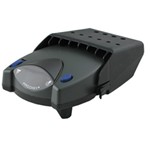
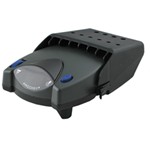
The Tekonsha P2 is a classic brake controller you know you can rely on. It's easy to install, and with the custom harness, it's plug-and-play.
Features:
Specs:
Gain is the maximum amount of power that will be applied to your trailer's brakes. How much braking output you need is determined by the weight of your trailer; a heavier trailer will need more power to bring it to a stop. You want to go as high as you can without the trailer brakes locking up.
You can adjust the gain by turning the thumbwheel on the front of the controller.
The boost setting controls the aggressiveness of your trailer's braking, meaning how quickly the brakes reach the maximum braking level. If your vehicle takes too long to come to a stop, increase the setting. If it stops too abruptly, decrease the setting.
Depending on the level of boost, your trailer brakes can start at either 13 percent or 25 percent of the set gain. So instead of starting at 0, the brakes will start at 25 percent and get to 100 percent sooner. This keeps the trailer from pushing your tow vehicle forward.
Boost Levels:
| Approximate Gross Trailer Weight | Boost Level | Increase in Initial Power Output |
|---|---|---|
| Less than tow vehicle GVW | B1 | 13% |
| Equal to tow vehicle GVW | B1 or B2 | 13% or 25% |
| Up to 25% more than tow vehicle GVW | B2 or B3* | 25% |
| Up to 40% more than tow vehicle GVW | B3* | 25% |
*Both B2 and B3 offer a 25-percent boost in initial power. But the braking curve for B3 is more aggressive than that of B2. This means that, even though you will start out with the same intensity when using these boost levels, you will get an overall more aggressive braking experience with the higher level. So if you use B3, you will reach maximum braking sooner than if you use B2.
To engage the manual override, twist the rotary-style lever from right to left. This will activate the trailer's brakes and brake lights independently of your vehicle, great for stopping sway or controlling your trailer's momentum in an emergency.
The Prodigy P2 offers key safety features to prevent damage to your towing setup:
- Integrated reverse battery protection shields the brake controller and your trailer's breakaway system from shorts.
- When the P2 is not in use, it draws only 3.6 milliamps to minimize the drain on your vehicle's battery.
- Any time your vehicle and trailer are at a standstill with the brakes applied for more than 5 seconds, the hold feature will kick on and reduce power to just 25 percent. This will keep your trailer in place without your brakes overheating.
The Prodigy P2 also runs continuous diagnostics to check for problems as they come up, including:
Installing the P2 is incredibly simple. You'll mount the bracket to your dashboard then mount the unit to the bracket. Plug the custom harness into your vehicle and into the unit. Done!
Keep in mind that the P2 must be horizontally level and parallel with the direction of travel to work correctly.
With a replacement wiring harness (sold separately) and replacement bracket (P7685 - sold separately), you can even transfer the Prodigy P2 to another vehicle.
Note: If you don't already have a 7-way plug at the back of your vehicle, take a look at our exclusive 7- and 4-way brake controller installation kit (ETBC7 - sold separately).
Proportional braking means that your trailer brakes mimic your tow vehicle's brakes. If you slam on the brakes, your trailer brakes will activate with the same intensity; if you brake lightly, your trailer brakes lightly too. The trailer's braking is in proportion to your vehicle's braking. This saves wear and tear on the tires and the brakes on both your vehicle and trailer.
The Prodigy P2 uses an internal inertia sensor to detect how your vehicle is braking so it can send the right amount of braking power to your trailer. It measures the inertia of your tow vehicle and activates the trailer's brakes to slow at the same rate. The result is uniform braking across your towing setup. No push-pull action - just smooth, proportional braking every time.
California residents: click here
Videos are provided as a guide only. Refer to manufacturer installation instructions and specs for complete information.
Hey, everybody. Ryan here at etrailer. Today on our 2021 Ford Ranger, we're gonna be showing you how to install the Tekonsha Prodigy P2 Trailer Brake Controller, and we're gonna be doing that in conjunction with our CURT Custom Fit 7-Way Vehicle Wiring Harness. But before we get into that, let's just take a couple minutes, check this out to make sure it'll work for you. And we'll also kind of cover some of the things you might need to pick up to make a brake controller setup work with your Ranger. So right off the bat, before we talk about how to figure out some of the things you're gonna need for your brake controller, we'll check out some of the features of this one to make sure it's the one you even want.
So honestly, this is kind of that good, all the round middle of the road trailer brake controller. It's gonna work in a lot of situations and it's really simple to use and figure out. So this will work for trailers that have one to four axles. So all your bases covered there. And it's going to be a proportional type trailer brake controller, which we'll get to in just a second here.
But, you know, this is a traditional style one that I like to call "mounts up to the dash," and it's not huge, but not super compact either. If you're looking for something that's a little more concealed, that looks a little more factory, I'm a fan of the REDARC Trailer Brake Controllers, the main body of them will sit under the dash where you won't see it, and to make all your adjustments and everything, you'll just have a real small knob that you can mount up. So if you're concerned with, you know, appearance or anything along those lines, that's one definitely worth checking out. I mentioned this being a proportional brake controller, and this is usually what I recommend pretty much the majority of the time, over the time-delayed style. So with proportional, you just get kind of a smoother and more predictable braking experience, and that's because the trailer brakes are going to match the truck brakes, what you're doing up here.
And kind of give you an example of that, let's say if you're just coasting up to a stop sign or something and you're halfway on the brake, trailer's gonna match it. On the other hand, if you have to slam on the brakes, if there's an accident up ahead or something, trailer's gonna respond in the same fashion. So kind of know what to expect a little bit more, as opposed to the time-delayed styles, which those pretty much have a set trailer braking pressure over an allotted amount of time, right So regardless, if you're barely on the brake or it's matted all the way down to the floor, the trailer's gonna do the same thing regardless. So with this, you know, proportional, I feel like you just stop more as a cohesive unit, and less likely to kind of have the trailer dragging or pushing you around. If you do happen to feel the trailer may be wanting to drag a little bit, or it's just not set up exactly how you want it, you do have a few basic adjustments to kind of of fine tune it and really dial it in.
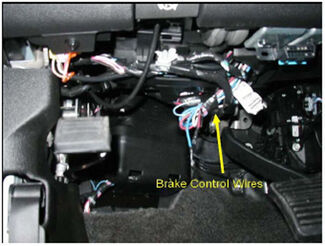
So you have a knob here, and essentially, what that's gonna do is kind of increase the aggressiveness, or how much power is really being sent back to the brake. So let's say, for example, if you feel like the braking pressure is a little on the strong side, right So you hit the brake, you can actually dial this, you know, up or down, and kind of fine tune it there. So you know, if you're going on the highway, you're going straight, probably dial it down if you're going through big hills or something, you can dial it up, so on and so forth. There's also boost settings, which is this button here, and this kind of lets you just set on the fly, so you have no boost, boost one, boost two, and boost three. You know, no boost and boost one, if trailer weighs less than the truck, probably go with that. You know, two and three if it weighs the same or more than the truck, you can kind of roll with that. And again, it kind of makes it a quick adjustment on how aggressive it needs to be. So let's say, for example, if your trailer's unloaded, you know, you can probably get away with that, and once you get some weight in there and really get it loaded down, you can crank that up a little bit, and that'll just kind of make them brakes come on a little more aggressively and a little harder to help kind of slow you down better. And then it's going to have this manual override lever as well. And when you apply this, it's gonna hit just the trailer brakes, all right And the reason for it, one of the reasons, the bigger reason, if the trailer starts to sway and kind of get away from you a little bit, catching wind or whatever, you can kind of feather this up and slowly apply some braking power back there to kind of slow that trailer down and get it going straight behind you again. This is gonna be compatible with trailers that have electric brakes, which is what the majority of you are gonna have. And also, electric over hydraulic. You know, you're really not too limited there on what you're gonna be able to hook up to and tow and and stop and everything else. So pretty simple unit, you know, you have your basic adjustments, easy to use, figure out, kind of see the screen, know what's going on. If you're looking for something that has a little bit more, you know, if you tow a lot of trailers and you'd like to save settings and make some other adjustments and things like that, the Tekonsha Prodigy P3 offers a lot of those types of things. So if that's something you're interested in, this one's definitely we're checking out. As far as figuring out everything you're gonna need to actually install the brake controller, you know, everyone's setup might be a little bit different. So the very first thing you wanna look for, underneath the driver's side dash, you wanna look up there, and on the left hand side, you should, or you might have four wires, okay That are kind of just sealed off at the ends and not connected to anything. If you see those, then you can kind of move on to the next step and look for the next couple things that you're gonna need. That way, you can get all the parts and pieces kind of put together. So if you identified those wires, the next thing you want to check is for a 7-way on the back of your truck. So a factory style one will probably be located here in the bumper. Ours didn't have that, so we actually had to add a 7-way to ours, which is this one here. We use the CURT T-Connector. Really simple, it just plugs into a factory connector underneath the truck. So you wanna make sure to have a 7-way back here, that way all the outputs can be sent back. Now, with that said, you know if you got the wires and you got the 7-way or you can use this 7-way, that's really about it as far as extras and stuff like that that you're gonna need. If you looked under the dash and you don't have the wires at all, you can't locate them, because it seems like these Fords are kind of hit and miss sometimes, all set up a little bit different. If you don't have any of them wires, what you're gonna need to do is pick up the Etrailer.com Universal Brake Controller Install Kit that'll give you a 7-way and some more wiring and everything to kind of run up to the front and actually get a brake controller hooked up. Other than that, at the end of the day, you know, good, kind of middle of the road brake controller, definitely gonna get the job done and work for just about any situation. As far as the installation goes, in our case, it really wasn't too bad. Hooked up our wiring in the back there and got this bolted up, and the wiring connected and everything else. So really shouldn't give you a ton of issues, but if you'd like to stick around, feel free to, we'll go ahead and get started on it now. To begin our installation, we're gonna be underneath the back of our Ranger, and we're gonna be working on our driver's side frame rail here towards the back where our factory connector is. With that said, I did temporarily lower and remove the spare tire. You don't have to do this at all, you can still get to everything, but by doing so, it just gives you a lot more working room. Here's the factory connector we're gonna be teeing into. And so, you can kind of just pull that off of the little keeper there, and to separate it you push down on this tab, pull the two ends apart. And what we're gonna do now is take our new trailer wiring end here. And with this, I'm going to take some dielectric grease and just put a little bit on our connector ends here. This just helps prevent corrosion and stuff. Like I say, this isn't absolutely necessary, but something you can do if you want. And the way this is gonna work, it's gonna tee right in, so one end we'll plug in there, and the other end we'll just plug in right there. We are gonna have this white wire with the pre-attached ring terminal, and we're gonna need to ground it. So really, anywhere on this metal portion of our frame is fine. In our case, on our truck, we have kind of a hole halfway started right there. So I'm just going to utilize that. I got a self-tapping screw. And just run this down. (drill whirs) I took the other end of our wiring and just brought it over here to where we're gonna mount it up to our bracket. And once that's done, we'll come back, and kind of clean everything up. But I wanna mention a bracket isn't gonna come included with the wiring kit, so you can always grab that separately if you need one. But on this end, I'm going to put some dielectric grease as well. And what you can do from there is take the 7-way connector, just plug that right into it, and then I'm gonna go ahead and get this mounted up to our bracket. I like to do these one at a time, kind of just get them on their loose, and then once they're all in place, you can come back and snug them down. So once you have connector tightened down, you can come back and just use some of the zip ties to secure your wiring. And when you're doing this just, you know, avoid hot parts or anything which are pretty wide open over here. So I guess more importantly you just want to avoid your spare tire, really. So some factory wiring up here that I'm using, it should work out pretty good. When you have everything hooked up, it's a good idea to test your wiring and make sure that it's working properly. I like using a tester like this as opposed to plugging into your trailer. That's because if your trailer has any issues, it might mislead you into thinking it's something you did on the truck side. But with that said, we'll try our running lights. Our left turn signal. Our right turn signal. Our brakes. We've got the 12 volt auxiliary power going. And I hit our brake, and put it in reverse. Make sure that light comes on. And you can also check other components if you end up putting a brake controller in or something along them lines, you can always use this method to to check that as well. With our 7-way wiring all sorted now, we can move into the cab, and on the driver's side under our dash, where our factory brake controller wiring is located, you know, we'll get these pulled down and start to get everything hooked up down here. So before we even mess with our factory wires, I kinda like to have the brake controller adapter plug prepped, so to speak. So the brake controller will come with this connector plug and a handful of butt connectors, and I like to get them on there. So the way that these butt connectors work is you'll strip back some of the insulation on the wiring, give it a twist, take the butt connector, put it over the bare end, and crimp it down. And this is eventually how we're gonna connect these wires to our factory ones. But what these are gonna control, it's pretty simple. Get them untangled here. The blue wire, that's gonna be our electric brake output. So you'll put a yellow butt connector on that, 'cause that's a little thicker wire. The black one is our power. Again, yellow butt connector 'cause it's thicker. Then you'll have blue butt connectors. You'll put them on the white and red wire. The white wire is our ground, and the red one is our brake input. So whenever we push our brake pedal down, you know, that signal will come through this wire. As far as our factory wires, what they're gonna control. So the thick blue one, that's gonna be our electric brake output. So that will get connected to the thick blue one on our brake controller adapter plug. This thicker yellow wire with the orange stripe, that's going to be our 12 volt power. So that'll actually get connected to the black wire on our brake controller adapter plug. Then you'll have this wire, it's a relatively thin, white in color, that's gonna be our ground. So that'll get connected to the white wire on our brake controller adapter. And then, this wire here, relatively thin. It's purple with a white stripe. That's going to be our brake white signal. So that will get connected to the red wire on our brake controller plug. So, but these factory wires ends just have some heat shrink on them, and so you're really doing nothing different. You know, you'll just strip the ends back, and plug it into the butt connector just like we did before. So I'll go ahead and, and get that done. Get these hooked up, and show you how it turned out. And just a quick point or two I thought I'd mention. So since the yellow wire with the orange stripe is always hot, meaning it always has power, you know, it's not a bad idea to get that one hooked up, that way you don't have bare, you know, bare wire moving around, and you don't want to touch these together and short something out, or anything like that. So just be aware of that, you know, if you want to be safe, you wanna do that one first or last. But we saw it was worth mentioning there. Got all of our wires hooked up, and here's how it turned out. If you want to, you know, you can always come back, which I probably will come back with some electrical tape and kind of tape everything up, just to keep it protected. And once that's done, we can focus on getting our brake controller mounted up. To figure out where you want your bracket, you know, there's not a a ton of great spots on our Ranger to put this. I mean, anywhere on this area is generally fine, 'cause there's not really anything behind this. But on the driver's side, you know, you just can't hardly see the brake controller with the steering wheel on the way. And then of course, here you have your access to your fuse panel, so you don't wanna block that. So the best I could come up with is somewhere, you know, right at about in here. You still see your brake controller, get to it easily, so you have access to your fuse panel and everything else. So what I did, you want your bracket to be level, all right And so I kind of just lined it up, you know, and then drew a couple of dots on our tape where we can get it attached. We're going to transfer our marks from the tape to the dash. And I like to do this anyway. Take the screw and start it by hand. 'Cause going into this plastic, you know, if you get carried away with a power tool, it might strip out. So I just like to barely get it started, you know, puncture through that tape, kind of get a couple threads cut. We'll get the tape out of the way. Now, you can grab your bracket, and get it attached to our dash. What I usually like to do is get, you know, one started hand tight, and get the other one going. That way, you can kind of adjust it as needed. I suggest plugging it in, just seems to be a little bit easier. Just goes right into place. Then we'll line up the holes in the brake controller with the holes in the bracket, and get the screws started. With the brake controller all set up now, it's not a bad idea to test it to make sure it's working. So I'm hooked up to this test box here. For those of you at home, you know, you can always hook up to your trailer. But keep in mind, if you end up running into any issues, could be the trailer side of things that's giving them to you instead of the truck. So just something to think about, using something like this bypasses it. But I got it plugged in here, and if I go to my brake controller and hit the manual override, we should have power being sent back. We're getting the appropriate power sent back, so it looks like we're in good shape. Now that we tested everything and know that it's working the way it should, what I did was just kind of clean up our wiring. I put some wire loom over the wire and kind of just tucked everything up underneath the dash to kind of clean up our install look. And that'll finish up our look at and our installation of the Tekonsha Prodigy P2 Trailer Brake Controller on our 2021 Ford Ranger.
Do you have a question about this Trailer Brake Controller?
Info for this part was:
At etrailer we provide the best information available about the products we sell. We take the quality of our information seriously so that you can get the right part the first time. Let us know if anything is missing or if you have any questions.


Thank you! Your comment has been submitted successfully. You should be able to view your question/comment here within a few days.
Error submitting comment. Please try again momentarily.