To see if this custom-fit item will work for you please tell us what vehicle you'll use it with.
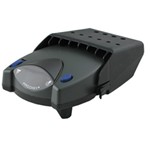
This proportional brake controller has simple controls and a digital display for diagnostic information. Includes 3 boost levels, a slide-bar manual override, built-in battery protection, automatic leveling, and continuous diagnostics.
Features:
Specs:
You can adjust the gain (also known as output) with the thumbwheel on the front of the controller. Gain lets you set the maximum amount of power that will be applied to your trailer's brakes. A heavier trailer will need more power to achieve smooth, safe braking, while a lighter trailer will need less. Typically, the gain is only readjusted when you experience changing road conditions or if the weight of your trailer changes.
The boost setting controls the aggressiveness of your trailer's braking, meaning how quickly the brakes reach the maximum braking level. You can adjust this when you're towing heavy loads and you need more umph to bring your trailer to a stop. Your tow vehicle doesn't need that much power to brake in time, but your heavy trailer does.
Depending on the level of boost, your trailer brakes can start at either 13 percent or 25 percent of the set gain. What this means is that, instead of starting at 0, the brakes will start at 25 percent and get to 100 percent sooner. This keeps the trailer from pushing your tow vehicle forward.
If your trailer weighs less than your tow vehicle, no boost is needed. But, if you want your trailer to lead the braking, you can select level B1.
Boost Levels:
| Approximate Gross Trailer Weight | Boost Level | Increase in Initial Power Output |
|---|---|---|
| Less than tow vehicle GVW | B1 | 13% |
| Equal to tow vehicle GVW | B1 or B2 | 13% or 25% |
| Up to 25% more than tow vehicle GVW | B2 or B3* | 25% |
| Up to 40% more than tow vehicle GVW | B3* | 25% |
*Both B2 and B3 offer a 25-percent boost in initial power. But the braking curve for B3 is more aggressive than that of B2. This means that, even though you will start out with the same intensity when using these boost levels, you will get an overall more aggressive braking experience with the higher level. So if you use B3, you will reach maximum braking sooner than if you use B2.
To adjust the boost, use the blue push-button on the top of the Primus IQ.
The Tekonsha Primus IQ comes with an easy-to-reach, slide-bar manual override, great for stopping sway or controlling your trailer's momentum in emergencies. To engage the manual override, just push the slide-bar to the left, towards the center of the controller. This will activate the trailer's brakes and brake lights without you having to apply the brakes on your tow vehicle, perfect for limiting trailer movement while you're cruising.
The Primus IQ can mount between -90 degrees and 90 degrees vertically, but the brake controller still needs to be horizontally level and parallel with the direction of travel.
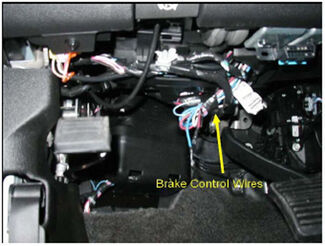
After mounting the Primus IQ unit in your cab using the included bracket, simply plug the included custom harness into your vehicle. The other end of the harness plugs into the brake controller. To remove the IQ for storage when you're not using it, just unplug the unit and slide it out of the bracket. With a replacement wiring harness (sold separately) and replacement bracket (6927 - sold separately), you can even transfer the IQ to another vehicle.
Note: If you don't already have a 7-way plug at the back of your vehicle, take a look at our exclusive 7- and 4-way brake controller installation kit (ETBC7 - sold separately).
The Tekonsha Primus IQ brake controller comes equipped with proportional braking to give you the best towing experience. Proportional braking means that your trailer brakes mimic your tow vehicle's brakes. If you slam on the brakes in your vehicle, your trailer brakes will activate with the same intensity; if you brake lightly, your trailer brakes lightly too. The trailer's braking is in proportion to your vehicle's braking. This saves wear and tear on the tires and the brakes on both your vehicle and trailer.
The Primus IQ uses an internal inertia sensor to detect how your vehicle is braking so it can send the right amount of braking power to your trailer. It measures the inertia of your tow vehicle and activates the trailer's brakes to slow at the same rate. The result is uniform braking across your towing setup. No push-pull action - just smooth, proportional braking every time.
California residents: click here
Videos are provided as a guide only. Refer to manufacturer installation instructions and specs for complete information.
Today on our 2004 Chevrolet Silverado 3500 we're going to be installing the Tekonsha Prodigy P3 Trailer Brake Controller, part number 90195. In addition to the brake controller we're also going to be using the Tekonsha Plug-in Wiring Adapter for electric brake controllers for GM vehicles, part number 3015-P. Now here's what our P3 brake controller looks like. We get a couple different options for mounting it. We can use the standard metal bracket style or we can use the metal and plastic combination. This one here will allows you to remove the brake controller when you're not using it, but because it is out of plastic it is not quite as durable as our metal one here. Now this particular vehicle here is a work truck so we're going to go ahead and install the metal bracket to give us a little better chances of the brake controller staying connected onto the lower dash where we'll be putting it. Now that we've gone over the parts of the brake controller, here's the wiring harness that we're going to be using.
We're going to go ahead and get our brake controller mounted up, and then we'll make our wiring connections. Now here on the dash there's already a couple holes, as this vehicle has already had a brake controller installed previously, so instead of drilling some new ones we're going to go ahead and utilize those holes. Now that we have our bracket mounted we'll go ahead and take the wiring harness, plug it into the back of the brake controller. You'll notice here's a locking tab, lines up with this little tab right here built in on the brake controller. Want to make sure you hear it click. Next we'll go ahead and we're going to mount the brake controller, selecting one of the four options.
We're going to choose to mount it a little bit closer to the dash. We'll use one of these two holes. We'll be using the machine screw and threading it into the hole here, as well as on the other side right here. Next we're going to need to gain access to the fuse block or the electrical connections underneath this plastic cover. We'll need to remove this plastic nut right here and then lift the cover out of the way. Now once you have the cover removed, when you flip it over there's a diagram on the backside.
We're looking for this connector right here. As we're looking at it, it matches up with exactly what's up there so we'll look for the second one over from the left on the top, so this port right here. Next we'll need to route our wiring harness over to our fuse panel area. When you line up the plug you want to make sure the locking tab is on the top side and plug it in. You want to make sure you hear it click. Next we can go ahead and put our cover back in place.
With our cover back in place we'll go ahead and use a few zip ties to help secure any loose wiring. We can then go ahead and trim off any excess zip tie. Now we have all of our connections made. Go ahead and pull the manual override. You'll notice without our trailer connected it says no trailer connected. Now we'll go ahead and plug the trailer in. Now with our trailer connected and you do the manual overhead, see we get our reading. There's three different boost levels: one, two, and three, as well as off. The higher the level of boost the more aggressive the brakes will be applied. These two buttons here are what adjusts the maximum power setting. There's the down and there's the up, as well as several other functions. This button here on the lower right allows you to go into the setup screen, where you can do and adjust several other functions of the brake controller. With that, that will do it for the installation of the Tekonsha Prodigy P3 Trailer Brake Controller, part number 90195, in conjunction with the Tekonsha Plug-in Wiring Adapter for electric brake controllers for GM vehicles, part number 3015-P, on our 2004 Chevrolet Silverado 3500. .
Easy to install and very affordable.
Quick install works Great
Worked great!
easy to install
Just what the doctor ordered. Thanks
The package arrived on time (actually a day early!). It came with the correct Harness. It was easy to install and is working properly!
Great for the price
was easy to install and works great
Easy to hook up , works flawlessly
Simple hook-up when using the model specific harness.
Easier to install than expected. Works flawlessly
Very easy installation.
Easy to install and works great no issu es
Haven't tried it yet but it was very easy to install plug and play if you have tow package already
fast shipping, it installs easily. It's too early to comment on how good it works.
I went to all my local trailer places, auto parts stores and no one had a clue as to what I needed or how to install a brake controller. U-haul wanted $600 dollars to install a controller.
I visited e-trailer, bought $92, worth of parts, and watched an installation video, and a couple of hours later I was ready to tow.
Do you have a question about this Trailer Brake Controller?
Info for this part was:
At etrailer we provide the best information available about the products we sell. We take the quality of our information seriously so that you can get the right part the first time. Let us know if anything is missing or if you have any questions.


Thank you! Your comment has been submitted successfully. You should be able to view your question/comment here within a few days.
Error submitting comment. Please try again momentarily.