To see if this custom-fit item will work for you please tell us what vehicle you'll use it with.
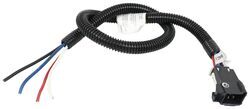
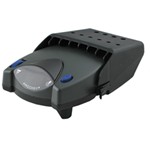
The Tekonsha P2 is a classic brake controller you know you can rely on. It's easy to install, and with the custom harness, it's plug-and-play.
Features:
Specs:
Gain is the maximum amount of power that will be applied to your trailer's brakes. How much braking output you need is determined by the weight of your trailer; a heavier trailer will need more power to bring it to a stop. You want to go as high as you can without the trailer brakes locking up.
You can adjust the gain by turning the thumbwheel on the front of the controller.
The boost setting controls the aggressiveness of your trailer's braking, meaning how quickly the brakes reach the maximum braking level. If your vehicle takes too long to come to a stop, increase the setting. If it stops too abruptly, decrease the setting.
Depending on the level of boost, your trailer brakes can start at either 13 percent or 25 percent of the set gain. So instead of starting at 0, the brakes will start at 25 percent and get to 100 percent sooner. This keeps the trailer from pushing your tow vehicle forward.
Boost Levels:
| Approximate Gross Trailer Weight | Boost Level | Increase in Initial Power Output |
|---|---|---|
| Less than tow vehicle GVW | B1 | 13% |
| Equal to tow vehicle GVW | B1 or B2 | 13% or 25% |
| Up to 25% more than tow vehicle GVW | B2 or B3* | 25% |
| Up to 40% more than tow vehicle GVW | B3* | 25% |
*Both B2 and B3 offer a 25-percent boost in initial power. But the braking curve for B3 is more aggressive than that of B2. This means that, even though you will start out with the same intensity when using these boost levels, you will get an overall more aggressive braking experience with the higher level. So if you use B3, you will reach maximum braking sooner than if you use B2.
To engage the manual override, twist the rotary-style lever from right to left. This will activate the trailer's brakes and brake lights independently of your vehicle, great for stopping sway or controlling your trailer's momentum in an emergency.
The Prodigy P2 offers key safety features to prevent damage to your towing setup:
- Integrated reverse battery protection shields the brake controller and your trailer's breakaway system from shorts.
- When the P2 is not in use, it draws only 3.6 milliamps to minimize the drain on your vehicle's battery.
- Any time your vehicle and trailer are at a standstill with the brakes applied for more than 5 seconds, the hold feature will kick on and reduce power to just 25 percent. This will keep your trailer in place without your brakes overheating.
The Prodigy P2 also runs continuous diagnostics to check for problems as they come up, including:
Installing the P2 is incredibly simple. You'll mount the bracket to your dashboard then mount the unit to the bracket. Plug the custom harness into your vehicle and into the unit. Done!
Keep in mind that the P2 must be horizontally level and parallel with the direction of travel to work correctly.
With a replacement wiring harness (sold separately) and replacement bracket (P7685 - sold separately), you can even transfer the Prodigy P2 to another vehicle.
Note: If you don't already have a 7-way plug at the back of your vehicle, take a look at our exclusive 7- and 4-way brake controller installation kit (ETBC7 - sold separately).
Proportional braking means that your trailer brakes mimic your tow vehicle's brakes. If you slam on the brakes, your trailer brakes will activate with the same intensity; if you brake lightly, your trailer brakes lightly too. The trailer's braking is in proportion to your vehicle's braking. This saves wear and tear on the tires and the brakes on both your vehicle and trailer.
The Prodigy P2 uses an internal inertia sensor to detect how your vehicle is braking so it can send the right amount of braking power to your trailer. It measures the inertia of your tow vehicle and activates the trailer's brakes to slow at the same rate. The result is uniform braking across your towing setup. No push-pull action - just smooth, proportional braking every time.
California residents: click here
Videos are provided as a guide only. Refer to manufacturer installation instructions and specs for complete information.
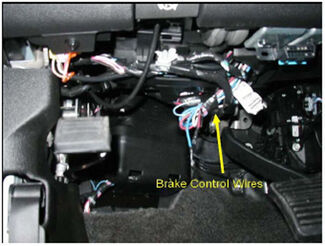
All right, today on this 2012 Chevy Silverado, we're going to install part #90885 from the inaudible. This is the P2 brake controller. First thing we need to do is go ahead and find the factory wiring harness on our truck. Now it's located behind the dash underneath the steering wheel just a little towards the left and a little bit left of the brake pedal. Now it's pretty far up in there so it'll take a while to find. Now, take the wires and let's gently pull them down.
All right, when you look for the wires, you will look for this bundle right here with the dark blue wire, bright orange wire, a light-blue wire, a white wire, and a red wire with black stripe. There's five wires here but we'll only use four. We're going to use the red with the black stripe, that's our 12-volt battery feed. We're going to use our blue wire which is our output from our brake controller including that to the trailer connector. Our all white wire which will be ground and our blue wire with the white stripe, that'll be a signal coming from a brake switch.
So we will not use the orange one. Let's put that out of the way for now. We'll cut the wires flush and strip them out for buck connectors that will hook up our wire harness from the brake controller to here. We're going to hook up one wire at a time. So we'll start with blue wire first.
And this is our brake controller wire harness and we did add some bloom to it. So let's take our buck connector, it comes with it, when we connecting blue to blue. Blue is the output to the 7-Pole Connector. Now, I'll work with our wire with the red and black stripe, that's a 12-volt power supply and that will go to black on our brake controller harness. Our white wire for ground, this will connect to our white wire in the brake harness which is also ground.
And our blue and white stripe, which is our brake switch signal, will go to the red. All right, we'll go ahead and tape the wires and then we'll run our wire to the location we're going to mount our brake controller. They got a brake controller in a bracket, so we're going to mount it in this location right here. Now, you just screw to mark it then we'll go ahead and drill out our hole. That one screw holding it in place, go ahead and level out. Put the brake controller in. to help you with that, we'll go ahead and mark first so that I can hold. Take the wire harness, pull through the bracket and into the brake controller, snap it in place. Dont take the remaining wires, zip on them safe out of the way. Okay. Now, we got a brake controller hooked up but we don't have any power coming to it, so to go underneath the hood and make some connections. You see a fuse box here. Now let's hook up this wire here which is labeled aftermarket 12-volt trailer power feed. So, we'll take the cover off. The wire we need to hook up is taped to the wire harness so I'll just cut the tape and pull the wire loose, then we'll attach it right here. Now, it doesn't come for not to hold it down is a 6 millimeter nut, 1.25 thread pitch. And remove the handle just a little bit but you don't want to lift both of these up at the same time. This disconnect you from your wire harness and you may have had needed a trip to the dealership. All right, we'll just put the handle back into place and then the cover too. And with that, that'll finish it for our install part #90885 The Prodigy P2 brake controller on our 2012 full-size pickup.
Do you have a question about this Trailer Brake Controller?
Info for this part was:
At etrailer we provide the best information available about the products we sell. We take the quality of our information seriously so that you can get the right part the first time. Let us know if anything is missing or if you have any questions.


Thank you! Your comment has been submitted successfully. You should be able to view your question/comment here within a few days.
Error submitting comment. Please try again momentarily.