To see if this custom-fit item will work for you please tell us what vehicle you'll use it with.
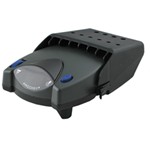
This proportional brake controller has simple controls and a digital display for diagnostic information. Includes 3 boost levels, a slide-bar manual override, built-in battery protection, automatic leveling, and continuous diagnostics.
Features:
Specs:
You can adjust the gain (also known as output) with the thumbwheel on the front of the controller. Gain lets you set the maximum amount of power that will be applied to your trailer's brakes. A heavier trailer will need more power to achieve smooth, safe braking, while a lighter trailer will need less. Typically, the gain is only readjusted when you experience changing road conditions or if the weight of your trailer changes.
The boost setting controls the aggressiveness of your trailer's braking, meaning how quickly the brakes reach the maximum braking level. You can adjust this when you're towing heavy loads and you need more umph to bring your trailer to a stop. Your tow vehicle doesn't need that much power to brake in time, but your heavy trailer does.
Depending on the level of boost, your trailer brakes can start at either 13 percent or 25 percent of the set gain. What this means is that, instead of starting at 0, the brakes will start at 25 percent and get to 100 percent sooner. This keeps the trailer from pushing your tow vehicle forward.
If your trailer weighs less than your tow vehicle, no boost is needed. But, if you want your trailer to lead the braking, you can select level B1.
Boost Levels:
| Approximate Gross Trailer Weight | Boost Level | Increase in Initial Power Output |
|---|---|---|
| Less than tow vehicle GVW | B1 | 13% |
| Equal to tow vehicle GVW | B1 or B2 | 13% or 25% |
| Up to 25% more than tow vehicle GVW | B2 or B3* | 25% |
| Up to 40% more than tow vehicle GVW | B3* | 25% |
*Both B2 and B3 offer a 25-percent boost in initial power. But the braking curve for B3 is more aggressive than that of B2. This means that, even though you will start out with the same intensity when using these boost levels, you will get an overall more aggressive braking experience with the higher level. So if you use B3, you will reach maximum braking sooner than if you use B2.
To adjust the boost, use the blue push-button on the top of the Primus IQ.
The Tekonsha Primus IQ comes with an easy-to-reach, slide-bar manual override, great for stopping sway or controlling your trailer's momentum in emergencies. To engage the manual override, just push the slide-bar to the left, towards the center of the controller. This will activate the trailer's brakes and brake lights without you having to apply the brakes on your tow vehicle, perfect for limiting trailer movement while you're cruising.
The Primus IQ can mount between -90 degrees and 90 degrees vertically, but the brake controller still needs to be horizontally level and parallel with the direction of travel.
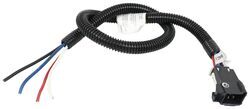
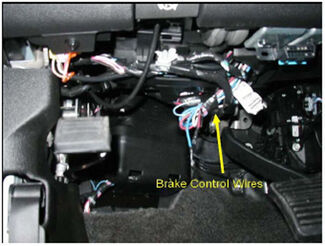
After mounting the Primus IQ unit in your cab using the included bracket, simply plug the included custom harness into your vehicle. The other end of the harness plugs into the brake controller. To remove the IQ for storage when you're not using it, just unplug the unit and slide it out of the bracket. With a replacement wiring harness (sold separately) and replacement bracket (6927 - sold separately), you can even transfer the IQ to another vehicle.
Note: If you don't already have a 7-way plug at the back of your vehicle, take a look at our exclusive 7- and 4-way brake controller installation kit (ETBC7 - sold separately).
The Tekonsha Primus IQ brake controller comes equipped with proportional braking to give you the best towing experience. Proportional braking means that your trailer brakes mimic your tow vehicle's brakes. If you slam on the brakes in your vehicle, your trailer brakes will activate with the same intensity; if you brake lightly, your trailer brakes lightly too. The trailer's braking is in proportion to your vehicle's braking. This saves wear and tear on the tires and the brakes on both your vehicle and trailer.
The Primus IQ uses an internal inertia sensor to detect how your vehicle is braking so it can send the right amount of braking power to your trailer. It measures the inertia of your tow vehicle and activates the trailer's brakes to slow at the same rate. The result is uniform braking across your towing setup. No push-pull action - just smooth, proportional braking every time.
California residents: click here
Videos are provided as a guide only. Refer to manufacturer installation instructions and specs for complete information.
Today on our 2013 Chevrolet Express Van, we're gonna be installing Tekonsha's Primus IQ Trailer Brake Controller, part number TK90160. And to help us complete this installation, we'll be using etrailer's universal installation wiring kit, part number ETBC7. This brake controller's gonna provide you with proportional braking for your trailer. And unlike some brake controllers, it doesn't have to be mounted completely level, it can be mounted 90 degrees up or down, which gives you a lot more options on where you could mount your brake controller. On the brake controller itself, you'll have an LCD display to output whether it's connected or not. "NC" would indicate not connected and just a "C", like we have here, shows that we are connected.
When you're applying your brakes, you'll get a voltage readout showing how much is being applied back to your brakes.The higher the voltage, the harder it will brake. The manual slider here can be used to assist when adjusting or in case of an emergency or if you're sitting on a hill, you can use it to hold the brakes on your trailer. There's a boost button located on top of your brake controller. And this will allow you to adjust how much boost you want. This boost setting can be useful, depending on the weight of the trailer that you're hauling.
If you're hauling a trailer that weighs less than the vehicle, a boost setting of one can provide you with a properly adjusted set up to ensure that you are braking optimally. If your trailer weighs roughly the same as your vehicle, you can use the boost two setting. And the boost three is for when you have a trailer that weighs more than your vehicle.Additionally, the boost button can be used to cancel all of the boost settings when backing up, as the boost can make it difficult to back up 'cause it can be applying the trailer brakes when you're trying to get that trailer in a tight spot. Located to the left of the display, is a sensitivity knob, and this will adjust how much output goes to your trailer brakes. You can see this by using the manual slider.
If you push the manual slider in, you slowly apply the brake. When you push it all the way in, that's how much you're applying at maximum braking. So, here we've got 10-volts, we can spin our knob and lower that down to where we will want our maximum braking power to be. We'll begin our installation at the back of the vehicle. In addition to our ETBC7 kit, we are using the long-bracket.You can pick these up here at etrailer.com, as we need to place to mount of our seven-pole connector.
So, we're gonna go ahead and take our bracket, we're going to put it on our hitch. We're gonna use the band that comes included with it to secure it to the hitch. We'll then use a pair of tin-snips to trim off the excess. And we can now mount our seven-pole connector. If we use the hardware that comes included with our long-bracket to secure our seven-pole bracket. We'll slide these bolts down through the top of the long-bracket, slide our seven-pole bracket on there and use the included nut to secure it. We'll do that with the other hole as well. We'll then tighten both of those down using a 10-millimeter socket. Take your seven-pole connector, we're gonna slide it into the bracket and we'll use the hardware that comes with our seven-pole connector to attach it to the bracket.You'll slide the long bolt from the outside through the connector and the bracket and use the included nuts to secure it to the back side. We'll do that with the three remaining holes. We'll then tighten them down using a flat-bladed screwdriver. We can now take our included wiring and we're going to route it up over the hitch. You'll use your existing four-pole connector, plug it into the four-pole connector coming out of the back of your seven-pole connector. We'll now install our ground wire. We're gonna use the larger self-tapping screw in the kit and we're just gonna run it into the frame here. We'll use a 10-millimeter socket to thread our bolt in. We'll now take our duplex-wire that comes in the kit, we're gonna need to strip some of it back. We'll use our razor knife, cut it down the gray sheathing, that'll expose our wiring. And we'll need to strip back each of the black and white wires.And if you want, you can cut the excess gray off as well. We'll now take the blue and the black wire coming off of our seven-pole connector. You can just crimp your white and black wires directly to these but we're gonna be upgrading ours to heat shrink butt connectors to keep out any moisture, ensuring a long-lasting connection. So, we're just gonna snip those off. Strip each of these wires back. And then connect on our heat shrink butt connectors. Now, on the other side of our black and blue wires, we'll connect our duplex-wiring. We'll connect the black to the black, and the white to the blue. We'll then use a heat gun to shrink down our connectors. The purple wire is for your back up lights, so if you we're going to connect this, you would just tap into your back up lights on the rear of your vehicle.We're not gonna be connecting this on our vehicle today. So, we can take the rest of our wiring here and we're just going to bundle it up and secure it. We'll use the zip-ties that come in the kit to keep our wiring nice and clean. Now, I'm wanting to run our duplex-wire up into our engine compartment. Whenever you route this wire you wanna make sure to avoid any excessively hot objects such as your exhaust or moving components, such as your steering and suspension. I'm gonna route this wire now, and then I'll show you the path I took to get there. We took our wiring, we routed it up on top of the frame here, and then we just followed our factory wiring harness all the way down the side of the frame towards the front, zip-tying it along the way. Up by the tire. It's best to follow your factory wiring whenever possible, as it's already routed in a way where it's going to avoid any of those things that I suggested that you should avoid.To get our wiring up into our engine compartment, we're gonna be using a fish wire. We're just using a piece of airline tubing for that. But you could use pretty much anything. An old coat-hanger un-winded works pretty well. So, we're gonna feed it down to the section where we stopped running our wire underneath. Then we'll take our wiring, we're just gonna use some electrical tape to tape that to that fish wire. Then we can pull the other end of our fish wire, pulling it back up. Use your razor knife to separate your fish wire from your duplex-wiring. And then, here we can just kinda route it a little bit better up top. We're gonna take it above this existing wiring here. We're gonna need to strip back the sheathing from where we've got it routed up here, all the way down to the end.Next, we'll attach our circuit-breakers. We're gonna go ahead and mount those here and here. You get a 20, 40, and 30-amp breaker in your kit. The 40-amp is for the black wire that runs to the back connector, and you can use either the 20 or 30 for your brake controller, depending on which one you purchased. We're gonna be using the 20 here today. We're gonna connect this using the self-tapping screws that come in the kit and a 1/4 inch socket. And we'll attach our other circuit breaker just like that but, right next to it here. We'll then take our black wire. We're gonna kinda measure up the length. This is gonna connect to our 40-amp circuit breaker, so we've got it about here. Cut our wire. We'll then strip that back and crimp on one of the smaller yellow ring terminals that come in the kit. We'll connect this to the silver post of the 40-amp circuit breaker.And you can snug it down with a 3/8 socket. Now, on the lower left kick-panel on the driver's side, you'll find a grommet located here on the firewall, that's where we're gonna be routing our wiring to the inside. We're gonna start by using a Phillips screwdriver to just poke a hole through this grommet. And we'll just push that in. And then you can check on the other side to see your screwdriver, as we're gonna be using that hole there to get our wiring in. Now that we've poked our hole, we're gonna take our screwdriver back out. And we're gonna take our fish wire again, we're gonna push that through the hole. We'll now take our white wire here, we're gonna fold it in half until it comes to about there. And then we're gonna cut our wire. And so, we're gonna be using this to run the brake signal wire and a ground wire. So, the brake controller output is gonna connect to this wire here. And we're gonna use this as our ground.So, what I like to do, is I like to go ahead and take some electrical tape and I like to mark the ground wire. So, we're gonna go ahead and just wrap some electrical tape around the end of this wire here. This way when we pull it inside, we know that this is the one we've got designated for our ground. We can go ahead and connect the ground now as well. So, we'll strip back one side, connect one of the larger yellow ring terminals in our kit to it. Crimp it down. We can go ahead and connect to the ground location here on the driver side inner fender here. We'll remove the bolt using a 10-millimeter socket. Slide the bolt through our ring terminal. And then we're just gonna reattach it right to the location where we removed it. We'll now take both of the white wires that we had and the rest of the black wire that we cut off earlier, and we're going to attach all three of these to our fish wire that we ran through.We'll then pull our wiring inside using our fish wire. You'll wanna take the bracket that comes included with your brake controller and find a mounting location for it. We're gonna be putting ours about right here. We'll use the included screws that came with our brake controller to tap it into our lower dash area here. We're gonna use a 1/4 inch socket to mount that screw in there. We can then slide our brake controller in the bracket and click it into place. And we can begin making our connection for the harness that comes with your brake controller. We'll take each wire that we ran in and we're gonna strip it back. You may wanna strip back your harness as well. Ours are already pre-stripped but, I like to have a little more stripped off. Now, we'll start making our connections. Our black wire that we ran in is going to connect to the black wire on our harness.We're gonna use the yellow butt connectors that come in the kit to make these connections. The white wire that we ran in, that we didn't put any tape on is our brake wire that goes back to our seven-pole, that's gonna connect to the blue wire. The white wire that we marked, is our ground wire, that one will connect to the white wire on our harness. And the red wire's gonna connect to the cold side of the brake switch. So, we're gonna go ahead and route this wire over to our brake controller before making that connection as we're gonna need to verify which is the appropriate wire. Now, the red wire is not gonna be long enough to make the connection, so you are gonna need to extend it. You can pick up additional wire here at etrailer.com using part number 16-1-1. So, we'll strip back our wire and we'll make our connection using one of the yellow butt connectors that come in our kit.And now, this red wire does need to be routed to the outside. So, we're gonna use the black wire, since it a little bit longer than the rest. We're gonna kinda pull some of the excess in, we're gonna take our red wire to the black wire and then use that to pull it back out, just like we did to our other fish wire tricks. Pull our black wire back in, and then we'll separate the red from the black. Our red wire is gonna connect into our fuse box to get its brake signal from the third brake lamp fuse. So, in order to get this connected, we're gonna be using a fuse tap. You can pick up fuse taps here at etrailer.com. We'll take the red wire that we ran out, we'll strip it back, twist our red wire and crimp it onto the fuse tap. We'll now need to insert our fuse tap where our third brake lamp fuse goes, which is going to be the third fuse over from the bottom left corner of your fuse box here. It's a 15-amp fuse.So, we're gonna pull that fuse out. We'll then insert the fuse that we just removed into the lower portion of our fuse tap. We'll then take the 10-amp fuse that comes with our fuse tap, we're gonna insert that into the top portion of our fuse tap. Then we'll insert our fuse tap where we removed the 15-amp fuse. We'll now need to take our fuse cover and we're gonna need to modify it to allow the wire to poke through. So, let's simply use a pair of side cutters to just cut a notch out. When you put your cover back on, you'll wanna line your wire up with the notch that you made so that way it can poke through. Now, we'll zip-tie and clean up all of our wiring and plug our connector into the back of our brake controller. Now, back on the outside, we'll need to make our power connections. So, the black wire that we ran inside, we'll need to connect that to our 20-amp circuit breaker.We'll now cut our wire to length. Strip it back. And crimp on one of the small yellow ring terminals. This will hook to the silver post on the 20-amp circuit breaker. The rest of the black wire that we had, we'll use to make the connections to our battery. Now, since our battery is a side-post type battery, we're not actually gonna be connecting it to the batter directly. We're gonna be connecting it to the battery positive post on our fuse box, located directly below. So, we're gonna fold the black wire in half, check our length to make sure that we can reach that. Which we can. So, we'll then cut our wire so we have two equal lengths. Strip back each end of our wire. And then on one end of each wire, we're gonna put a small ring terminal. This will be the circuit breaker side. And on the other end of each wire, we're gonna put the larger ring terminals. This will be our battery side.First, we'll connect our circuit breaker side. This is gonna go to the copper post. So, we're gonna put one wire on one and one wire on the other. Doesn't really matter which wire goes to which at this point 'cause they're both gonna be going to the battery. We'll now wanna make sure that all of our circuit breaker wires are snug. We're gonna use a 3/8 socket to do that. Now, on our fuse box, if you remove just the small cover, it'll access your battery positive wires that run to it. You can use either one. We'll then use a 10-millimeter socket to remove one of the nuts. We'll slide the large ring terminals from our circuit breakers onto the posts and then we'll tighten it back down. You'll now either wanna hook up your trailer or a tester and verify everything is working properly. You'll know you're connected when the display on your brake controller becomes a "C". This indicates you're connected.You wanna also make sure that you have your left turn signal, right turn signal, tail lamps, and brake lamps. And you'll wanna verify that your trailer brakes are working. So, you can use the slider on your brake controller and verify you've got a signal back there. As you can see, we've got a signal on our tester here. And that completes our installation of Tekonsha's Primus IQ Trailer Brake Controller on our 2013 Chevrolet Express Van.
Easy to install and very affordable.
Quick install works Great
Worked great!
easy to install
Just what the doctor ordered. Thanks
The package arrived on time (actually a day early!). It came with the correct Harness. It was easy to install and is working properly!
Great for the price
Ordered as replacement for one that quit after 18 years. New plugged into existing wiring and even fits in existing mounting bracket. So far so good.
was easy to install and works great
Easy to hook up , works flawlessly
Simple hook-up when using the model specific harness.
Easier to install than expected. Works flawlessly
Very easy installation.
Easy to install and works great no issu es
Do you have a question about this Trailer Brake Controller?
Info for this part was:
At etrailer we provide the best information available about the products we sell. We take the quality of our information seriously so that you can get the right part the first time. Let us know if anything is missing or if you have any questions.


Thank you! Your comment has been submitted successfully. You should be able to view your question/comment here within a few days.
Error submitting comment. Please try again momentarily.