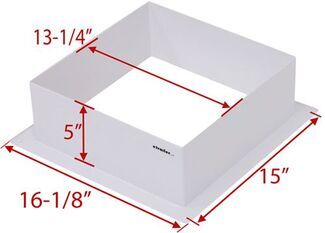
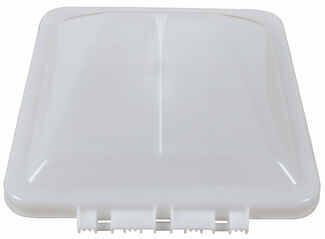
Hey Alex. From the information I can find online it does look like your 2011 Keystone Cougar 318SAB does come prepped for a second AC unit. The bedroom roof vent should be reinforced and pre-wired for a 13.5k or 15k BTU unit. To check if your trailer…
Welcome back Rich and thanks for the information! To replace your Sharp Carousel microwave R-820BK-F, I recommend the Greystone Built-In RV Convection Microwave item #GR27FR. It measures 21" wide x 11" tall x 15-3/4" deep.…
Hey Jonathan, RV air conditioners all fit a 14" x 14" hole so the only real important factors to determining the correct fit for you would be the BTU rating and whether you have a 6-pin or 9-pin connector. The 936000108 part number you…
Hey Skip, welcome back! The Vitrifrigo RV Refrigerator w/ Freezer item #VT56FR is going to need a 12v power supply. You can not plug it into a standard 110v outlet. You'll need to use the PowerMax AC to DC Converter item #PM54VR, which works with…
Hey Mark, welcome back! Yes, that factory damper will be removed to install the Safe-T-Plus Steering Stabilizer #ST98MR. See the photos below. I also went ahead and linked the instructions and an installation video further down on this page for your…
Hey Nang, the mounting holes on the back of the MORryde TV bracket part #MR85ZR can accommodate bolt sizes that are up to M8 in diameter. M8 is 8mm (about 0.315 inches) across its threads, while 1/4-20 is 0.25 inches. Typically TV hardware is M4, M5,…
In my experience the MORryde Wall Mount #MR82ZR will require additional mounting height to allow it to clear the storage door opening on most RV's. I have had better results using the Mount #MR38DR in the area you are looking to mount the TV.
Hey John, welcome back! I do have a way better functional solution for you. It's the Brandmotion Tailgate Delete Backup Camera with Wiring Harness item #BM67JR. This camera attaches to your license plate bracket. The other end will connect to the…
Hey Jonathan, congrats on the new truck. The 7" drop should be enough, but it is hard to say for sure without knowing what trailer you will be pulling. The 7" drop will get your ball height at 17" or 18" (we measure from the upper…
The Lippert Patio Upgrade Kit for Toy Hauler Garage Doors #LC27FR is a complete kit. It has all the hardware and struts that you need to convert your garage door into a patio. It may seem confusing because there were optional side rails that you…
Trailer coupler height varies slightly on every trailer and every vehicle has a slightly different trailer hitch receiver height based on the hitch manufacturer. Most trailers have a coupler height between 15 and 19 inches, but there are exceptions…
The MORryde Wall RV TV Mount #MR23ZR has dimensions of 5.25" W x 5.83" T for the plate that attaches to the wall. The MORryde Wall RV TV Mount #MR65ZR has dimensions of 10" W x 5.87" T for the plate that attaches to the wall.…
Tight spaces call for a mount that pans left and right, so a swivel RV TV mount lets everyone see from the dinette, sofa, or cab seats. Match your TV's weight to the mount's capacity and verify VESA patterns like 75 mm x 75 mm up to 200 mm x 200 mm, with adapter options for 300 mm x 300 mm or 400 mm x 400 mm. For RV walls that are thin or have hard-to-find studs, plan your backing plate and hardware length before you drill.
Use a template to mark holes so you're not holding the mount while aligning. Hardware bolts may be too short for some TVs, so have longer bolts on hand. If walls are thin or studs don't line up, add a plywood backer to spread the load. Be careful with screw length, especially on outside walls, to avoid going through the exterior.
Match the mount's weight capacity to your TV's weight and include the mount's own weight in what the wall supports. Some mounts list 50 lb capacities, others around 25 lb. RV walls can be thin with scarce studs, so verify the backing plate or stud location before drilling. If your rig has a labeled TV location, check that posted limit first.
Swivel range varies; some pan left and right enough to watch from seats, while others have a more limited angle. Check for nearby cabinets or doors that could limit movement. Certain flip-down styles lock when stowed to help secure the TV for travel. If you notice rattling on the road, adding foam behind the TV can help quiet it.
Yes, if the VESA pattern and weight match. Common patterns supported include 75 mm x 75 mm, 100 mm x 100 mm, 200 mm x 100 mm, and 200 mm x 200 mm. If your TV is 300 mm x 300 mm or 400 mm x 400 mm, use an adapter that mounts to the 200 mm x 200 mm pattern. Some mounts don't list a max screen size—go by weight and VESA.


 RV TV Mount Parts or Accessories
 Filters