


How to Program Replacement Digital Remote Control for Fan-Tastic Vent Roof Vent
Updated 07/07/2026 | Published 07/08/2017
Question:
Need instructions for our new remote.
asked by: Linda M
Expert Reply:
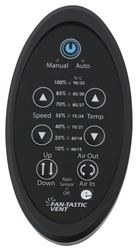
For programming a Fan-Tastic roof vent remote like part # FV9068-09 what you need to do is hold your remote 12 inches away from the fan while holding both arrows. The Auto and Manual lights will begin flashing immediately. Continue holding both arrows down until the seven LED's flash once. Now it's programmed.
You may have to try both sets of arrows, the speed and temp ones.

Rick
2/18/2025
What does it mean by "both" arrows? There are 4 arrows


Kris R.
7/7/2026
Hello, I just received my remote. I installed the batteries and followed the instructions to program with no results. All attempts were within 12 inches of the fan. 1st attempt - pressed the power button so the manual and 100% lights were on. I pressed and held the up and down temp buttons for 30 seconds. There was no change to the LEDS. No flashing and no response from the fan. 2nd attempt - pressed the power button so the manual and 100% lights were on. I pressed and held the up and down Speed buttons for 30 seconds. There was no change to the LEDS. No flashing and no response from the fan. 3rd attempt - pressed the power button so the manual and 100% lights were on. I pressed and held the up temp and up Speed buttons for 30 seconds. There was no change to the LEDS. No flashing and no response from the fan. 4th attempt - pressed the power button so the manual and 100% lights were on. I pressed and held the don Speed and down temp buttons for 30 seconds. There was no change to the LEDS. No flashing and no response from the fan. 5th and further attempts - I tried combinations of buttons, 2 at a time for 30 seconds. There was no change to the LEDs. No flashing and no response from the fan. The old remote that is no longer functional has a designation on it of Model with 417RF. From research on etrailer, I purchased the FV9068-81 remote. Further advice would be greatly appreciated. Thank you. Kris

Product Page this Question was Asked From
Replacement Digital Remote Control for Dometic FanTastic Roof Vent with 12V Fan

- Accessories and Parts
- RV Vents and Fans
- Roof Vent
- Remote Control
- Dometic
more information >

Continue Researching
- Shop: Progressive Dynamics 9300 Series RV Converter Charger - 12V - 45A
- Search Results: dometic vent
- Search Results: maxxfan deluxe
- Shop: Replacement Digital Remote Control for Dometic FanTastic Roof Vent with 12V Fan
- Shop: Furrion Variable Speed Chill Cube RV AC w/ Heat Pump - 18K Btu - Ducted - White - R32 - AC Unit Only
- Shop: Replacement Digital Remote Control for Dometic FanTastic Roof Vent with 12V Fan - White
- Q&A: Fantastic Vent Wireless Remote Programming Instructions
- Shop: MaxxFan Roof Vent w/ 12V Fan - Manual Lift - 4 Speed - White
- Shop: Dometic FanTastic Roof Vent Assembly Upgrade Kit - Clamp-on - Power Lift - 14-1/4"x14-1/4"
- Shop: MaxxFan Deluxe Roof Vent w/ 12V Fan, Thermostat, and Remote - Powered Lift - 10 Speed - Smoke
- Search Results: rv surge protectors
- Search Results: fantastic fan replacement parts
- Search Results: fantastic fan remote
- Video: Review of Fantastic Vent RV Vent and Fan Parts - Replacement Remote Temperature Control - FV9068-09
- Video: Review of Fantastic Vent Replacement 17rpm Lift Motor B Series Roof Vents Powered Lifts - FVK6010-81
- Search Results: sewer hose container
- Q&A: How To Pair The Replacement Digital Remote Control For Fan-Tastic Vent Roof Vents
- Q&A: Troubleshooting Remote of Fan-Tastic Roof Vent 7350 Not Operating Fan
- Video: The Low-Down on the Camco Pop-A-Tissue Dispenser
- Search Results: cabinet hardware rv cabinet and drawer hardware
- Q&A: How to Pick Either the Left or Right Hand Side Lippert Screen Door Latch
- Q&A: Replacement Remote Control for Fan-Tastic Vent Roof Vent with 12V Fan
- Q&A: Troubleshooting Remote of Fan-Tastic Roof Vent that Does Not Open or Close Fan After Battery Swap
- Q&A: Tips for Difficult to Program Fan-Tastic Roof Vent Remote
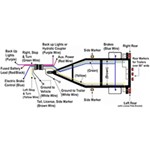
- Article: Trailer Wiring Diagrams
- Shop: Trailer Hitch
- Video: Firestone Ride-Rite Air Bags with Easy Mount Compressor Feature Breakdown
- Article: Brake Controller 7- and 4-Way Installation Kit (ETBC7)
- Shop: Trailer Wiring
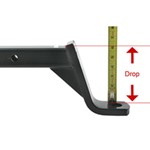
- Article: How to Measure for Trailer Hitch Drop

on Accessories and Parts







Rick F.
2/18/2025
just got a new fantastic remote control. it says to hold down the two top arrows, manual and auto. the two light s will come on. that's where it ends as both lights don't come on Thanks