


Troubleshooting Fan-Tastic Roof Vent Remote that Won't Program
Updated 10/23/2025 | Published 08/16/2021
Question:
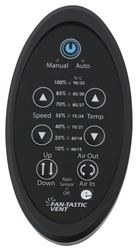
Thanks for your response. After taking out the batteries and the fuse and letting everything sit for 2-5 minutes (we tried this six times so far), I still cannot get the manual and auto lights to flash. I have tried every combination of two arrows to try to get a reset. If it matters, there is no light shining out of the diode on the remote, although I can scroll through all the options with single arrows. I assume this means that I need a new remote. Does that seem right? Best,
asked by: Lynn R
Expert Reply:
Sounds like you tried to program the remote using the following instructions:
Hold your remote 12 inches away from the fan while holding both arrows. The Auto and Manual lights will begin flashing immediately. Continue holding both arrows down until the seven LED's flash once. Now it's programmed.
You may have to try both sets of arrows, the speed and temp ones.
Now I would try this if you haven't since it will reset the remote and circuit board:
1. Ensure that you have good batteries in the remote. 2. Verify that fan is working otherwise. 3. Pair the remote to the fan by a.) remove batteries for 2 minutes then install them again making sure to match polarity, b.) Remove the fuse from the fan for 2 minutes then install it again. c.) Hold remote control up to the fan and hold down the two arrow buttons. The arrow LED's will start flashing. Continue holding down until the seven LED's flash once after about 45 seconds.


Fred
10/23/2025
Which two arrows? I have up and down for speed and temp. And one up down button for closure.



Product Page this Question was Asked From
Replacement Digital Remote Control for Dometic FanTastic Roof Vent with 12V Fan

- Accessories and Parts
- RV Vents and Fans
- Roof Vent
- Remote Control
- Dometic
more information >

Continue Researching
- Shop: Replacement Digital Remote Control for Dometic FanTastic Roof Vent with 12V Fan
- Search Results: rv jack pads
- Search Results: wheel stabilizer
- Search Results: stabilizer pads
- Search Results: fantastic vent motor
- Search Results: fantastic fan remote
- Search Results: stableloads
- Shop: Dometic FanTastic Roof Vent Assembly Upgrade Kit - Clamp-on - Power Lift - 14-1/4"x14-1/4"
- Q&A: Troubleshooting Remote of Fan-Tastic Roof Vent 7350 Not Operating Fan
- Shop: Replacement Fan Motor Assembly Kit for Dometic FanTastic Roof Vent Fans
- Search Results: fantastic fan cover
- Shop: Replacement Digital Remote Control for Dometic FanTastic Roof Vent with 12V Fan - White
- Video: Review of Fantastic Vent Replacement Digital Remote Control For Roof Vent - FV9068-81
- Video: Demco Tow Bar Adapter for Roadmaster MS or MX Series Base Plates Review
- Q&A: Parts Needed to Flat Tow 2004 Honda CR-V with Demco Dominator Tow Bar
- Shop: Base Plate for Tow Bar
- Shop: GE Appliances RV Refrigerator w/ Freezer Drawer - French Doors - 18.6 Cu. Ft. - Stainless Steel
- Shop: Replacement Pads for SnapPad Jack Stand Pad System - 9" Round Jack Feet - Qty 4
- Shop: SnapPad StakPad Universal Leveling Block and Jack Pad for RVs and Trailers - Yellow - Qty 1
- Q&A: Troubleshooting A Fan-Tastic Vent 7350 That Randomly Operates
- Shop: Suspension Enhancement
- Video: Fantastic Vent RV Vents and Fans FVK8017-00 Review
- Q&A: Solution for Needing Replacement Circuit Board for Fan-Tastic Roof Vent
- Shop: Camper Tie-Downs
- Q&A: Solution for Needing Replacement Circuit Board for Fan-Tastic Roof Ven 7350
- Q&A: Fantastic Vent Wireless Remote Programming Instructions
- Video: Complete Breakdown of the Dometic FanTastic Roof Vent Assembly Upgrade Kit
- Q&A: Replacing Fan-Tastic Fan with MaxxAir Deluxe and Relocating Fan-Tastic Fan on 2018 Lance 1475
- Video: Review of Roadmaster Complete Sterling Tow Bar Repair Kit - RM-910003-30
- Video: Ultimate Overview of the Handrail for Second Generation 4-Step MORryde Steps
Lynn R.
8/16/2021
Thanks for your response. After taking out the batteries and the fuse and letting everything sit for 2-5 minutes (we tried this six times so far), I still cannot get the manual and auto lights to flash. I have tried every combination of two arrows to try to get a reset. If it matters, there is no light shining out of the diode on the remote, although I can scroll through all the options with single arrows. I assume this means that I need a new remote. Does that seem right? Best,