


How to Change Camera Location on Furrion RV Observation System
Updated 08/06/2021 | Published 05/03/2019
Question:
When I received the camera package, the camera was already paired with camera # 1 door and I need to know how to pair it as camera # 4 back..Can it be unpaired and paired again for another location?
asked by: Ira F
Expert Reply:
Yes, to pair the included camera for your Furrion RV Observation System # FOS05TASF to a different location name on the monitor you will first need to select "PAIRING" under the menu options. Once selected you will select the desired camera on the monitor, which in your case will be "4 REAR/BACK CAM". Then press the "MONITOR PAIRING" button on the bottom of the camera itself for 3 seconds.
This will pair the camera and sync it with the desired location on the monitor.


Chris C.
4/26/2020
Hello,Is there a way to set the default view to show all screens at once versus one ed?I have the rear and both side cameras so three views total I would like to have in one view all together.Thank you!



Steve D.
1/11/2021
Now they’re telling me that I have to have the rear camera the observation lines on the measuring Lyons have to be off now I’ll try that

Product Page this Question was Asked From
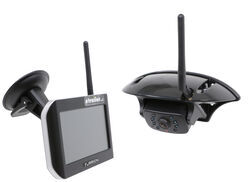
Furrion Vision S Wireless RV Backup Camera System w/ Night Vision - Rear Mount - 5" Screen

- RV Camera System
- Backup Camera
- Observation Camera
- Anti-Glare
- Mirrored Image
- Motion Detecting
- Night Vision
- Touch Screen
- Waterproof
- Pre-Wired RVs
- Wireless
- Wide View
- Dashboard Mounting Bracket
- Suction Cup Mount
- Side Marker
- 5 Inch Display
- 3 Cameras
- Furrion
more information >
Featured Help Information
Instructions

Continue Researching
- Shop: 12V PWM Filter for RV Backup Camera Systems - Hardwire
- Q&A: Will The 12V PWM Filter Fix My Power Issue With My Furrion Vision S Cameras And My 2021 GMC Sierra?
- Shop: Folding, Bumper Spare Tire Mount - U-Bolt Mount
- Video: Feature Review Replacement 2" Shank Adapter for Yakima RidgeBack or FullTilt Bike Racks
- Shop: Replacement Table-Mount Bracket for 5" and 7" Furrion Vision S RV Camera System Monitors
- Shop: Replacement Suction Cup Mount for Furrion Vision S 4.3" Monitors
- Shop: Replacement Suction Cup Mount for Furrion Vision S 5" and 7" Monitors
- Shop: Kenda Karrier KR53 ST205/75R14 Radial Trailer Tire with 14" Black Mod Wheel - 5 on 4-1/2
- Shop: Ultra-Fab Folding Spare Tire Mount for Trailers and RVs - Bumper Mount
- Search Results: 2 to 1 1/4
- Search Results: yakima hitch adapters
- Q&A: How to Use Dr. Tray With 1-1/4 Inch Shank in 2 Inch Trailer Hitch Receiver
- Q&A: Using Yakima HoldUp EVO for 1-1/4” Hitches on a 2” Hitch Receiver
- Q&A: Can Yakima Dr.Tray for 1-1/4" Hitch Fit 2" Hitch
- Q&A: How To Change From 4 To 3 Camera Views On The Furrion Vision S RV Camera System
- Video: Let’s Check Out the Replacement SpeedKnob for Yakima Dr. Tray Bike Racks
- Video: Review of Lippert Solera Replacement Roller Tube Endcap - LC423751
- Q&A: Troubleshooting A Furrion Camera System That Switches To Side Cameras When The Brakes Are Applied
- Search Results: trailer hitch
- Q&A: Lug Nut Torque Chart for Trailer Wheels
- Shop: Trailer Hitch
- Video: Firestone Ride-Rite Air Bags with Easy Mount Compressor Feature Breakdown
- Article: Trailer Wiring Diagrams
- Shop: Trailer Wiring
- Search Results: trailer tires and wheels
- Article: Brake Controller 7- and 4-Way Installation Kit (ETBC7)
- Shop: Suspension Enhancement
- Search Results: trailer wiring
- Article: How to Measure Your Trailer Wheel Bolt Pattern
- Shop: Brake Controller

on RV Camera System








Rick E.
4/24/2020
Follow up question to the above: If my rear view observation camera is set to the #1 position door security instead of #4 position rear view/observation, does it really matter as long as I know this? Next time I get the ladder out and climb up for any reason, I can change it, but for now, can I just leave as is? I had a problem at first figuring out how to “flip” the view! It made it appear as though we were driving in England on the wrong side of the road. But finally got that changed, for now anyway. Thanks guys!