


Connecting Remote to 2014 Keystone High Country 337FLS 5th Wheel Trailer with LCI Leveling
Published 12/21/2017
Question:
Hello, I need to link my LCI remote to my camper so I can use it to raise and lower the camper and hook to the 5th wheel hitch. 2014 Keystone High Country 337FLS 5th wheel camper with LCI Leveling
asked by: John L
Expert Reply:
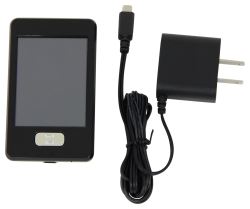
The Replacement Touchscreen Remote w/ Charger for Lippert Ground Control 3.0 Electric Leveling System # LC358601 will work with your 2014 Keystone High Country 337fls with LCI leveling.
To configure the remote to the touch pad:
1. Enter the Leveler app on the LINC Remote.
2. Turn the remote on by pressing and releasing the large silver button at the bottom of the unit.
3. Press the “OK” button on the touch screen to access the Function Menu.
4. Press the Leveler App button.
5. With the interface turned off, press LEFT 5 times and then RIGHT 5 times.
6. The LCD on the interface should read “Wireless Configuration”.
7. Click any button on the LINC remote in the Leveler App.
8. The LCD on the interface should read “Successful!”
Then you are ready to use the remote to adjust your leveling.


Product Page this Question was Asked From
Replacement Touchscreen Remote w/ Charger for Lippert Ground Control 3.0 Electric Leveling System

- Accessories and Parts
- Camper Jacks
- Trailer Jack
- Controllers
- Remote Control
- Lippert
more information >
Featured Help Information
Instructions
Miscellaneous Media

Continue Researching
- Shop: Replacement Single Zone Controller for Furrion Chill RV Air Conditioner Setup w/ 2 Fan Speeds
- Shop: Replacement Premium Wall Thermostat for Furrion Chill HE RV Air Conditioner - Single Zone - Black
- Shop: Replacement Touchscreen Remote w/ Charger for Lippert Ground Control 3.0 Electric Leveling System
- Video: Let’s Check Out the Screen Defender Screen Protector for Lippert RV Entry Doors
- Search Results: pet screen
- Search Results: lippert remote
- Shop: Screen Defender Screen Protector for Lippert RV Entry Doors - For Doors 28" Wide
- Shop: Lippert Screen Door Slider Panel with Push-Down Knob Opener - Clear
- Q&A: How to Sync the Linc Analog Remote Part # LC292614
- Q&A: Can I Switch From the LC358601 Touchscreen Remote to Analog Remote LC292614
- Q&A: Location of Lippert LINC Remote Control Receiver
- Q&A: How to Sync the Lippert Remote Part # LC358601 to the Multi-Function Pad
- Q&A: Touchscreen Remote for 2026 Forest River Sierra
- Q&A: Replacement Control Module for Lippert Ground Control 3.0
- Q&A: Does Lippert Ground Control Have Wireless Remote Capabilities
- Article: Can I Put Wallpaper in My RV?
- Article: Is It Illegal to Leave My Hitch on My Truck?
- Article: 5 Things to Know About Weight Distribution Hitches
- Article: Our Team Picked The Best Camping Gear of the Year - Here Are Their Top Choices
- Article: Aftermarket Brake Control Wiring for 07-13 GM Full-Size Truck with Factory-Integrated Brake Control
- Article: Sidewinder with Rotating Turret for Short Bed Pickups
- Article: 12V Systems For Extended Overland Travel