


Troubleshooting New Voyager WiSight Monitor Not Pairing with Cameras
Updated 03/12/2024 | Published 03/07/2024
Question:
Have a voyager wisight camera I just replaced and the monitor will not allow pairing to happen or go into pairing.
asked by: Eric P
Expert Reply:
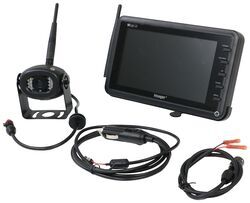
Something that we've found on the Voyager WiSight 2.0 Wireless RV Backup Camera System w/ Night Vision # ASA57YR kit is if you have power on the cameras prior to powering up the monitor and putting it in "pairing" mode the system will have difficulty pairing the signals together.
Try disconnecting power to your camera(s) and then get the monitor powered on and set in pairing mode, then apply the power back to your camera to see if that changes anything.


Product Page this Question was Asked From
Voyager WiSight 2.0 Wireless RV Backup Camera System w/ Night Vision - Rear Mount - 7" Screen

- RV Camera System
- Backup Camera
- Built-In Microphone
- Mirrored Image
- Night Vision
- Waterproof
- Wireless
- Wide View
- Suction Cup Mount
- Rear
- 7 Inch Display
- 1 Camera
- Voyager
more information >

Continue Researching
- Search Results: trailer hitch scale
- Search Results: towing mirrors
- Search Results: tongue weight scale
- Shop: Voyager WiSight 2.0 Wireless Backup Camera System w/ Night Vision for Prewired RVs - 7" Screen
- Video: Voyager WiSight Wireless Backup Camera System Installation - 2018 Coachmen Apex Travel Trailer
- Q&A: Which Cameras Can Be Used With Voyager WiSight Wireless RV Backup Camera System ASA37YR?
- Shop: Voyager WiSight 2.0 Wireless Backup Camera System w Night Vision for Prewired RVs - 4.3" Screen
- Shop: Towing Mirrors
- Shop: Big Truck Big RV Tongue Weight Scale for Trailers - 1,000 lbs - Fixed
- Shop: Longview Custom Towing Mirrors - Slip On - Driver and Passenger Side
- Shop: Longview Custom Towing Mirrors - Slip On - Driver and Passenger Side
- Shop: K-Source Snap & Zap Custom Towing Mirrors - Snap On - Driver and Passenger Side
- Video: Voyager WiSight Wireless Backup Camera System Review
- Q&A: Where to Find Key Number for Bauer RV Door Latch
- Shop: Bauer Products Camper Door Lock - Black
- Video: Comprehensive Review: Voyager WiSight 2.0 Wireless RV Backup Camera System w/ Night Vision
- Article: Trailer Wiring Diagrams
- Q&A: How To Pair Voyager WiSight 2.0 Wireless RV Backup Camera and Monitor
- Q&A: Additional Cameras to Use with the Voyager WiSight on a 2021 Winnebago Minnie
- Q&A: Troubleshooting No Power To Screen On a Voyager WiSight 2.0 Wireless Camera System
- Search Results: 7 wire trailer cable
- Search Results: lippert solid stance
- Q&A: Voyager WiSight 2.0 Camera System That Works With A Trailer That Is Not Pre-Wired
- Q&A: Replacement Camera System For Voyager WiSight WAOM562 Monitor
- Video: Optronics LED Trailer Lights | Straight from the Manufacturer
- Video: Review of ASA Electronics RV Camera System - Voyager Backup Camera - ASA37YR
- Video: A Closer Look at the Optronics Smoke Lens Identification Light Bar in Red
- Video: Feature Breakdown: 7-Way Round RV Style Trailer Connector
- Search Results: trailer hitch
- Shop: Trailer Hitch

on RV Camera System


















Eric P.
3/12/2024
I have tried to pair camera to screen as instructed by you guys and screen will not go into pair mode at all is there a way to reset the monitor or does it need to be replaced. Unit is a customers unit and is used daily. Customer needs camera on unit for when backing up