


Will The Furrion Vision S RV Camera System Switch Camera Views When Using Turn Signals
Updated 08/26/2024 | Published 05/06/2022
Question:
When I turn on my turn signal, will that side of the trailer automatically show? Does the display show any reference points that can be set back bumper for example?
asked by: Ryan N
Expert Reply:
Yes, when using your turn signals the monitor of your Furrion Vision S Wireless RV Backup Camera System w/ 3 Cameras - 5" Screen # FCE48TASL-05 will switch to the corresponding side marker camera.
You will need to ensure that you have "LCD Auto" off in your settings and that your monitor is in "View ALL" mode. You can get to view all mode by double tapping the screen and in the bottom left corner "View All" will pop up for you to press. A few seconds after you turn off the turn signal it will revert back.
Yes, the rearview camera has optional reference points to guide you while backing up.


(click to enlarge)

Product Page this Question was Asked From
Furrion Vision S Wireless RV Backup Camera System w/ 3 Cameras - 5" Screen
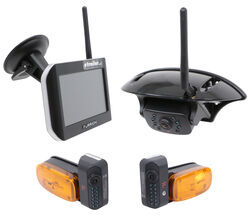

- RV Camera System
- Backup Camera
- Observation Camera
- Anti-Glare
- Mirrored Image
- Motion Detecting
- Night Vision
- Touch Screen
- Waterproof
- Wireless
- Wide View
- Dashboard Mounting Bracket
- Suction Cup Mount
- Side Marker
- 5 Inch Display
- 3 Cameras
- Furrion
more information >
Featured Help Information
Instructions
Miscellaneous Media

Continue Researching
- Search Results: weight distribution hitch
- Shop: Equal-i-zer Weight Dist Shank - 2-1/2" Hitch - 10" Rise/6" Drop
- Search Results: shank
- Search Results: fastway weight distribution hitch
- Search Results: weight distribution hitch shank
- Search Results: 1000 lbs wd tw trailer hitch
- Shop: Equal-i-zer Weight Distribution Shank - 12" Long - 13" Rise, 9" Drop
- Shop: Fastway e2 Weight Distribution Shank - 12" Long - 12-1/2" Rise 9-3/4" Drop - 1.2K TW
- Shop: Fastway e2 Weight Distribution w/ Sway Control - Trunnion - 12,000 lbs GTW, 1,200 lbs TW
- Shop: Fastway e2 Weight Distribution w/ Sway Control - Round - 6,000 lbs GTW, 600 lbs TW
- Q&A: How To Adjust The Height on a Fastway E2 Weight Distribution Hitch
- Q&A: Best Wireless Observation System for Full Size RV
- Q&A: Is Furrion Vision S+ Direct Replacement for Vision S
- Shop: B&B Adjustable RV Ceiling Cool Vent - 1/4" Flange - Oyster
- Shop: Equal-i-zer Weight Dist Shank - 2-1/2" Hitch - 7" Rise, 3" Drop
- Q&A: WDS Shank Needed For 2-1/2" Hitch On A 2022 Ford F-250 4X4 That Sits Too High
- Q&A: 2 1/2" Shank For Fastway e2 Weight Distribution Hitch
- Q&A: Will Shank On Fastway e2 Weight Distribution Hitch For GMC 1500 Truck Work On Chevy 2500 Truck?
- Q&A: Weight Distribution Shank for Fastway e2 with More Drop and Longer Shank than Included Shank
- Article: RV Converter vs Inverter Explained
- Shop: Vehicle Sway Bars
- Shop: Trailer Hitch
- Article: Trailer Wiring Diagrams
- Search Results: trailer hitch
- Shop: Trailer Wiring
- Article: Brake Controller 7- and 4-Way Installation Kit (ETBC7)
- Search Results: trailer tires and wheels
- Video: How to Choose a Trailer Brake Controller
- Shop: Suspension Enhancement
- Article: How to Measure for Trailer Hitch Drop

on Blind Spot Detection



















Jeremy A.
8/25/2024
Hello, I just purchased an RV where this Furrion Vision S was pre-installed from a dealership and I am not seeing this functionality working correctly. I uploaded a video here to illustrate the issue: https://youtu.be/JRrqT8SmBKY Basically what I'm seeing is the monitor defaults to the rear camera view and as long as it's on the rear camera view: it does not switch to the side view when the turn signal is activated. However: If I manually switch to the "View all" mode: In this mode it DOES correctly switch to the side view when the turn signal is activated. HOWEVER: It will NOT *stay* in the view all mode. After 5 seconds it switches back to the rear camera view which disables the automatic side view when the turn signal is activated. Is there a way to fix this?