


How To Stop Your Furrion Camera Monitor From Switching Out Of Tri-View Mode
Updated 04/23/2026 | Published 06/09/2022
Question:
Camera jumps between the 3 cameras
asked by: Ray
0
Expert Reply:
If you have your "Auto Display" function turned on in the settings of your Furrion Vision S Wireless RV Backup Camera # FOS43TASF then it will keep switching the view from Tri-Camera View. You can turn this off by completing the following steps:
1. Select Setup
2. Select Auto Display
3. Switch Auto Display to off
Once this is complete it will stop backing out of Tri-View.
expert reply by:
Kevin C

0

Product Page this Question was Asked From
Furrion Vision S Wireless RV Backup Camera System w/ Night Vision - Rear Mount - 4.3" Screen
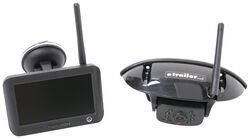

- RV Camera System
- Backup Camera
- Observation Camera
- Built-In Microphone
- Touch Screen
- Anti-Glare
- Mirrored Image
- Night Vision
- Motion Detecting
- Waterproof
- Pre-Wired RVs
- Wireless
- Standard View
- Dashboard Mounting Bracket
- Suction Cup Mount
- Rear
- 4.3 Inch Display
- 1 Camera
- Furrion
more information >
Featured Help Information
Instructions
Miscellaneous Media


Continue Researching
- Search Results: pwm filter
- Shop: 7-Way Vehicle Power Adapter for Furrion RV Observation Camera
- Shop: 12V PWM Filter for RV Backup Camera Systems - Hardwire
- Video: In-Depth Review of the 7-Way Vehicle Power Adapter for Furrion RV Observation Camera
- Video: Setting up the 12V PWM Filter for RV Backup Camera Systems on a 2021 Thor Coleman Motorhome
- Video: How to Set Up Your 12V PWM Filter for RV Backup Camera Systems on a 2020 Taxa Mantis Travel Trailer
- Video: Replacement Drive Head Pin for Solera Power RV Awnings: The Breakdown
- Video: All About the Replacement Drive Head Pin for Solera Power RV Awnings
- Shop: Replacement Drive Head Pin for Solera Power RV Awnings - Regal Style - Qty 1
- Shop: Replacement Drive Head Pin for Solera Power RV Awnings - Plain Style - Qty 1
- Q&A: Troubleshooting Limited Signal with Furrion Vision S Wireless RV Backup Camera
- Q&A: Troubleshooting Furrion RV Camera System Signal Issues
- Q&A: Troubleshooting Non-Working Sidemarker Cameras Of A Furrion Vision S RV Camera System
- Video: The Low-Down on the Trimax King Pin Lock for 5th Wheel Trailers
- Search Results: f2bc004xxbk
- Shop: Trailer Wiring
- Q&A: What is the Difference Between the Red and Yellow Trimax King Pin Locks?
- Shop: Ultra-Fab 5th Wheel King Pin Lock
- Q&A: King Pin Locks Compatible With PullRite Superglide Capture Plates
- Shop: Trimax King Pin Lock for 5th Wheel Trailers - Collar Style - Hardened Steel - Red
- Video: A Closer Look at the 7-Way Trailer Adapter for Towing Trailers with LED Lights
- Shop: 7-Way Trailer Adapter for Towing Trailers with LED Lights
- Q&A: Troubleshooting A Furrion Vision S Monitor That Won't Turn On
- Q&A: Troubleshooting Furrion Vision S 5" Monitor Not Registering Touches
- Search Results: trailer hitch
- Article: Trailer Wiring Diagrams
- Shop: Trailer Hitch
- Search Results: trailer wiring
- Article: Brake Controller 7- and 4-Way Installation Kit (ETBC7)
- Article: Wiring Trailer Lights with a 7-Way Plug (It's Easier Than You Think)
Explore Expert Info
![Our Expert]()
on RV Camera System

on RV Camera System












John
5/10/2024
Your settings fix isn’t working. Auto display is off Tri-view is selected Only remains in that mode for seconds before going back to switching. Expensive frustration!!