Troubleshooting Furrion Marker Light Camera Not Working Properly
Published 05/26/2022
Question:
I have a new Jayco camper that came prewired for Furrion backup and side marker lights cameras. They installed easily but the left marker light camera continually flashes on and off with a no signal message. The other 2 cameras work fine. Furrion has been great to work with and having proved with a video of a volt meter connected to the electrical connectors that we have a uninterrupted 13V when the vehicle is running they sent me a new camera. The new camera does the same thing. On a long shot I hooked everything up and went for a ride but the camera still did not work properly. After talking to CS at Furrion they sent me a new monitor. Still have the same problem. The only thing I can think of is rather than a connection or voltage issue there is an amperage issue, but when I unhook the right and rear camera the left one still flashes on and off with a no signal message. I would appreciate anybodys thoughts!
asked by: Lawrence E
Helpful Expert Reply:

This is a tough situation, especially since Furrion has already been helping you out big time with a new camera AND a new monitor for your Vision S System # FCE48TASL-05.
It sounds like you've checked everything but the ground for that camera. Since the right side works great and you're getting the right amount of power to the left side the only other thing to check would be your ground connection. A poor ground can cause a lot of little issues like what you're experiencing so that's where I'd look next. Make sure it's connected to a clean, bare-metal surface.

Product Page this Question was Asked From
Furrion Vision S Wireless RV Backup Camera System w/ 3 Cameras - 5" Screen
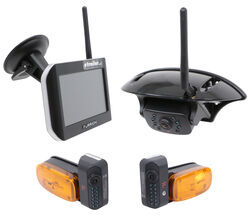

- RV Camera System
- Backup Camera
- Observation Camera
- Anti-Glare
- Mirrored Image
- Motion Detecting
- Night Vision
- Touch Screen
- Waterproof
- Wireless
- Wide View
- Dashboard Mounting Bracket
- Suction Cup Mount
- Side Marker
- 5 Inch Display
- 3 Cameras
- Furrion
more information >
Featured Help Information
Instructions
Miscellaneous Media

Continue Researching
- Shop: 7-Way Vehicle Power Adapter for Furrion RV Observation Camera
- Shop: Towing Mirrors
- Video: CIPA Dual-View Clip-on Towing Mirror Road Test
- Video: Setting up the CIPA Custom Towing Mirror on a 2001 Chevrolet Silverado
- Search Results: furrion rv plug adapters
- Shop: Trailer Hitch
- Shop: CIPA Universal Dual Lens Towing Mirrors - Clip On - Qty 2
- Shop: CIPA Universal Towing Mirrors - Clip On - Qty 2
- Shop: CIPA Universal Towing Mirrors - Clamp On - Qty 2
- Shop: CIPA Custom Towing Mirrors - Slip On - Driver Side and Passenger Side
- Shop: CIPA Custom Towing Mirror - Slip On - Driver Side
- Shop: CIPA Universal Fit Towing Mirrors - Clip-On - Qty 2
- Search Results: spare tire and wheel
- Search Results: st215/75r14d
- Search Results: hub savers
- Search Results: spare tire
- Shop: Trailer Wiring
- Shop: Brake Controller
- Q&A: Troubleshooting Furrion 7-Way Power Adapter For RV Camera Systems
- Search Results: tire pressure monitoring system
- Search Results: tekonsha trailer brake controller
- Article: Trailer Wiring Diagrams
- Q&A: What is the Difference Between a Class II and a Class III Hitch?
- Video: Towing Mirror Options - Custom Fit VS Universal Fit
- Article: Brake Controller 7- and 4-Way Installation Kit (ETBC7)
- Q&A: Lug Nut Torque Chart for Trailer Wheels
- Shop: Suspension Enhancement
- Article: How to Measure for Trailer Hitch Drop
- Video: Firestone Ride-Rite Air Bags with Easy Mount Compressor Feature Breakdown
- Q&A: What is the Difference Between a 4-Way and 7-Way Trailer Connector

on Blind Spot Detection