


No Signal on Furrion Vision S Wireless RV Backup Camera System
Updated 09/19/2025 | Published 08/29/2021
Question:
I bought a Furrion Camera and Monitor. It was installed AT A Dealer and it worked fine I came home and 4 days later got in to use the RV, and the camera states inch No Signal??
asked by: Daniel A
Expert Reply:
The most likely cause of the "no signal" error you are receiving with the Furrion Vision S Wireless RV Backup Camera System part # FOS43TASF is due to an interruption on the camera's power wire. Make sure that the camera is receiving power (indicated by LED light on camera). This may include the need to have your headlights in the on postion, depending on how this was wired at install. Once you verify power, be sure to hold the pairing button on the camera for 2 seconds before pairing with the monitor.
I have attached a clip from the troubleshooting section for the Vision S that you can use to try to get the monitor and camera to pair.

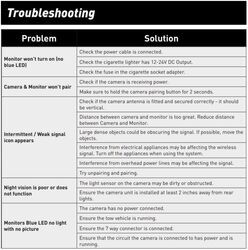
(click to enlarge)

Clay
3/4/2025
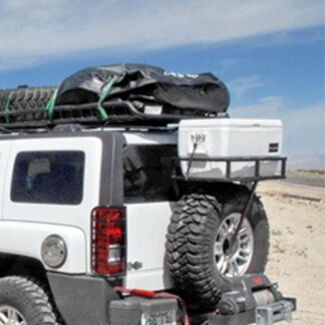
Make sure your lights are on. If your light switch is set to automatic, they are NOT on during daylight. Go under an overpass and they may blink in but back off adter.oitsode again.
John D.
8/17/2025
Thank you, sir! You were right about the headlights needing to be on. What a relief!



Product Page this Question was Asked From
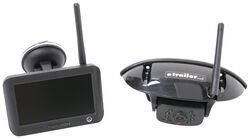
Furrion Vision S Wireless RV Backup Camera System w/ Night Vision - Rear Mount - 4.3" Screen

- RV Camera System
- Backup Camera
- Observation Camera
- Built-In Microphone
- Touch Screen
- Anti-Glare
- Mirrored Image
- Night Vision
- Motion Detecting
- Waterproof
- Pre-Wired RVs
- Wireless
- Standard View
- Dashboard Mounting Bracket
- Suction Cup Mount
- Rear
- 4.3 Inch Display
- 1 Camera
- Furrion
more information >
Featured Help Information
Instructions

Continue Researching
- Shop: 12V PWM Filter for RV Backup Camera Systems - Hardwire
- Shop: 7-Way Vehicle Power Adapter for Furrion RV Observation Camera
- Shop: Furrion USB-A to USB-C Power Cable - 5' Long
- Shop: Trailer Hitch
- Search Results: rv vents and fans
- Video: Setting up the 12V PWM Filter for RV Backup Camera Systems on a 2021 Thor Coleman Motorhome
- Q&A: No Signal And PWM Fix For Furrion Vision S Camera System Connected To 2022 GMC
- Shop: Mach-C Everest Variable Speed RV Air Conditioner - 18K Btu - Ducted/Non-Ducted - R32 - AC Unit Only
- Search Results: rv camera system
- Search Results: furrion monitor power cord
- Search Results: furrion monitor
- Video: In-Depth Review of the 7-Way Vehicle Power Adapter for Furrion RV Observation Camera
- Search Results: 22292
- Search Results: 303600
- Shop: Replacement Stainless Steel Trim Kit for Greystone Built-in Microwave
- Shop: Coleman-Mach WiFi Thermostat for RV Air Conditioners and Heat Pumps - Single Zone - Black
- Search Results: 13168
- Shop: Onan 9,500-Watt Dual Fuel Portable Generator w/EFI - Gas or Propane - Remote Start
- Shop: Brake Controller
- Shop: Suspension Enhancement
- Video: Review of PowerMax RV Toilets - Standard Height White RV Toilet - PM62VR
- Q&A: Can I Purchase Just the Furrion S Wireless Camera System Monitor By Itself?
- Q&A: Availability Of Antenna Extender For Furrion Vision S+ Camera System
- Q&A: Can I Replace Furrion Vision S Cameras With Furrion Vision S+ Cameras in Fifth Wheel
- Video: PowerMax RV Toilets and Fresh Water Pumps Manufacturer Spotlight
- Shop: Gooseneck Hitch
- Q&A: Which Brake Controller Install Harness Fits 2022 Ford E-450 Cutaway
- Q&A: Replacement Option For Norcold N306.3 RV Fridge
- Q&A: How To Measure To Make Sure The MORryde CRE3000 Equalizers Will Fit Your Trailer
- Video: How to Set Up Your 12V PWM Filter for RV Backup Camera Systems on a 2020 Taxa Mantis Travel Trailer

on RV Camera System











Ken E.
7/11/2024
Our Furion is 4 years old. We have experienced a lot of connection problems. We have changed the antenna we have changed our power cord. We last changed our location for monitor and put it in a cup holder mount. That made the most difference. Today we have traveled all day and it is losing signal again. I am wandering if Furion has a new design or a repeater if that’s the problem. We have noticed that the power plug in back of monitor doesn’t seem to lock on all the way. Any suggestions???