


Troubleshooting Furrion Vision S Monitor and Camera Not Pairing
Updated 08/10/2026 | Published 05/19/2019
Question:
Unit was working then lost ID showed up on screen.
asked by: Betty H
Expert Reply:
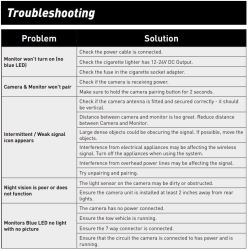
A couple of things to check when trying to pair monitor to the camera for the Furrion Vision S # FOS43TASF.
First make sure that the monitor is close enough to the camera. Next make sure that the camera is receiving power (indicated by LED light on camera). If it is then be sure to hold the pairing button on the camera for 2 seconds before pairing with the monitor.
I have attached a clip from the troubleshooting section for the Vision S that you can use to try to get the monitor and camera to pair. If you still can't get it to work let me know and I can help you troubleshoot further.

Chuck S.
7/4/2020
Have the Furrion 7 backup and two side cameras. All connections are good and the system is brand new. I get pictures on and off, just 2-4 second blinks. The trailer is only 24' and my TV is a 2016 Mercedes GLE 350. I have checked my 7pin and I do make certain the lights are set to on. I have the antenna in the right direction. Any ideas?



Linda W.
7/24/2020
Can’t pair the camera to the back on road now won’t wor

Greg G.
11/7/2021
It all has too do with the voltage on the newer models 2021/ 2022 they are putting out round about 10.5 volts not enough it needs the full 12volts + and I used a 5 pin relay, wiring was really easy there is plenty of diagrams for the 5 pin relay, 12 volt from trailor battery to the 30 pin, (make sure to add fuse in between battery and 30 pin ), trigger wire (trailor parking lights wire comeing from the 7 pin trailor harness) to the 86 pin, 85 is neutral or ground and the last pin is 87a and 87 need to check witch one becomes hot after turning on trailor lights that's your wire and just cap the other one off
Joey
6/17/2024
We have recently onstalled the Furrion camera on our 5th wheel. Yesterday it was working fine with the monitor. Today as we are traveling, the monitor shows no connection. I opened the passenger door for something and the monitor came on. I closed the door, the monitor went off! Did it several times- same thing. Back on the road and no signal. Obviously we can’t travel with the door open so do you have any suggestions, please?





Product Page this Question was Asked From
Furrion Vision S Wireless RV Backup Camera System w/ Night Vision - Rear Mount - 4.3" Screen
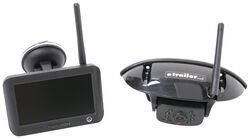

- RV Camera System
- Backup Camera
- Observation Camera
- Built-In Microphone
- Touch Screen
- Anti-Glare
- Mirrored Image
- Night Vision
- Motion Detecting
- Waterproof
- Pre-Wired RVs
- Wireless
- Standard View
- Dashboard Mounting Bracket
- Suction Cup Mount
- Rear
- 4.3 Inch Display
- 1 Camera
- Furrion
more information >
Featured Help Information
Instructions

Continue Researching
- Search Results: morryde
- Search Results: furrion rv camera system
- Shop: Furrion Vision S+ Wireless RV Backup System w/ 1 Camera - 7" Screen
- Search Results: morryde crossmember
- Search Results: morryde alltrek 4000
- Search Results: morryde trailer suspension parts
- Search Results: morryde 5th wheel pin box
- Shop: Furrion Vision S+ Wireless RV Observation System w/ 3 Cameras - 5" Screen
- Search Results: furrion monitor power cord
- Shop: The Headrest Safe Vulcan Car Safe - Leatherette - Black
- Shop: 12V PWM Filter for RV Backup Camera Systems - Hardwire
- Shop: MORryde AllTrek 4000 Equalizers for Tandem Axle Trailers - 35" Wheelbase
- Q&A: Can I Purchase Just the Furrion S Wireless Camera System Monitor By Itself?
- Q&A: Will 12V PWM Filter Fix Power Loss On Furrion Camera With 2026 Chevy Silverado 2500 Trail Boss Z71
- Q&A: Can I Replace Furrion Vision S Cameras With Furrion Vision S+ Cameras in Fifth Wheel
- Shop: 7-Way Vehicle Power Adapter for Furrion RV Observation Camera
- Q&A: Looking For Replacement Ladder Receiver For Retractable RV Ladder
- Q&A: Furrion Camera Has Power but Won't Pair
- Shop: MORryde Snap Trap P-Trap for RV Sewer Hoses
- Shop: Towing Mirrors
- Video: Setting up the 12V PWM Filter for RV Backup Camera Systems on a 2021 Thor Coleman Motorhome
- Video: In-Depth Review of the 7-Way Vehicle Power Adapter for Furrion RV Observation Camera
- Q&A: No Signal on Furrion Vision S Wireless RV Backup Camera System
- Video: Review of the Replacement Furrion Monitor Power Cable
- Video: Checking Out the Stromberg Carlson Electric Trailer Jack
- Video: Furrion Vision S Wireless RV Backup Camera Installation - 2022 Forest River Salem FSX Travel Trailer
- Q&A: Compatible Pin Box Replacement For A 2024 Brinkley Model Z 3100 With A Lippert Rhino Pin Box
- Video: Install: etrailer Electric Trailer Brakes on a 2019 Grand Design Reflection 150 Fifth Wheel
- Shop: Brake Controller
- Video: Review of Demco Autoslide Locking Plate Lippert Helux Pin Box - DM53KV
Saralyn
1/17/2020
Just picked up our new 5th Wheel equipped with the Furion Vision S and the F0505TASF. Monitor. Simply cannot get it to pair. Truck is hooked up And running. Camera on rear has power. “No signal”And pairing failed each time we try. What the heck are we doing wrong? Thanks for any help!