


Troubleshooting OneControl App Not Recognizing More Than One Phone for Curt Echo Controller
Updated 03/19/2025 | Published 03/13/2025
Question:
One control app has officially broken existing Echo devices. At least on iPhones, since there is no way to clear the memory cache for the app there is no way to add a “new” device.
asked by: PETER K
Expert Reply:
Hey Peter, thanks for reaching out about your Curt Echo # C51180 brake controller!
I'm sorry to hear you're having issues, but I reached out to my contact at Curt and got the following response so I'm posting it here for you to check out the steps:
Remove Bluetooth Profile & Previous app
- Delete the Echo Smart app from your phone
- Navigate to Settings > Connected Devices > Bluetooth and if your Echo shows as saved, select the settings wheel/"i" next to the connection, then Forget/Delete Connection.
- If the Echo is paired in Bluetooth settings it will not allow a connection in the app.
Power Cycle Echo & Start Pairing
- Disconnect Echo from both the tow vehicle and trailer
- While Echo is disconnected, open up the One Control Auto app and allow the permissions that pop up.
- Prior to starting pairing, be sure to have your PIN ready; PIN is located on the reference card that came with your Echo & there is a backup label on the under-side of the door flap on the trailer side of the Echo. It should be 6 digits.
- Once you have everything ready, insert the Echo into the 7-way without the trailer connected (sometimes this method won't work and you will need to plug in the trailer)
- The LED of the Echo should be blinking blue, indicating it is in pairing mode. If it is solid, this indicates it is still paired and you will not be able to pair it within the app.
- With the LED Blinking Blue, select Pair Device.
- On the Devices Found page select your Echo and hit connect
- At this time a window should pop up asking for the PIN - you will have 10 seconds to enter it.
If the customer still has issues with connecting, have them select the Settings wheel in the app > select E-mail Logs. In the body of the email have them put in the case number 5707593 and we can have our development team take a look.


Product Page this Question was Asked From
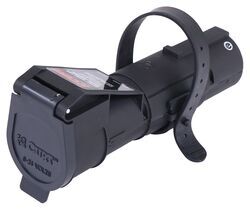
Curt Echo Wireless Brake Controller - 7-Way Plug-in w/ Bluetooth App - Up to 2 Axles - Proportional

- Trailer Brake Controller
- Proportional Controller
- Electric
- Plug-In
- Smartphone App
- Under-Dash
- Up to 2 Axles
- Smartphone Display
- Multiple Trailers
- CURT
more information >
Featured Help Information
Instructions

Continue Researching
- Search Results: brake controller
- Article: Trailer Brakes Not Working? Troubleshooting Guide
- Shop: Brake Controller
- Shop: Suspension Enhancement
- Shop: Firestone Coil-Rite Air Helper Springs - Rear Axle
- Shop: Towing Mirrors
- Search Results: airlift bags
- Video: A Closer Look at the Trailer Valet Essentials Trailer Dolly
- Shop: K-Source Snap & Zap Custom Towing Mirrors - Snap On - Driver and Passenger Side
- Shop: CIPA Custom Towing Mirrors - Slip On - Driver Side and Passenger Side
- Shop: Curt TriFlex NEXT Trailer Brake Controller w/ Custom Harness - 1 to 4 Axles - Proportional
- Shop: Curt TriFlex NEXT Trailer Brake Controller w/ Custom Harness - 1 to 4 Axles - Proportional
- Shop: Curt Discovery NEXT Trailer Brake Controller - Up to 4 Axles - Time Delayed
- Shop: Curt TriFlex NEXT Trailer Brake Controller - 1 to 4 Axles - Proportional
- Q&A: What Do Blue Lights Mean on Curt Echo
- Q&A: Will Curt TriFlex NEXT Controller and Wiring Adapter Fit a 2022 Genesis GV70?
- Q&A: Troubleshooting Curt Echo Trailer Brake Controller Blowing Fuse on 2023 VW Atlas With Factory 7-Way
- Q&A: Curt Echo Brake Controller Will Not Pair To Phone With Working Bluetooth Connection
- Video: DIY Install: Firestone Coil-Rite Air Helper Springs on your 2014 Nissan Rogue Select
- Q&A: Troubleshooting Curt Echo Mobile that Isn't Connecting to OneControl App
- Q&A: What is the Difference Between a Class II and a Class III Hitch?
- Shop: Trailer Hitch
- Video: Firestone Ride-Rite Air Bags with Easy Mount Compressor Feature Breakdown
- Search Results: trailer hitch
- Article: Trailer Wiring Diagrams
- Video: How to Choose a Trailer Brake Controller
- Q&A: What is the Difference Between a 4-Way and 7-Way Trailer Connector
- Search Results: trailer tires and wheels
- Shop: Trailer Wiring
- Article: Brake Controller 7- and 4-Way Installation Kit (ETBC7)

on Trailer Brake Controller
















Peter J.
3/19/2025
Hi, thank you for the effort. I will follow this procedure and report back. I’ve definitely done this but will give it another try. It’s the cache memory in the app that is the issue, it remembers your echo profiles which is where the fault arises.