


Curt Echo Brake Controller Will Not Pair To Phone With Working Bluetooth Connection
Updated 09/07/2026 | Published 03/16/2020
Question:
I keep getting the blue blinking light on the controller. Phone says its paired, blutetoooth on. It seems my phone/app cant find the brake controller unit.
asked by: Brent
Expert Reply:
It sounds like you are trying to pair the Curt Echo part # C51180 to the Bluetooth on your phone which is why the app is not recognizing it. You want to go into your settings on your phone and make sure you disconnect the Bluetooth from the Curt Echo device. Then go to the Curt app and pair the brake controller. If you do not disconnect the Bluetooth from the Echo in your settings it will not allow you to pair on the app. You want to connect through the app not your phone settings.


Avram
5/31/2024
My echo pairs with android phone and shows the device name and it's MAC address,, but times out waiting to communicate. Im stuck.


Craig
5/19/2025
Need code for app for app to connect to bluetooth
Mike
6/11/2025
Hi Heather, Do I disconnect or unpair? Thanks, Mike

Patrickinbama
8/23/2025
I had the same issue, I followed the directions to the T and never could completely pair. Blinking blue light, see the device in the app's connect screen, but after 5 to 10 minutes it fails to connect with a red banner. I did everything in the comments and still nothing. So I started to wonder if everything I'm doing is correct but the pin is wrong. So I lifted the lid on the controller and the pin there did not match the one on the card. I have no idea how I got that enter pin prompt to reappear but it did on its own after about 15 minutes of trying to connect the 5th time. I entered the pin from the device and this time it worked. If you have been using the pin on the card compare to the one inside the lid of the controller since the pin there should be matched to that device (one hopes). I guess worse case, is their QA sucks and they placed the wrong pin inside the lid too. In that case, you are out of luck. The thing is, the software does not tell you that the pin is incorrect, it just tries to pair up and then will fail after several minutes.


Product Page this Question was Asked From
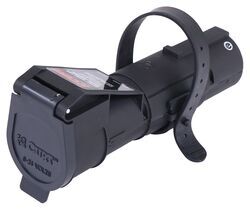
Curt Echo Wireless Brake Controller - 7-Way Plug-in w/ Bluetooth App - Up to 2 Axles - Proportional

- Trailer Brake Controller
- Proportional Controller
- Electric
- Plug-In
- Smartphone App
- Under-Dash
- Up to 2 Axles
- Smartphone Display
- Multiple Trailers
- CURT
more information >
Featured Help Information
Instructions

Continue Researching
- Shop: Brake Controller
- Search Results: brake controller
- Shop: Suspension Enhancement
- Shop: Curt Echo Wireless Brake Controller - 7-Way Plug-in w/ Bluetooth App - Up to 2 Axles - Proportional
- Article: Trailer Brakes Not Working? Troubleshooting Guide
- Search Results: threaded hitch pin
- Search Results: round bars
- Shop: Trailer Hitch
- Shop: Trailer Wiring
- Q&A: What is a Great Brake Controller for 2022 Nissan Pathfinder with Factory Tow Package?
- Shop: Firestone Coil-Rite Air Helper Springs - Rear Axle
- Shop: Towing Mirrors
- Q&A: Trailer Wheel Torque Spec Chart
- Search Results: 2500 lb scissor jack
- Shop: RV Covers
- Video: How to Set Up Your Curt Trailer Hitch Receiver on a 2021 Ford Explorer
- Video: Review of Peterson Trailer Lights - Clearance Lights - PET65PV
- Article: Trailer Lighting Requirements
- Search Results: airlift bags
- Shop: Curt Echo Under-Dash Bluetooth Brake Controller w/ Custom Harness - Up to 4 Axles - Proportional
- Search Results: 47336
- Search Results: timken l44649
- Article: Determining Trailer Tongue Weight
- Shop: Parkit360 Transformer Trailer Dolly w/ Kingpin and Hitch Adapter - Remote Control - 15,000 lbs
- Shop: etrailer Anti-Rattle Hitch Collar for 2" Hitch Receivers
- Shop: Curt Spectrum Brake Controller w/ Custom Harness - Dash Mounted Knob - Up to 4 Axles - Proportional
- Shop: Redarc Tow-Pro Liberty Brake Controller - Dash Knob - Up to 2 Axles - Proportional
- Video: A Closer Look at the Trailer Valet Essentials Trailer Dolly
- Q&A: Troubleshooting Curt Echo Mobile that Isn't Connecting to OneControl App
- Video: How to Choose a Trailer Brake Controller

on Trailer Brake Controller







Paul
3/16/2024
I have tried to connect my android phone as directed, I have downloaded the app, plugged in the echo Bluetooth brake controller, and inputted my pin # in my phone in the app, but it will not connect, Bluetooth is off but yet it comes up with this app must use the Bluetooth to connect and it doesn't , I've started my vehicle ,turned on 4 way flashers as some suggest , must I stand on my head to get it to connect???