


Replacement Remote for Lippert Ground Control System that Won't Hold Charge
Updated 08/06/2018 | Published 08/04/2018
Question:
Hello, I have a 2016 Forest River Vibe that came with a LCI 6 function remote. The remote will not charge properly. Is there a battery in this unit? I dont see how to open the kitchen slide without the remote. I have a slide toggle, but it only controls the living room slide. Also, I tried to my trailer in your vehicle choices but you dont list a 2016 Forest River Vibe. Thank you in advance for your help, the place I bought the trailer from doesnt know much about the trailer they sold me. By the way, I recently purchased a Gen-Y weight distribution shank from you. Other than weighing a ton, it looks and feels great on my Ram, Thank you for your fast and friendly service. Thanks again,
asked by: Joe G
Expert Reply:
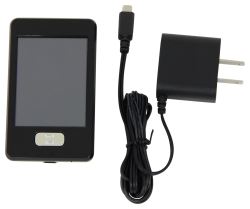
The battery of the remote that comes with the # LC358601 is a Lithium-ion battery that is not replaceable. Since yours won't hold a charge only option is to replace it with the # LC358601.
On the Lippert Ground Control leveling system using remote # LC358601 you may need to configure the remote to the touch pad by the following steps:
1. Enter the Leveler app on the LINC Remote.
2. Turn the remote on by pressing and releasing the large silver button at the bottom of the unit.
3. Press the “OK” button on the touch screen to access the Function Menu.
4. Press the Leveler App button.
5. With the interface turned off, press LEFT 5 times and then RIGHT 5 times.
6. The LCD on the interface should read “Wireless Configuration”.
7. Click any button on the LINC remote in the Leveler App.
8. The LCD on the interface should read “Successful!” Your wireless Level-Up system is now ready to use.


Product Page this Question was Asked From
Replacement Touchscreen Remote w/ Charger for Lippert Ground Control 3.0 Electric Leveling System

- Accessories and Parts
- Camper Jacks
- Trailer Jack
- Controllers
- Remote Control
- Lippert
more information >
Featured Help Information
Instructions

Continue Researching
- Search Results: 16058
- Q&A: Which Brake Controller Install Harness Fits 2022 Ford E-450 Cutaway
- Q&A: Replacement Option For Norcold N306.3 RV Fridge
- Q&A: How To Measure To Make Sure The MORryde CRE3000 Equalizers Will Fit Your Trailer
- Q&A: How To Change The Progressive Dynamics PD4060K Power Center To A Lithium Charging Profile
- Q&A: How to Use Lithium Batteries With a PD4060K Converter/Panel That Does Not Have the Li Switch
- Search Results: 22292
- Search Results: 303600
- Shop: Replacement Stainless Steel Trim Kit for Greystone Built-in Microwave
- Shop: Furrion USB-A to USB-C Power Cable - 5' Long
- Shop: Curt Spectrum Trailer Brake Controller w/ Plug-In Harness - Up to 4 Axles - Proportional
- Shop: Lippert Heavy-Duty Replacement Shock - Yellow
- Search Results: trailer brake controller
- Search Results: 39523
- Search Results: 80500
- Search Results: tekonsha
- Shop: Curt TriFlex NEXT Trailer Brake Controller w/ Custom Harness - 1 to 4 Axles - Proportional
- Shop: B&W Turnoverball Underbed Gooseneck Trailer Hitch w/ Custom Installation Kit - 30,000 lbs
- Shop: Replacement Universal Ignition DC Furnace Control Board for Atwood Hydro Flame Furnaces
- Video: Replacement Rear Anchor for HappiJac Truck-Mounted Camper Tie-Downs Spec Review
- Video: HappiJac Camper Tie-Downs Review
- Q&A: Replacement Landing Gear Motor for a 8532-07 Motor
- Video: Ultimate Overview of the Lippert On-The-Go Telescopic Ladder
- Video: A Closer Look at the Lippert On-The-Go Telescopic Ladder
- Q&A: Touchscreen Remote for 2026 Forest River Sierra
- Article: Can I Put Wallpaper in My RV?
- Article: Is It Illegal to Leave My Hitch on My Truck?
- Article: 5 Things to Know About Weight Distribution Hitches
- Article: Aftermarket Brake Control Wiring for 07-13 GM Full-Size Truck with Factory-Integrated Brake Control
- Article: Our Team Picked The Best Camping Gear of the Year - Here Are Their Top Choices