


How Do You Remove The Screen On the MaxxAir MaxxFan?
Updated 06/18/2020 | Published 12/15/2016
Question:
How do you remove the screen over max air vent to get at the model and make number q
asked by: Ernest
1
Helpful Expert Reply:

To remove the screen for the MaxxAir MaxxFan Trailer Roof Vent w/ 12V Fan - Manual Lift - 14-1/4" x 14-1/4" - White, # MA00-04000K, you simply remove it from the 4 mounting tabs. These tabs rotate. I've attached a picture for you.
expert reply by:
Jason S

1
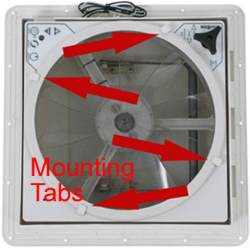
click to enlarge
Product Page this Question was Asked From
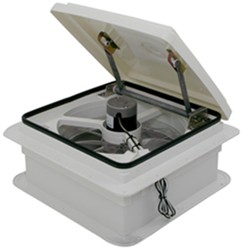
MaxxFan Plus Roof Vent w/ 12V Fan and Thermostat - Manual Lift - 10 Speed - White

- RV Vents and Fans
- Vent
- Roof Vent
- Manual Lift
- 12V Fan
- Reversible Fan
- Plastic
- White
- MAXXAIR
more information >
Featured Help Information
Instructions

Continue Researching
- Search Results: tallboy
- Shop: Power Mountain Tallboy Off-Road Bottle Jack - 8-1/2" to 37-3/4" Lift - 6 Tons
- Video: Let’s Check Out the Replacement MaxxAir Roof Vent Manual Lift Operator
- Q&A: Troubleshooting MaxxAir Vent Powered Lid that Won't Open
- Shop: Replacement MaxxAir Roof Vent Manual Lift Operator
- Q&A: Troubleshooting A MaxxAir MaxxFan Deluxe That Wont Lift Open
- Q&A: Troubleshooting MaxxFan that Opens and Closes on Its Own
- Q&A: Troubleshooting Bumping And Bouncing Noises When Opening And Closing A MaxxFan Plus Roof Vent
- Search Results: dometic
- Search Results: domestic
- Search Results: awning trim
- Shop: Rain Blocker G2 Side Panel for Thule 10' HideAway Awning - 8' Wide x 8-5/8' Tall
- Shop: Replacement Printed Circuit Board for MaxxAir Powered Lift RV Roof Vents w/ Reversible Fan
- Shop: Solera Manual Retractable Awning to Electric RV Awning Conversion Kit - Pull Style to Power - Black
- Shop: Replacement MaxxFan Plus 10-Speed Roof Vent with Smoke Lid
- Search Results: mopeka
- Search Results: rhino flex
- Shop: Roof Rack
- Q&A: Recommended Replacement Steps For Forest River Wildwood Travel Trailer
- Search Results: ramp door weather stripping
- Video: All About the D-Shaped Rubber Seal for Enclosed Trailer
- Shop: Replacement M8 Channel Nut for Rhino-Rack Accessories - Qty 4
- Q&A: Replacement Weather Seal For Enclosed Trailer
- Q&A: Troubleshooting A MaxxAir MaxxFan Lid That Won't Open
- Shop: Trailer Hitch
- Video: A Look at the Power Mountain Tallboy 6 Ton Off-Road Bottle Jack with a Military Cargo Trailer
- Article: Trailer Wiring Diagrams
- Article: Brake Controller 7- and 4-Way Installation Kit (ETBC7)
- Video: Review of Power Mountain Automotive Tools - Jacks and Jack Stands - PM34FR
- Shop: Trailer Wiring
Explore Expert Info
![Our Expert]()
on RV Vents and Fans

on RV Vents and Fans



















Loralee L.
6/18/2020
Thank you for that simple piece of information that is so helpful. My tabs don't rotate easily and since I wasn't sure if they were supposed to rotate, I didn't want to force them. But I spent an hour checking MaxX Fan manuals and other RV fan cleaning videos and never found that simple piece of information till now. Again, thanks! I wonder why MaxX didn't put it in their manual?