


Resetting TireMinder i10 TPMS
Updated 01/05/2026 | Published 09/09/2024
Question:
I have the TireMinder I10 monitoring system. I need to know how to set the overheating and over pressure parameters that the tires reach while traveling down the road. My warning alarm comes way to soon
asked by: Dan
Expert Reply:
Hey Dan,
Thanks for the purchase and to reset your TireMinder i10 # TM89FR you have to set up the installation process over again. Per TireMinder, here's the steps.
First, remove all transmitters from the valve stems and set them down by the tires.
From Monitoring Mode, press and hold the LEFT and RIGHT buttons for 5 seconds (until all 20 positions appear). The screen will show LEARN in the top center of the display.
You will see that all your currently active tire positions display a tire pressure.
Press and hold the CENTER and RIGHT buttons. After 5 seconds, the unit will beep twice, and each tire position will read “- -."
Since you are already in the Learn Mode, you may start the re-install process immediately.
If you are not ready, you should exit from this mode by pressing and holding the LEFT and RIGHT buttons until all 20 positions disappear.
You will be back in Monitoring Mode From here, you may start over at any time.


Product Page this Question was Asked From
TireMinder i10 TPMS for RVs and Trailers w/ Signal Booster - 4 Tire Sensors
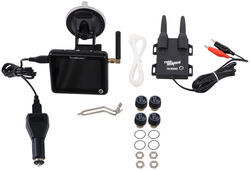

- TPMS Sensor
- Boat Trailer
- Camper
- 5th Wheel
- Motorhome
- Cap Sensors
- 4 Sensors
- Extended Range
- Color Monitor
- Smartphone Display
- TireMinder
more information >

Continue Researching
- Shop: Trailer Axle w/ Electric Brakes - Easy Grease - 6 on 5-1/2 - 86-1/2" Long - 6,000 lbs
- Shop: Suspension Enhancement
- Video: Comprehensive Review: Trailer Axle w/ Electric Brakes
- Video: Trailer Axle with Idler Hubs Spec Review
- Search Results: hub saver
- Shop: Air Lift LoadLifter 5000 Air Helper Springs - Rear Axle
- Q&A: Replacement Sensors for TireMinder i10 TPMS for RVs and Trailers w/ Signal Booster
- Video: TireMinder RV and Trailer i10 TPMS Installation - 2018 Coachmen Leprechaun Motorhome
- Shop: TireMinder i10 TPMS for RVs and Trailers w/ Signal Booster - 4 Tire Sensors
- Search Results: axles
- Search Results: hub saver washer
- Video: The Low-Down on the TireMinder i10 TPMS for RVs and Trailers w/ Signal Booster
- Shop: TireMinder i10 TPMS for RVs and Trailers w/ Signal Booster - 6 Tire Sensors
- Shop: TireMinder i10 TPMS for RVs and Trailers w/ Signal Booster - 10 Tire Sensors
- Shop: Thule Compass Kayak Roof Rack w/ Tie-Downs - J-Style - Folding - Clamp On
- Q&A: TireMinder Tire Pressure Monitoring System for Multiple Trailers
- Q&A: Does The TireMinder i10 TPMS Display Tire Temperature?
- Shop: Empire Faucets RV Kitchen Faucet w/ Pull-Down Spout - Single Lever Handle - Brushed Nickel
- Q&A: Which Folding Kayak Carrier Will Fit The Thule Wingbar Evo Crossbars?
- Search Results: trailer hitch
- Article: Trailer Wiring Diagrams
- Video: Firestone Ride-Rite Air Bags with Easy Mount Compressor Feature Breakdown
- Q&A: What is the Difference Between a Class II and a Class III Hitch?
- Shop: Trailer Hitch
- Video: Manufacturer Spotlight - SuperSprings Vehicle and Trailer Suspension
- Shop: Trailer Wiring
- Q&A: Firestone Air Bags for 2026 Ford F-350 FX4 Dually
- Search Results: trailer tires and wheels
- Article: Brake Controller 7- and 4-Way Installation Kit (ETBC7)
- Video: Choosing the Right Vehicle Suspension Upgrades

on Accessories and Parts








Jameson C.
1/5/2026
Hey Dan, how did things go after you reset your TireMinder i10 and went through the setup again? Your update could make it easier for others trying to fine-tune their pressure and temperature alerts.