


Troubleshooting WiSight Camera Not Paired to Monitor
Updated 03/14/2024 | Published 03/07/2024
Question:
Im having problems re-linking the backup camera to this new replacement monitor512946-102 Voyager 5.6” LCD , while hooked up and with the TV while in drive. I worry that it is not the correct replacement for my Airstream 2021 23foot Globetrotter? Or maybe there is a reset method of some sort to wake the camera up so that the replacement remote can see it?
asked by: Del S
Expert Reply:
Here's the pairing process for the WiSight camera kit for you to try:
PAIRING PROCESS
This system contains an Auto-Pairing function. If your monitor is not receiving a signal from the camera; the two may not be paired correctly.
1. Make sure the monitor is connected to 12 Volt DC power supply, but 12 Volt DC power is removed from the camera (clearance lights turned off).
2. Press the SEL/PAIR button on the front of the monitor expected mode & select the appropriate AV source.
3. Press and hold the "SEL/PAIR" button on the front of the monitor for 5 seconds and release. (Monitor will display "PAIRING")
4. Apply 12 Volt DC power to the camera (turn on the clearance lights). If pairing multiple cameras to the system, make sure that only the only the corresponding camera (Camera 1 –Camera 4 corresponding to Monitor's CH1- CH4) has power when pairing.
If done correctly, the monitor will display "PAIRING SUCCESSFUL". If pairing is not successful, the monitor will display "PAIRING FAIL". If you receive this message, repeat steps


Product Page this Question was Asked From
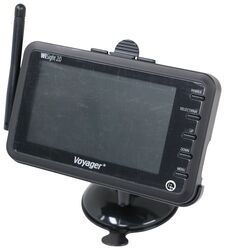
Replacement Voyager WiSight 2.0 Wireless RV Backup Camera Monitor - 4.3" Screen

- Accessories and Parts
- RV Camera System
- Monitors
- Dash Monitor
- Voyager
more information >

Continue Researching
- Shop: Replacement Voyager WiSight 2.0 Wireless RV Backup Camera Monitor - 4.3" Screen
- Shop: Stainless Steel Trailer Hitch Lock for 2-1/2" Receivers by Master Lock
- Shop: InfiniteRule Trailer Coupler Lock - Trigger Latch Style - 1/4" Pin Diameter - 1-1/8" Span
- Search Results: side marker lens
- Search Results: side marker vehicle lights
- Video: Stainless Steel Trailer Hitch Lock for 2-1/2" Receivers by Master Lock Review
- Video: Comprehensive Review: Voyager WiSight 2.0 Wireless RV Backup Camera System w/ Night Vision
- Video: Hands-On with the Replacement Voyager WiSight 2.0 Wireless RV Backup Camera Monitor
- Shop: Voyager WiSight 2.0 Wireless RV Backup Camera System w/ Night Vision - Rear Mount - 7" Screen
- Shop: Voyager WiSight 2.0 Wireless Backup Camera System w Night Vision for Prewired RVs - 4.3" Screen
- Shop: Voyager WiSight 2.0 Wireless RV Backup Camera System w/ Night Vision - Rear Mount - 4.3" Screen
- Shop: Master Lock Trailer Hitch Receiver Lock - Swivel Head Design - 2" Hitches
- Video: Extension Hose for SewerSolution Macerator System Review
- Search Results: water flow meter
- Search Results: water meter
- Q&A: Troubleshooting A Furrion Vision S Wireless Backup Camera System That Won't Pair
- Q&A: Which Monitors Are Compatible With Furrion Vision S Wireless RV Backup Camera
- Q&A: Side Marker Camera Recommendation For A 2022 Jayco 166FBS That Is Prepped For Side Cameras
- Q&A: Can Furrion Vision S 4.3" Monitor Be Upgraded to 7" Monitor for Use with Side Cameras
- Q&A: Can I Replace My 5" F0S05TASF Furrion Screen for the 7" Monitor for Furrion Vision S?
- Q&A: Parts Needed For A Furrion Camera System On A 2020 Keystone Sprinter Limited 5th Wheel Trailer
- Q&A: Troubleshooting Furrion Vision S Wireless Back Up Camera Monitor Not Turning On or Having Blue Light
- Search Results: furrion replacement monitor
- Article: Trailer Wiring Diagrams
- Shop: Trailer Hitch
- Search Results: trailer hitch
- Video: Firestone Ride-Rite Air Bags with Easy Mount Compressor Feature Breakdown
- Search Results: trailer tires and wheels
- Shop: Trailer Wiring
- Article: Brake Controller 7- and 4-Way Installation Kit (ETBC7)

on Accessories and Parts
















Del S.
3/14/2024
Are there any troubleshooting steps, since the pairing keeps failing?