


How To Pair A Voyager WiSight 2.0 Camera And Monitor Together
Updated 05/15/2025 | Published 06/21/2023
Question:
Tried 30 times or so while driving back home on the last trip I was on and could NOT get the WiSight to pair. Only thing I found from the bloggers is that you must 1st shut off the Tow vehicles lights and then while pairing, you can turn them back on. Is this correct or am I missing something?
asked by: Mark R
Expert Reply:
The camera for the Voyager WiSight 2.0 Wireless Backup Camera System # ASA24YR can not be powered until the monitor is powered and ready to pair, which is why you saw that the headlights need to be turned off to stop power from reaching the camera. I've added the instructions below to walk you through the pairing process.
1. Make sure the monitor is connected to 12 Volt DC power supply, but 12 Volt DC power is removed from the camera (clearance lights turned off).
2. Press the SEL/PAIR button on the front of the monitor expected mode & select the appropriate AV source.
3. Press and hold the "SEL/PAIR" button on the front of the monitor for 5 seconds and release. (Monitor will display "PAIRING")
4. Apply 12 Volt DC power to the camera (turn on the clearance lights). If pairing multiple cameras to the system, make sure that only the only the corresponding camera (Camera 1 –Camera 4 corresponding to Monitor's CH1- CH4) has power when pairing.
If done correctly, the monitor will display "PAIRING SUCCESSFUL". If pairing is not successful, the monitor will display "PAIRING FAIL". If you receive this message, repeat steps


Product Page this Question was Asked From
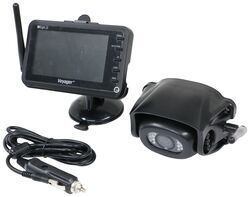
Voyager WiSight 2.0 Wireless Backup Camera System w Night Vision for Prewired RVs - 4.3" Screen

- RV Camera System
- Backup Camera
- Built-In Microphone
- Mirrored Image
- Night Vision
- Waterproof
- Pre-Wired RVs
- Wireless
- Standard View
- Suction Cup Mount
- Rear
- 4.3 Inch Display
- 1 Camera
- Voyager
more information >

Continue Researching
- Search Results: airbag hitch
- Search Results: 50 amp rv surge protector
- Shop: Shocker Hitch Air Ball Mount - 2-5/16" Ball - 2" Hitch - 2" Rise/Drop - 12K
- Search Results: molle panels
- Search Results: airsafe
- Search Results: airsafe hitch
- Search Results: airsafe hitch
- Search Results: shocker hitch
- Shop: Mighty Cord SurgeMinder Surge Protector and Circuit Tester - 50 Amps
- Shop: Power Watchdog Surge Protector with Bluetooth - Portable - 50 Amp
- Video: All About the Mighty Cord SurgeMinder Surge Protector and Circuit Tester
- Video: A Closer Look at the etrailer 2" Clamp-On Bucket Hitch Receiver for Tractor or Loader Use
- Shop: Antenna Extension for Voyager Digital Wireless System - Compatible with WVCMS130AP and WVCMS10B
- Shop: etrailer 2" Clamp-On Bucket Hitch Receiver for Tractor or Skid Steer Bucket
- Video: Review of Shocker Hitch Trailer Hitch Ball Mount - Air Ball Mount 2 Inch Receiver - SHK47VR
- Video: Shocker Hitch HD Air Ball Mounts | Manufacturer Interview
- Video: Review of Rear View Safety Flush Mount 7 Inch Monitor - RVS-421
- Shop: Rear View Safety Flush Mount for 7" Monitor
- Q&A: Adding Additional Cameras to the Voyager WiSight 2.0 Wireless Backup Camera
- Shop: Voyager WiSight 2.0 Wireless Backup Camera System w Night Vision for Prewired RVs - 4.3" Screen
- Q&A: Trouble Pairing Camera and Monitor on Voyager WiSight Wireless RV Backup Camera System
- Q&A: What is the Difference Between a Class II and a Class III Hitch?
- Article: Trailer Wiring Diagrams
- Video: Firestone Ride-Rite Air Bags with Easy Mount Compressor Feature Breakdown
- Shop: Trailer Hitch
- Article: How to Measure for Trailer Hitch Drop
- Shop: Trailer Wiring
- Q&A: Lug Nut Torque Chart for Trailer Wheels
- Q&A: Installation Time for Blue Ox BX1128 Flat Tow Base Plate Kit for 2016 Jeep Grand Cherokee
- Shop: Suspension Enhancement

on RV Camera System














Chrissy
5/11/2025
We also have tried these steps multiple times and system still will not pair. Is there something we are missing or does that mean this system just isn’t any good anymore? Please assist.