


Why Is My Prewired RV Camera Not Pairing With The Voyager WiSight 2.0 Monitor?
Updated 05/12/2026 | Published 05/06/2026
Question:
I have a 2022 Coachman Freedom Express and purchased this camera. The coach is setup for this camera so installation was a breeze. However, I cant get the system to sink together. The lights are in the ONinch position and the running lights are lit. I have tried all channels. I have tried powering both the camera and the monitor off. Not sure what else to try at this point, other than to verify that there is power at the connection. Can you help me out? I do have a volt meter and could try that when Im near the camper again. Thanks.
asked by: Gary M
Expert Reply:
Hello Gary,
It sounds like you’ve already done most of the right troubleshooting, so you’re definitely on the right track. With the Voyager WiSight 2.0 system # ASA37YR, the most common issue when it won’t pair is actually power at the camera, not the monitor.
Since your Coachmen Freedom Express is prewired, that rear camera port should only get power when the running lights are on, which you already checked. The next step I’d take is exactly what you mentioned, verify power with your volt meter at the camera connection. You should be seeing around 12V at the pins when the running lights are on. If you’re not getting power there, then the issue is likely in the trailer wiring or fuse, not the camera system itself.
If you do have good power, then it usually comes down to pairing. One thing that trips people up on the # ASA37YR is that it doesn’t always auto sync just by turning it on. You’ll want to manually pair it by going into the monitor menu, selecting the camera channel you want, CAM 1 is typical, and then hitting “pair” while the camera has power. It can take a few seconds, so I usually give it 10 to 15 seconds to lock in.
Also worth double checking, the little antenna on the back of the camera and the monitor both need to be fully threaded on and snug. If either one is loose, the signal won’t connect even if everything else is right.
If after all that it still won’t sync, then there’s a chance the camera isn’t actually powering up even if the lights are on, which the volt meter will confirm, or you could be dealing with a defective component.
When you get a chance to check voltage, let me know what you find. That will narrow it down really quickly.
Getting things geared up for the next great adventure? What trip are you looking most forward to this summer?


(click to enlarge)

Product Page this Question was Asked From
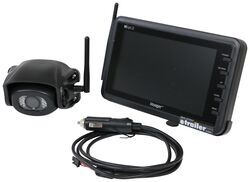
Voyager WiSight 2.0 Wireless Backup Camera System w/ Night Vision for Prewired RVs - 7" Screen

- RV Camera System
- Backup Camera
- Built-In Microphone
- Mirrored Image
- Night Vision
- Waterproof
- Pre-Wired RVs
- Wireless
- Standard View
- Suction Cup Mount
- Rear
- 7 Inch Display
- 1 Camera
- Voyager
more information >
Featured Help Information
Miscellaneous Media


Continue Researching
- Search Results: trash can
- Q&A: Where Does the Voyager PWM Filter for RV Camera Systems part # VGR74VR Install?
- Shop: Topargee Flush-Mounted Fresh Water Tank Gauge w/ Adapter Fittings
- Search Results: happijac
- Q&A: Will the Voyager WiSight 2.0 Wireless Backup Camera System Work w/a Pre-Wired Travel Trailer?
- Shop: Towing Mirrors
- Q&A: How To Identify a Voyager WiSight or WiSight 2.0 Camera on a 2016 Lance 1062.
- Shop: Replacement Voyager WiSight 2.0 Wireless RV Backup Camera with Low Light Assist
- Shop: 7-Way Vehicle Power Adapter for Furrion RV Observation Camera
- Shop: Voyager WiSight 2.0 Wireless Backup Camera System w/ Night Vision for Prewired RVs - 7" Screen
- Shop: Voyager PWM Filter for Voyager RV Camera Systems - CEC Connector
- Shop: Voyager Rear Camera with LED Low Light Assist - Black
- Shop: 12V PWM Filter for RV Backup Camera Systems - Hardwire
- Q&A: Is The 2022 Winnebago Micro Minnie 1700BH Prepped For a Voyager WiSight 1.0 or 2.0?
- Q&A: Correct Backup Camera System for a Coachmen Apex Ultra Lite
- Q&A: Permanent PWM Filter for 2024 Ford F-250 and Furrion Vision S Camera System
- Q&A: Recommended Camera System for Pre-Wired 2020 Winnebago Minnie Plus
- Search Results: extendable towing mirrors
- Video: Review of ASA Electronics Replacement Voyager RV Camera - ASA64YR
- Video: What to Know About the Spacer Washer for Fastway e2 Weight Distribution Head
- Search Results: trailer hitch
- Shop: Trailer Hitch
- Video: Firestone Ride-Rite Air Bags with Easy Mount Compressor Feature Breakdown
- Article: Trailer Wiring Diagrams
- Search Results: trailer tires and wheels
- Shop: Trailer Wiring
- Article: Brake Controller 7- and 4-Way Installation Kit (ETBC7)
- Article: How to Measure for Trailer Hitch Drop
- Shop: Suspension Enhancement
- Search Results: trailer wiring

on RV Camera System


















Fran
5/12/2026
Kate’s advice covers all the possible glitches in the camera system. The only thing I would add is that you have to do the initiating sequence exactly the way it’s specified in the manual to successfully pair the camera and monitor. If you don’t follow each step in the correct order the pairing will fail, so this detail is important. If I remember correctly the vehicle’s lights should be on before you power up the monitor. It might require a couple of tries but if there is power to the camera it should work. Good luck!