


Troubleshooting Pairing Issues With A Voyager WiSight 2.0 Wireless Backup Camera System
Updated 08/03/2025 | Published 06/17/2023
Question:
We are not able to pair the Voyager digital wireless observation system wisight 2.0 We have a 2020 Micro Minnie Winnebego prewired for Voyager. Please help.
asked by: Marta
Expert Reply:
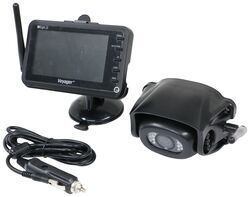
The Voyager WiSight 2.0 Wireless Backup Camera System w/ Night Vision for Prewired RV - 4.3" Screen # ASA24YR you were looking at is both the camera and the monitor and is the second generation of Voyager's camera systems. If you are trying to pair any parts of this system with the old system then that would be your issue since first generation and second generation cameras and monitors can not communicate with each other. I've attached the pairing process instructions below:
If you're trying to pair the camera and monitor from this kit and not getting it to function then you'll want to disconnect power to the camera and power up the monitor first inside of your tow vehicle. You can install the camera on the trailer but for some reason the pairing process is very specific that you do not power it until the monitor is ready.
1. Make sure the monitor is connected to 12 Volt DC power supply, but 12 Volt DC power is removed from the camera (clearance lights turned off).
2. Press the SEL/PAIR button on the front of the monitor expected mode & select the appropriate AV source.
3. Press and hold the "SEL/PAIR" button on the front of the monitor for 5 seconds and release. (Monitor will display "PAIRING")
4. Apply 12 Volt DC power to the camera (turn on the clearance lights). If pairing multiple cameras to the system, make sure that only the only the corresponding camera (Camera 1 –Camera 4 corresponding to Monitor's CH1- CH4) has power when pairing.
If done correctly, the monitor will display "PAIRING SUCCESSFUL". If pairing is not successful, the monitor will display "PAIRING FAIL". If you receive this message, repeat steps
If this doesn't solve your issue then let me know how far through the steps you can get and what is happening and also what your tow vehicle is because it could also be a lack of power coming from the tow vehicle to power the camera, thus giving you pairing issues.


Product Page this Question was Asked From
Voyager WiSight 2.0 Wireless Backup Camera System w Night Vision for Prewired RVs - 4.3" Screen

- RV Camera System
- Backup Camera
- Built-In Microphone
- Mirrored Image
- Night Vision
- Waterproof
- Pre-Wired RVs
- Wireless
- Standard View
- Suction Cup Mount
- Rear
- 4.3 Inch Display
- 1 Camera
- Voyager
more information >

Continue Researching
- Shop: Replacement Voyager WiSight 2.0 Wireless RV Backup Camera with Low Light Assist
- Video: Review of ASA Electronics Replacement Voyager WiSight 2.0 Wireless RV Backup Camera - ASA74YR
- Video: Review of ASA Electronics Replacement Voyager RV Camera - ASA64YR
- Q&A: How To Identify a Voyager WiSight or WiSight 2.0 Camera on a 2016 Lance 1062.
- Video: Review of the Replacement Wireless Antenna for Voyager Backup Camera System
- Search Results: voyager backup camera
- Shop: Replacement Voyager WiSight 2.0 Wireless RV Backup Camera w/ Night Vision for Prewired System
- Search Results: furrion monitor
- Search Results: voyager camera
- Search Results: trailer lift kit
- Search Results: lift kits
- Search Results: accessories and parts
- Search Results: suspension enhancement
- Shop: Voyager Camera Extension Cable - 10' Long
- Q&A: Trouble Pairing Camera and Monitor on Voyager WiSight Wireless RV Backup Camera System
- Q&A: Lift Kit Fitment for a 2019 Airstream Bambi Sport 16RB
- Video: Installing the Dexter Torflex Lift Kit
- Shop: Mud Flaps
- Shop: Replacement Wireless Antenna for Voyager Backup Camera System
- Shop: Replacement Antenna for Furrion Vision 1, 2, and S Wireless RV Camera Systems
- Shop: Torflex Lift Kit - Tandem Axle - 3-1/8" Lift
- Shop: Lets Go Aero Jack-E Bike Rack for Electric Bikes - Trailer Tongue Rack
- Q&A: Voyager WiSight 2.0 Adjustment Instructions
- Q&A: Furrion Camera Not Getting Enough Power from Trailer Connector on 2019 Ford F250 to Operate
- Q&A: Troubleshooting A Voyager WiSight Camera Monitor That Won't Pair When In The Tow Vehicle
- Q&A: Troubleshooting A Voyager WiSight 2.0 Camera System That's Constantly Losing Signal
- Shop: Front Mount Hitch
- Video: Setting up the EcoHitch Hidden Front Mount Trailer Hitch Receiver on your 2021 Ford F-250 Super Duty
- Article: Trailer Wiring Diagrams
- Video: Firestone Ride-Rite Air Bags with Easy Mount Compressor Feature Breakdown

on RV Camera System


















Jerry
8/3/2025
After pairing the monitor to camera after about 30 seconds the screen on monitor goes dark and have to push any button and will bring view back but only for another 30 seconds before screen goes dark again!