


How Replace Bulb on Optronics Halogen Docking Light DL-16CC
Updated 07/30/2024 | Published 09/20/2015
Question:
Trying to find a way how to change the bulb
asked by: Diana
0
Expert Reply:
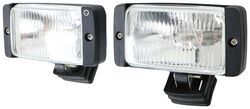
To change the bulb on the Optronics Halogen Docking Light, part # DL-16CC, you just remove the 2 screws that are on the front of the light, one on each side of the lens. You then need to pull the assembly out of the housing and on the back there is a small screw that needs to be removed as well. When that is removed the entire light assembly will be able to be replaced.
The # DL-16CC kit uses two 35-watt halogen lights.
expert reply by:
Jeffrey L

0

Product Page this Question was Asked From
Halogen Docking Light Kit - 35 Watt - Lighted Switch and Safety-Fused Wiring - Black Housing

- Boat Lights
- Docking Lights
- Deck
- Black Housing
- Surface Mount
- Halogen Light
- White
- Optronics
more information >

Continue Researching
- Shop: Halogen Docking Light Kit - 35 Watt - Lighted Switch and Safety-Fused Wiring - Black Housing
- Q&A: Will The Curt Trailer Hitch Receiver C82RJ Fit The 2027 Kia Telluride
- Q&A: Is There a Support Brace Designed for the Replacement Crank Extension for Lippert Spare Tire Winch?
- Q&A: Replacement LED Flood Light for Load Lights on a Horse Trailer
- Article: Roadmaster Vehicle Specific Base Plates
- Q&A: Recommended 4" x 6" Utility Work Light
- Q&A: How To Install the ThinLine LED Light As An Identification Light On Trailer Over 80 Wide
- Q&A: Why Do I Need to Disconnect the Battery to Flat Tow a 2022 GMC Sierra 1500 AT4?
- Q&A: Replacement 12 Inch Brake Assemblies for Redline EB01-140 and EB01-145 From Dexter Axle
- Article: Aftermarket Brake Control Wiring for 07-13 GM Full-Size Truck with Factory-Integrated Brake Control
- Article: Carrying on a Legacy: One Family’s Story of Grief, Growth, and a Global Pandemic
- Article: Trailer Lighting Requirements
Chase B.
7/30/2024
Do you have a part number for the bulbs?