To see if this custom-fit item will work for you please tell us what vehicle you'll use it with.
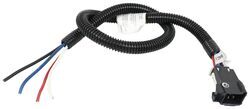
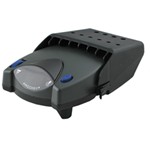
The Tekonsha P3 is a brake controller beloved for its reliability and useability. You're able to save your settings and multiple profiles. It's easy to install, and with the custom harness, it's plug-and-play.
Features:
Specs:
Braking output is the maximum amount of power that will be applied to your trailer's brakes. How much braking output you need is determined by the weight of your trailer; a heavier trailer will need more power to bring it to a stop. You want to go as high as you can without the trailer brakes locking up.
Use the arrow buttons on the front of the module to set the output.
The boost setting controls the aggressiveness of your trailer's braking, meaning how quickly the brakes reach the maximum braking level. If your vehicle takes too long to come to a stop, increase the setting. If it stops too abruptly, decrease the setting.
Depending on the level of boost, your trailer brakes can start at either 13 percent or 25 percent of the set braking output. So instead of starting at 0, the brakes will start at 25 percent and get to 100 percent sooner. This keeps the trailer from pushing your tow vehicle forward.
Boost Levels:
| Approximate Gross Trailer Weight | Boost Level | Increase in Initial Power Output |
|---|---|---|
| Less than tow vehicle GVW | B1 | 13% |
| Equal to tow vehicle GVW | B1 or B2 | 13% or 25% |
| Up to 25% more than tow vehicle GVW | B2 or B3* | 25% |
| Up to 40% more than tow vehicle GVW | B3* | 25% |
*Both B2 and B3 offer a 25-percent boost in initial power. But the braking curve for B3 is more aggressive than that of B2. This means that, even though you will start out with the same intensity when using these boost levels, you will get an overall more aggressive braking experience with the higher level. So if you use B3, you will reach maximum braking sooner than if you use B2.
To engage the manual override, twist the rotary-style lever from right to left. This will activate the trailer's brakes and brake lights independently of your vehicle, great for stopping sway or controlling your trailer's momentum in an emergency.
The P3 is able to store your settings in multiple profiles so that you can have them ready to go for different trailers and drivers. Even the display is super customizable: you can change the screen color, brightness, and language to make it easy to use.
The P3 makes it easy to troubleshoot problems as they come up, with comprehensible and detailed diagnostics displayed on the screen.
Diagnostic troubleshooting messages include:
Diagnostic warning signs include:
The Prodigy P3 offers advanced safety features to prevent damage to various components of your towing setup.
-Integrated reverse battery protection shields the brake controller and your trailer's breakaway system from shorts.
-When the P3 is not in use, it draws only 3.6 milliamps, minimizing drain on your vehicle's battery.
-Any time your vehicle and trailer are at a standstill with the brakes applied for more than 5 seconds, the hold feature will kick on and reduce power to just 25 percent. This will keep your trailer in place without your brakes overheating.
Installing the P3 is incredibly simple. You'll mount the bracket to your dashboard then mount the unit to the bracket. Plug the custom harness into your vehicle and into the unit. Done!
Keep in mind that the P3 must be horizontally level and parallel with the direction of travel to work correctly.
With a replacement wiring harness (sold separately) and replacement bracket (TK5906 - sold separately), you can even transfer the Prodigy P3 to another vehicle.
Note: If you don't already have a 7-way plug at the back of your vehicle, take a look at our exclusive 7- and 4-way brake controller installation kit (ETBC7 - sold separately).
Proportional braking means that your trailer brakes mimic your tow vehicle's brakes. If you slam on the brakes, your trailer brakes will activate with the same intensity; if you brake lightly, your trailer brakes lightly too. The trailer's braking is in proportion to your vehicle and trailer.
The Prodigy P3 uses an internal inertia sensor to detect how your vehicle is braking so it can send the right amount of braking power to your trailer. It measures the inertia of your tow vehicle and activates the trailer's brakes to slow at the same rate. The result is uniform braking across your towing setup. No push-pull action - just smooth, proportional braking every time.
California residents: click here
Videos are provided as a guide only. Refer to manufacturer installation instructions and specs for complete information.
Hi there Traverse owners. inaudible 00:00:01 2015 Chevrolet Traverse, we're going to be taking a look at and showing you how to install Tekonsha's P3 Brake Controller. Along with this, we're going to be using Tekonsha's GM custom fit wiring adapter that's going to allow us to plug it directly into the vehicle, straight into our brake controller. And this is what our brake controller looks like when it's installed. It comes with multiple different bracket options, we've chosen the one that has the quick release, since you can just easily pop it right out of there if you want to take it out, that's great for security if you get to a location where you're going to be towing maybe later, but you're not hooked up now, or you're going to be leaving your truck for a while at a spot, and you can secure this into your glove box or your center console, keep it out of sight and out of mind.Tekonsha's P3 is one of my top choice brake controllers. It's designed to work with trailers that have one to four axles.
And this brake controller comes with all the features you'd expect of a brake controller, with some additional ones that we're going to go into now. The main ones that you'll have that all brake controllers do, we can adjust our power output to our brakes with the buttons here on the left. We've got our manual slider here at the bottom, which is great for testing and can also be used to help straighten out a swaying trailer because if we apply our brakes real quick, our trailer is going to want to stop, we're just going to pull away from our truck, it's going to pull it nice and taut, bringing us back in line.In the top right, we've got our boost button which will allow us to cycle between three boost settings or no boost. The boost will make the inertia sensor a little bit more aggressive to apply the brakes a little bit quickly and stronger than before. Boost one is designed for trailers that weighs less than your vehicle.
Boost two is for trailers that wake close to the weight of your vehicle, and boost three is for trailers that weigh more than your vehicle.When the boost setting is activated, it can make things difficult when backing up as it may apply the brakes a little bit too aggressively causing your trailer to lock up when you're trying to back up. This can easily be temporarily removed without having to change any of your settings by holding down on the brake pedal and then holding down on the boost button. The boost indicator should change to an arrow with an R, indicating that is in reverse mode, and that's going to bypass our brake controller so we can easily back up into whatever spot and not have to worry about our brakes applying.Unless we've got the features that really set this one apart, we've got our beautiful display here with plenty of information and in the bottom right we can adjust our display with the brightness, the color, the contrast, but also down below that this brake controller can switch between a regular brake controller and adapt to one that can work with an electric over hydraulic trailer.We'll begin our installation by removing the under panel here so we can determine if our vehicle has a factory plug or not. If your vehicle doesn't have a factory tow package, you may not have this plug and you may need to use kit ETBC7 that we sell here at etrailer.com, which will get you your fully functioning seven way and all the wiring you need. The pins that we're popping out here on the bottom is how do we get the panel off.
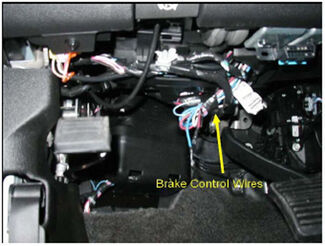
We're using a trim panel tool to get underneath the pin and pull out the center. Once you get the center pulled out, the whole pill will pop out. And we're just going to repeat that for two more pins, there's a total three under here. Now that we've got all those pulled out, this'll just drop down and slide away.Typically on your GM vehicles, you're going to find your connector for the factory tow package on the driver's side, underneath the dash, usually up here by your parking brake pedal, tucked up back there. You'll find it taped to the harness, and you can see it right here, it's taped to the harness.
We're just going to kind of give it a twist, pull it out of there, that tape can stay in there, that's fine.And it's often either a black tape like that, or a blue tape on most of the vehicles, but it's usually going to be in this location, taped up. You may need to pull your wires down and twist them around because sometimes it's taped up to the back side so we'd look on here and you think you don't have it, but it is there so just kind of fish around a little bit and look for that tape. But since we've got this connector, it's going to greatly simplify our installation as Tekonsha has a factory to Tekonsha adapter that's going to plug directly into this and then give us connector that plugs directly into a Tekonsha brake controller.And you really can't get much simpler than this. Here's our factory end, it's going to plug right into this connector. You can see it's got the little grooves and everything, it's perfect fit. So we're just going to click the two together. And then now we're going to route this wire across, over towards the passengers side. We're going to keep it on this side, we're just going to be mounting the brake controller on the other side of our steering wheel so we're just going to route this wire over there.Next we're going to need to mount up our bracket, and we're going to be using the small one that comes in our kit here. Kind of lining it up because we want it to be level horizontally, so I'm trying to hold it in place there level, kind of hold your screw, and then you'll use a quarter inch socket to run it right into your panel. And we're doing it right here on the passengers side of our steering wheel, but on the driver's side of the vehicle. And we're just going to run that in, and then we're just going to make sure we get it lined up nice and straight. We'll get our other screws set into place, make sure our bracket doesn't move too much, and then we can get this one run in.This part's going to attach to the bracket that we just installed. What I found on these is to make it a little bit easier to get these on is to take your screws and just kind of stick them in there and get them started by hand. And then you can take your gun and run them down. That's just going to make threads in it so it'll be a lot easier because it's a pretty tight spot right up in there and it can be difficult to get your hands in there and your tools to get everything tightened down. So putting those grooves in there really does make a huge difference in getting this attached to the bracket if you're dealing with tight spaces. I'm just going to run them back out and then we can get it attached.So we're going to go ahead and bring this guy up. It's going to go in between the ears of the bracket we just installed, and we're going to work our screws around there. You can see it's real tight space so that's why we pre-started them, because if you can, you want to just get it to start just a little bit by hand and that'll hold that in there for you. And then we can do the same thing over on the other side here.Now that we've got each one started, we're going to use a quarter inch wrench this time to get in here and snug these down. Before you get it all the way snug, I like to have mine tilted with the backside is far up as possible to make it level. It doesn't have to be perfectly level, depending on the brake controller you're using, we're going to be using Tekonsha's Prodigy P3, and it's the bracket that came with it here. And this one, you can install it straight up and down 90, and it's got a very good angle that you can mount inaudible 00:07:28. We're going to be trying to get a nice level so we can look at it and easily reach all of our buttons. We'll now take the controller, we're just going to slide it into the bracket, and then tip it up until it clicks into place.Now that we've got our brake controller installed, we can go and plug in our connector. You can reach it right at the back on most of them, but due to our tight space, I find on this one it's a lot easier to just pull it out of there, that's why we use the one that has the quick release so we can just plug it in, slide our brake controller back until it clicks back up into place.And with our panel, re-installed, we're ready to hook up our trailer and test everything out. First off, things are looking good because as soon as we plugged in our tester box, our controller changed from the screen indicating that a trailer wasn't connected to this screen here. And if we hit our manual slider, normally it would tell us that a trailer's not connected, but we're actually getting an output value as it's applying the brakes on our tester.So if we look here at our tester box, when I hit the manual slider, you'll see the dial go up, showing the output that it's putting to our brakes on our trailer. It's not a bad idea to also just verify that the rest of your seven way is working properly if you we're installing this, just to make sure nothing had any issues. So we're going to go ahead and start by checking our lighting signals. First thing that comes on is going to be our taillights when we turn the key on. Then we have our left turn signal, right turn signal, and brake lamps.And that completes our installation of Tekonsha's P3 Brake Controller on our 2015 Chevrolet Traverse..
Do you have a question about this Trailer Brake Controller?
Info for this part was:
At etrailer we provide the best information available about the products we sell. We take the quality of our information seriously so that you can get the right part the first time. Let us know if anything is missing or if you have any questions.


Thank you! Your comment has been submitted successfully. You should be able to view your question/comment here within a few days.
Error submitting comment. Please try again momentarily.