


How to Pair Drive/Way Interglobal RV Observation Camera to Monitor
Updated 07/28/2020 | Published 08/29/2019
Question:
Got power to both and had it working tried to figure out the menu and most buttons . Somehow list signal . How do I pair screen to camera
asked by: Courtney
Expert Reply:
I checked with Drive and this is the pairing instructions they gave me for the part # 324-000002 that you referenced:
To pair the camera with the monitor, the camera must be completely powered off. Go through the sync process on the monitor and when the Icon starts to flash then put power to the camera and it should pair up.
The camera is normally wired into the running lights of the camper so to turn power off to the camper you should be able to just turn the running lights off.


Product Page this Question was Asked From
Drive Wireless RV Backup Camera System w/ Night Vision - Rear Mount - 7" Screen
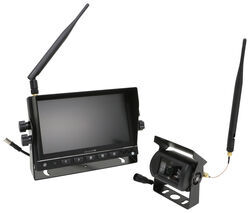

- RV Camera System
- Backup Camera
- Night Vision
- Removable Sunshade
- Wireless
- Standard View
- Dashboard Mounting Bracket
- Rear
- 7 Inch Display
- 1 Camera
- Drive
more information >

Continue Researching
- Shop: Rear View Safety Universal Mirror Monitor - 7" Color Screen
- Video: Rear View Safety Universal Mirror Monitor Feature Review
- Video: Breaking Down the Rear View Safety Color Monitor
- Shop: Rear View Safety Color Monitor - 9" LCD Digital Screen - Quad View
- Shop: Rear View Safety Monitor Cable - 8' Long - Double Sided Female Connections
- Video: Detailed Breakdown of the Drive Wireless RV Backup Camera System w/ Night Vision
- Shop: Drive Wireless RV Backup Camera System w/ Night Vision - Rear Mount - 7" Screen
- Q&A: Side Cameras that Can be Used with Rear View Safety Universal Mirror Monitor
- Q&A: Backup Camera Recommendation for Towing Trailer that Can be Turned on At any Time
- Search Results: backup camera
- Search Results: rv camera
- Shop: Buyers Products RV Backup Camera System w/ Night Vision - Rear Mount - 7" Screen
- Shop: Velit 2000R Mini AC - Teardrops and Truck Campers w/ Remote - 8.5K Btu - Non-Ducted - 48V DC - White
- Shop: GE Appliances Deluxe Plus RV AC System w/ Heat Pump, ADB & Thermostat - 15K Btu - Ducted - R32
- Q&A: Drive Wireless RV Backup Camera Not Pairing With Monitor
- Shop: RV Interior Lighting
- Shop: RV Exterior Lighting
- Search Results: puck lights
- Search Results: fridge
- Search Results: fresh jet
- Search Results: fresh jet
- Search Results: trailer lights
- Article: Trailer Wiring Diagrams
- Q&A: What is the Difference Between a Class II and a Class III Hitch?
- Shop: Trailer Hitch
- Video: Firestone Ride-Rite Air Bags with Easy Mount Compressor Feature Breakdown
- Shop: Trailer Wiring
- Q&A: Lug Nut Torque Chart for Trailer Wheels
- Article: Brake Controller 7- and 4-Way Installation Kit (ETBC7)
- Q&A: Installation Time for Blue Ox BX1128 Flat Tow Base Plate Kit for 2016 Jeep Grand Cherokee

on RV Camera System

















Shayne G.
7/22/2020
Bought this 30’ fifth wheel new had the furrion camera Frc12Ta-Bl installed hooked it up in the drive way . I had a picture for about 20 sec then went blank. Will not connect with camera again.