To see if this custom-fit item will work for you please tell us what vehicle you'll use it with.
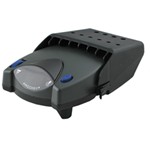
This proportional brake controller is designed to keep towing simple. Includes an LED braking indicator, a slide-bar manual override, and a knob to adjust braking power. Mounts easily within a 90-degree vertical range.
Features:
Specs:
Once the brake controller is installed, you can use the knob on the right side of the unit to adjust the gain (also known as output). Gain lets you set the maximum amount of power that will be applied to your trailer's brakes. You want to set it as high as you can without locking up the brakes. Typically, this setting is only readjusted when you experience changing road conditions or if you switch over from a heavy, loaded trailer to a much lighter, empty trailer, or vice versa.
You can fine-tune the gain by adjusting the sensitivity of the internal sensor using the knob on the left side. This controls the aggressiveness of your trailer's braking, meaning how quickly the brakes reach the maximum braking level. You can adjust this when you're towing heavy loads and you need more umph to bring your trailer to a stop. Your tow vehicle doesn't need that much power to brake in time, but your heavy trailer does. A high sensitivity level will get the braking power to your trailer brakes faster and with more intensity so that it doesn't push your tow vehicle forward.
LED Indicator
Keeping with its simple design, the Voyager will not overwhelm you with information. An LED indicator on the top of the unit lights up green to show that your trailer is securely connected to your tow vehicle. The LED indicator will change to red when the brakes on your trailer are activated.
During installation and setup, this light is also used to ensure that the Voyager will be able to function correctly. Proper leveling of the internal sensor is crucial to the operation of this brake controller. When the sensor is level, the LED will change to a shade of orange.
The Voyager is designed to be mounted in your cab at a vertical angle that is between -20 degrees and 70 degrees. The brake controller needs to be horizontally level and parallel to the direction of travel in order to function properly.
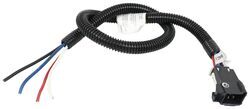
To connect the Voyager, just plug the included harness into your vehicle. The other end plugs into the controller - no hardwiring required.
Once the controller is mounted and connected, you must level the internal sensor. First, set the overall power to the maximum using the knob on the side of the controller. Then, while pressing the tow vehicle's brake pedal, adjust the level knob on the other side of the brake controller (this is the same knob that is used to fine-tune the power output) until the LED monitor is a shade of orange.
Note: If you don't already have a 7-way plug at the back of your vehicle, take a look at our exclusive 7- and 4-way brake controller installation kit (ETBC7 - sold separately).
The Tekonsha Voyager brake controller comes equipped with proportional braking to give you the best towing experience. Proportional braking means that your trailer brakes mimic your tow vehicle's brakes. If you slam on the brakes in your vehicle, your trailer brakes will activate with the same intensity; if you brake lightly, your trailer brakes lightly too. The trailer's braking is in proportion to your vehicle's braking. This saves wear and tear on the tires and the brakes on both your vehicle and trailer.
The Voyager uses a pendulum system to sense how your vehicle is braking so it can send the right amount of braking power to your trailer. It measures the inertia of your tow vehicle and activates the trailer's brakes to slow at the same rate. The result is uniform braking across your towing setup. No push-pull action - just smooth, proportional braking every time.
California residents: click here
Videos are provided as a guide only. Refer to manufacturer installation instructions and specs for complete information.
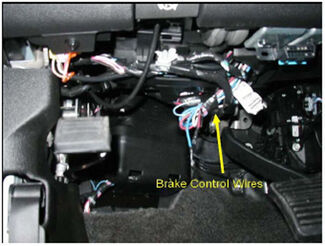
Today on our 2010 Chevrolet Silverado well be installing the Tekonsha Voyager Brake Controller, part number 39510 in conjunction with the Tekonsha Pigtail Wiring Harness, part number 7894. The first step of our install will be locating the manufacturers wiring up underneath the dash. This will be taped to the outside of a wire loom and a white sticker color indicator wrapped around it. Our first step will be cutting these wires free and pulling the sticker so we know which color has which power feed. Now for this application well only be using four of the five wires and the orange wire will not be used so Im going to go ahead and wrap it up then wrap up some of the wires with some black electrical tape. Then well go ahead and strip back each one of the wires adding a butt connector.
Our blue and red with the black tracer will get the yellow butt connectors, and the light blue with the white tracer and our white wire will get the blue butt connectors. Then we can bring in our Tekonsha Pigtail Wiring Harness and start connecting them directly to our butt connectors. Well connect dark blue to dark blue, black from the pigtail to the red wire with the black tracer on the vehicle side, then the red wire from our pigtail to the light blue with the white tracer on the vehicle side, and then white to white. Once we have made all these connections, well then go ahead and wrap up the remaining portion of our harness with some black electrical tape. This will assist in keeping dirt, dust, and debris out of our connection points and clean up our install look.
Now with the harness complete well go ahead and start routing it over to the location where well mount our brake controller. For this application, well mount it towards the center of the vehicle up underneath the dash. Now we can go ahead and mount the brake controller bracket. Put the bracket in place, then use the hardware provided to secure it. Now with our bracket installed, we can go ahead and connect the pigtail from the brake controller to the pigtail we installed on the vehicle.
Now well go ahead and mount the brake controller using the hardware provided. Now with the brake controller mounted well go ahead and use some black zip ties to secure our wiring up underneath the dash. Then well cut off the excess from the zip ties to clean up our install look. With the hood open we can go ahead and locate the power feeds thatll need to be connected to the fuse box. The first one is located on the outside of the wire loom below the brake master cylinder and booster.
Well go ahead and cut the tape and pull the pigtail up to the fuse panel. The second one is located between the fuse box and the inner fender well again taped to the outside of the wire loom. Well go ahead and remove the fuse box cover. Well go ahead and cut the tape again and pull the pigtail free. Now we can take a look at the terminals already attached to the pigtails, and you can see theyll specifically go over each stud thats open on our fuse box. For the smaller posts, well use a 6 mm nut, part number 189516, and for the larger posts well use the 8 mm nut, part number 18591,7 and well tighten it down. Well go ahead and use a couple of black zip ties to secure our wiring. Well cut off the excess from the zip ties and then reinstall the fuse box cover. And that will complete the install of the Tekonsha Voyager Trailer Brake Controller, part number 39510 in conjunction with the Pigtail Wiring Harness for Tekonsha Brake Controllers, part number 7894 on our 2010 Chevy Silverado. .
Do you have a question about this Trailer Brake Controller?
Info for this part was:
At etrailer we provide the best information available about the products we sell. We take the quality of our information seriously so that you can get the right part the first time. Let us know if anything is missing or if you have any questions.


Thank you! Your comment has been submitted successfully. You should be able to view your question/comment here within a few days.
Error submitting comment. Please try again momentarily.