


Why Won't My TST Internal TPMS Sensors Pair With the Monitor?
Updated 06/12/2026 | Published 06/10/2026
Question:
Had the internal sensors installed at a local tire shop when I had my tires replaced on my 2021 Winnebago Adventurer on a Ford F-53 chassis. Im trying to pair the internal sensors with the head unit, but the head unit cannot locate any of the sensors. Do the sensors need to be activated in some way, and if so, is it possible my installer missed this step? Should I remove the rims from the wheels before trying to pair the sensors? Any other tips?
asked by: Bob B
Expert Reply:
Hello Bob,
The internal sensors included with # TST-507-INT-6-C do not require a separate activation procedure from the installer, so there is generally not a step that would have been missed during installation. These sensors are designed to wake up and begin transmitting when the vehicle is moving and the tires are rotating.
Before removing any wheels, I would first try pairing the sensors with the monitor while the coach is being driven. If the motorhome has been sitting still during the pairing process, the sensors may remain in sleep mode and not transmit a signal for the monitor to detect. It can sometimes take a few minutes of driving for the sensors to wake up and begin communicating.
I would also verify that the signal booster is installed correctly and receiving power, since the length of a Class A motorhome can make the booster especially important for reliable communication between the sensors and monitor. A weak or missing booster signal can prevent the monitor from locating sensors even when they are functioning properly.
There should be no need to remove the tires or wheels just to pair the sensors. If you've driven the coach, confirmed the booster is powered, and the monitor still cannot detect any of the sensors, there may be an issue with the monitor setup or the sensor programming. At that point, I would recommend contacting TST technical support with the sensor IDs and monitor information so they can help verify everything is configured correctly.
Are you getting the Adventurer ready for a local trip, or are you planning a longer RV adventure this season?


Dan H.
6/11/2026
Hello Bob, First things first... There is a switch of some sort that activates the internal sensors when you pressurize the tire. So, no the installer did not need to do anything to activate them. You did not mention that you recorded the serial numbers on each sensor, and which wheel they were to be installed in. You then enter the sensor serial number into the monitoring device, based upon which position (wheel) the specific sensor is actually installed in. My system has 10 sensors, 6 in the motorhome tires, and 4 in my toad tires. The monitor is unable to discern which position the sensor is in, otherwise. I also found that I needed to take the whole rig (MH & toad) for a drive, for the monitor to connect and collect data for the first time. I hope you have found this helpful, Dan H



Product Page this Question was Asked From
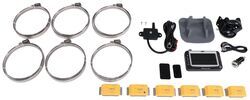
TST TPMS - Color Display - Signal Booster - 6 Internal Tire Sensors

- TPMS Sensor
- Boat Trailer
- Camper
- 5th Wheel
- Motorhome
- Truck/SUV
- Utility Trailer
- Internal Sensors
- 6 Sensors
- Extended Range
- Color Monitor
- TST
more information >
Featured Help Information
Miscellaneous Media


Continue Researching
- Search Results: metal valve stems
- Q&A: Troubleshooting TST TPMS Sensors Disconnecting and Reconnecting
- Shop: Internal Tire Sensor for TST TPMS Systems - Qty 1
- Q&A: How Do You Update Tire Positions After Rotating Tires on the Tuson TPMS6WIVS?
- Search Results: tst 770 tpms
- Shop: TST TPMS - Color Display - Signal Booster - 6 Internal Tire Sensors
- Video: TST TPMS: The Breakdown
- Q&A: Reliability and Battery Life of TST Internal Vs Flow Through Tire Pressure Monitoring Sensors
- Q&A: Will the Tuson Towable Tire Pressure Monitoring System Work w/a Mercedes Benz Sprinter Chassis?
- Video: Checking Out the Americana Metal, Bolt-In Valve Stem
- Video: A Closer Look at the Tuson Towable Tire Pressure Monitoring System
- Shop: Tuson Towable Tire Pressure Monitoring System - 6 Sensors - Brass Interchangeable Valve Stems
- Shop: TST TPMS for RVs - Color Display - Signal Booster - 6 Tire Sensors
- Shop: Americana Metal, Bolt-In Valve Stem - 1-1/4" Long
- Shop: TireMinder i10 TPMS for RVs and Trailers w/ Signal Booster - 6 Flow Through Tire Sensors
- Shop: TireMinder A1AS TPMS for RVs and Trailers w Signal Booster - Bluetooth - 6 Flow Through Tire Sensors
- Q&A: Will The Tuson Towable Tire Pressure Monitoring System Fit 2020 Hino 258 With 19-1/2 Inch Wheels
- Q&A: Can Tuson TPMS RV System be Used on Spare Tire
- Q&A: TPMS Recommendation for 2007 Ford F-350 Super Duty with Dual Rear Wheels
- Search Results: tire chocks
- Search Results: create account
- Shop: RV Exterior Lighting
- Search Results: rv jack pads
- Search Results: dash cam
- Search Results: rv leveling blocks
- Video: Review of Stackers RV Jack Pads - 10 Inch Jack Foot - VAL53MB
- Video: Detailed Breakdown of the Drive Wireless RV Backup Camera System w/ Night Vision
- Video: Review of Stackers RV Jack Pads - StayPut Jack Pads And Leveling Blocks With Bag - VAL43MB
- Video: Review of SnapPad RV Jack Pads - Universal Leveling Block and Jack Pad - SN74VR
- Article: Trailer Wiring Diagrams

on Accessories and Parts




Ed R.
6/11/2026
I have better success manually programing the sensor ID’s into the head unit along with the proper location. I recorded each sensor ID and the wheel location before I put them on the rims. I run a booster at front of my 30’ trailer, another booster at rear of motorhome, another at front of motorhome. Inside rim system worked good so far for 4 years. Last year I put new tires on trailer and had 2 inside sensors that quit. I replaced them with valve stem sensors and kept motoring. Not sure if I damaged those 2 putting the 14 ply tires on? I do wish the internal wheel sensor batteries could be changed though, instead of having the cost of demounting the tire and a new sensor.