


Troubleshooting Auto Level Fail Error Code On 2021 Cyclone 5th Wheel With Lippert Ground Control 3.0
Updated 06/28/2021 | Published 06/26/2021
Question:
I am trying to use the auto leveling system on my 2021 cyclone fifth wheel 4006 and an error occurred. Now the whole trailer is leaning and all tires are off the ground. Also we dont have a truck with a fifth wheel hitch on site. What can I do?
asked by: Christina E
Expert Reply:
I would be happy to help!
Since you are getting an Error Auto Level Fail code there are two causes. Either the ground is too unlevel for the jacks to get the trailer, or the zero point has not been set.
If the ground is too unlevel then you will need to move the trailer to more level ground.
If the zero point is not set you can set it by following the below steps:
Note: Prior to starting this procedure, double check all connections on the controller, jacks, and touch pad.
1. In manual mode, run the jacks to level the trailer. This is best achieved by placing a level in the center of the trailer and leveling it both front to back and then side to side. (See “Basic Jack Operation” for instructions on how to manually operate the system).
2. Once the trailer is level, turn off the touch pad.
3. With the touch pad off, press and release the “FRONT” button five (5) times and then press and release the “REAR” button five (5) times.
4. The touch pad will flash and beep and the display will read “ZERO POINT CALIBRATION ENTER to set, Power to Exit”.
5. To set the current position as the zero point, press the “ENTER” button.
6. LCD display will read “Zero point stability check”.
7. LCD display will read “Zero point set successfully” once process is complete.
8. The system will set this point as its level state and the touch pad will turn off.
I included a video of the Lippert Ground Control 3.0 for you to take a look at.


Product Page this Question was Asked From
Lippert Ground Control 3.0 Electric 5th Wheel RV Leveling System w Touchpad - 4-Point Set
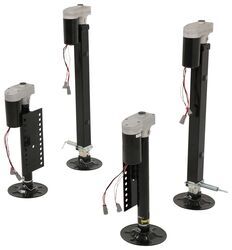

- Camper Jacks
- 5th Wheel Camper
- Stabilizer Jacks
- Steel
- 10001 lbs or More
- Electric Jack
- 36 Inch Lift
- Bolt-On
- 4 Jacks
- Lippert
more information >
Featured Help Information
Instructions
Miscellaneous Media

Continue Researching
- Q&A: Where are Circuit Breakers/Fuses Installed on Lippert Electric Stabilizer Jacks
- Q&A: How Can I Lock My Watchdog Power Center Surge Protector and Voltage Booster to Pedestal?
- Q&A: Will Turn Signals Activate Side Cameras of Furrion Vision S+ System
- Q&A: Do Lithium Batteries Need to be In Different Compartment from Inverter
- Article: 4 Steps to Choosing Your 5th Wheel Pin Box
- Q&A: Lippert Ground Control 3.0 Leveling System For A Prepped Forest River Wolf Pack 315PACK12
- Q&A: Replacement Control Module for Lippert Ground Control 3.0
- Q&A: Troubleshooting External Sensor Error On Lippert Ground Control 3.0 LC358590
- Article: How to Replace Trailer Leaf Springs in 5 Steps
- Article: How to Measure for Travel Trailer and Fifth Wheel Steps
- Article: Trailer Wiring Diagrams
- Article: 30-Amp and 50-Amp RV Service: What's the Difference?
- Article: Our Team Picked The Best Camping Gear of the Year - Here Are Their Top Choices
- Article: Sidewinder with Rotating Turret for Short Bed Pickups