


Replacement Circuit Board For MaxxFan 5301K
Updated 08/28/2026 | Published 08/19/2026
Question:
I need a new circuit board for the switch on my 12v Maxxfan with 2- button, manual 4 speed. The fan just doesn’t respond to any push of the buttons. Sticker on my fan says it’s Maxxfan White 5301K S/N 2108-530 K-0029. Sticker on my current board says SIEC 10B04 301KZ 2021.07. These numbers do not match your part no MA10-04301k-v16. It looks identical otherwise and the control panels match. Will your part still work?
asked by: Richard D
Expert Reply:
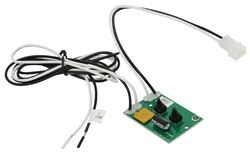
Hey Richard, thanks for reaching out. Yes, # MA10-04301k-v16 is the correct replacement circuit board and switch for your MaxxFan 5301K. If the fan has good 12V power and ground but neither button gets any response, the board/switch assembly is definitely the right place to look.
The numbers printed directly on your old board do not need to match the replacement board exactly. MaxxAir has revised these boards over the years, so the markings and circuit layout can be different even though the replacement serves the same fan. In fact, the # MA10-04301k-v16 is specifically confirmed as the replacement for the MaxxFan Deluxe 05301K/5301K manual-lift, 4-speed fan.
What RV or van is your 5301K in?


(click to enlarge)

Glenn
8/27/2026
I replaced the circuit board and still the fan does not continue to run. It will start some times it runs for 30 seconds then stops, other times it just turns a few times and quits.



Terrantula
8/27/2026
I had the same problem. This resolved the issue. It was a direct replacement. BDC

Pat
8/27/2026
In my case the replacement board solved the problem. The only noticeable difference was when starting or increasing speed, the fan increased speed more gradually. Ive seen this before in HVAC where the start-up of motors was gradual. Saves wear and tear on components.
Mdaigle
8/27/2026
I purchased the circuit board for my Maxxair vent. I think that the original had moisture intrusion and that contributed to its demise. I have a Forest River camper and the installation is in the bathroom. I installed the board last year and it has worked perfectly ever since. I initially evaluated replacing the entire fan versus just repairing the original one. Glad the I repaired it now,

Product Page this Question was Asked From
Replacement Printed Circuit Board and Switch for MaxxFan Roof Vents

- Accessories and Parts
- RV Vents and Fans
- Roof Vent
- Circuit Board
- Switches
- MAXXAIR
more information >

Continue Researching
- Q&A: Replacement Bearing Kit for Dexter Axle with 5,200 lb Capacity
- Q&A: How to Fix Backfeed From Trailer Battery and Solar Controller on 2024 GMC Sierra 2500
- Q&A: Troubleshooting Incompatibility Error Brake Controller 2024 Chevy Silverado 3500
- Q&A: Replacement For MaxxFan 10-4301K Circuit Board
- Q&A: Replacement Circuit Board For MaxxAir MaxxFan 4700K
- Q&A: Looking for Replacement RV Fridge for Dometic RM1350MSSX
- Q&A: Replacement Recommendation For Older Ventline Roof Vent
- Article: Brake Controller 7- and 4-Way Installation Kit (ETBC7)
- Article: Brake Controller Installation: Starting from Scratch
- Article: How to Measure for Trailer Hitch Drop
- Article: Best RV Roof Vents
- Article: Trailer Wiring Diagrams
- Article: Best Bike Racks for Electric Bikes
- Article: Breakaway Kit Installation for Single and Dual Brake Axle Trailers
Richard D.
8/26/2026
OK thanks for the reply. My RV is a 2002 Rexhall Roseair. The MaxxFan replaced the original in 2003.