


Can Voyager WiSight 2.0 Wireless Backup Camera System Volume Be Adjusted
Updated 10/17/2024 | Published 10/12/2024
Question:
can you adjust the volume on the voyager 2.0 camera? If so how?
asked by: Tom T
0
Expert Reply:
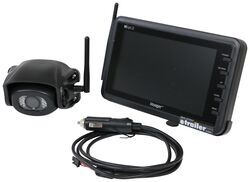
Hi Tom; you can adjust the volume on the Voyager WiSight 2.0 Wireless Backup Camera System # ASA37YR. Press the menu button for less than 1 second and then use the up/down arrows until you cycle to the volume screen where you can set the volume.
expert reply by:
Robin H

0

Volume Screen
(click to enlarge)
(click to enlarge)

Product Page this Question was Asked From
Voyager WiSight 2.0 Wireless Backup Camera System w/ Night Vision for Prewired RVs - 7" Screen

- RV Camera System
- Backup Camera
- Built-In Microphone
- Mirrored Image
- Night Vision
- Waterproof
- Pre-Wired RVs
- Wireless
- Standard View
- Suction Cup Mount
- Rear
- 7 Inch Display
- 1 Camera
- Voyager
more information >

Continue Researching
- Q&A: Recommended B&W Companion Slider For a 2024 GM Puck System Over a Curt A16 w/ Adapter
- Q&A: Where Does the Voyager PWM Filter for RV Camera Systems part # VGR74VR Install?
- Q&A: Back Up Camera For an In Bed Camper
- Q&A: Why Is My Prewired RV Camera Not Pairing With The Voyager WiSight 2.0 Monitor?
- Q&A: Is Remote of Advent Air RV AC System w/ Wall Thermostat # ADV62SR Wired or Wireless
- Q&A: Backup Camera & Monitor For Trailer Pre-Wired With Voyager WiSight Plate
- Q&A: Correct Voyager WiSight Camera for Installation on a 2022 Winnebago Prewired for Voyager Camera
- Article: 2 Steps for Finding the Right Weight Distribution Hitch Size
- Article: Trailer Wiring Diagrams
- Article: How to Measure for Travel Trailer and Fifth Wheel Steps
- Article: Our Team Picked The Best Camping Gear of the Year - Here Are Their Top Choices
- Article: Is It Illegal to Leave My Hitch on My Truck?
- Article: VCC Pickup and Dropoff
- Article: 30-Amp and 50-Amp RV Service: What's the Difference?
Tom T.
10/17/2024
Robin, Thanks for replying. I do not have a volume control function on the 7 inch screen. We just got back from an outing and we tried to get the volume adjusted. Oh well, it worked for what we needed it to. Again thanks for replying. Tom T