


Troubleshooting Horizontal Lines and Black Dot on Furrion Vision S Monitor
Updated 07/05/2023 | Published 07/02/2023
Products Featured in This Question
Question:
We have a Furion back up camera for our travel trailer, it was new with our trailer in 2018. Recently the screen inside the truck has multiple horizontal lines and a big black dot on the screen. I’ve cleaned the camera lens on the trailer several times without any change. Have you seen this before? Any suggestions?
asked by: David S
Helpful Expert Reply:

Typically when a monitor gets horizontal lines across it like you are describing it is one of two things. Either the connection cable is bad or the monitor is damaged/failing. Since this is a wireless system without a cable, I would say it is the monitor failing. If you only had the black dot it could be the camera having an issue but with the horizontal lines it is unlikely the camera plays a role in the problem.
In this case the only solution would be to replace the monitor. You can stick with the same size or upgrade to a larger monitor if you have a smaller one. We have the following available:
-Replacement 4.3" Monitor for Furrion Vision S Wireless RV Camera System # FR77FR
-Replacement 5" Monitor for Furrion Vision S Wireless RV Camera System # FR97FR
-Replacement 7" Monitor for Furrion Vision S Wireless RV Camera System # FR47FR


Product Page this Question was Asked From
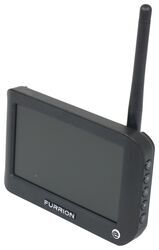
Replacement 4.3" Monitor for Furrion Vision S Wireless RV Camera System

- Accessories and Parts
- RV Camera System
- Monitors
- 4.3 Inch Screen
- Furrion
more information >
Featured Help Information
Miscellaneous Media



Continue Researching
- Shop: Replacement 5" Monitor for Furrion Vision S Wireless RV Camera System
- Q&A: Is There A Replacement 3.5" Monitor For My Furrion S+ System?
- Q&A: Replacement Monitor for Furrion Vision S on 2024 Arctic Fox 811 Truck Camper
- Q&A: Troubleshooting A Furrion Vision S Monitor That Won't Turn On
- Q&A: Replacement Monitor for a Voyager WiSight 2.0 Wireless RV Backup Camera System
- Q&A: Troubleshooting A Furrion Vision S Monitor Not Powering On
- Q&A: Can Furrion Camera Connect to Smartphone for a Monitor
- Q&A: Troubleshooting Furrion Vision S Monitor and Camera Not Pairing
- Article: How Much Solar Power Do I Need For My RV?
- Article: How to Winterize & De-Winterize Your RV (Simple Guide)
- Article: Brake Controller 7- and 4-Way Installation Kit (ETBC7)
- Article: 5 Things to Know About Weight Distribution Hitches
- Article: Stability Control for Heavy Duty Vehicles
- Article: Sidewinder with Rotating Turret for Short Bed Pickups
- Article: 4 Steps to Choosing Your 5th Wheel Pin Box