


How To Set Or Erase Torque Settings in the Memory of PowerBuilt Digital Torque Adapter
Updated 10/28/2020 | Published 10/26/2020
Question:
How do you set or erase torque settings in the memory?
asked by: W F
0
Expert Reply:
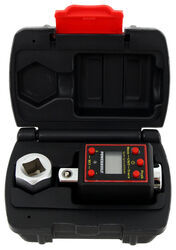
The PowerBuilt #ALL940962 Torque Adapter does not have a clear memory function. As each new value is saved to memory it is recorded into a bank of 50 locations. When a new setting is saved to memory it goes into location 1. When a new value is saved it goes into location 1 and the value previously in one is bumped to location 2. This continues to happen until all 50 locations are filled, then as a new value is added, the 50th value is lost.
I have attached a link to this product and to a video review.
expert reply by:
Les D

0

Product Page this Question was Asked From
Powerbuilt Digital Torque Adapter - 1/2" Drive

- Automotive Tools
- Torque Wrench
- Wrenches
- 150 ft/lbs
- 1/2 Inch Drive
- Powerbuilt
more information >
Featured Help Information
Miscellaneous Media

Continue Researching
- Q&A: Parts Needed to Boat Trailer with 5,200 lb Axle Drums Brakes to Disc
- Q&A: Replacement Disc Brake Rotors and Hubs for a 2015 Road King Boat Trailer
- Q&A: What is Height of etrailer Electric Jack Above Mounting Bracket
- Q&A: Recommended Torque Wrench for Trailer Hitch Installation
- Q&A: Tools Required For Installation of B&W Companion Slider 5TH Wheel Hitch
- Q&A: Grease For B&W Companion Sliding 5th Wheel HItch
- Article: Fifth Wheel Trailer Hitch Information and Installation Tips
- Q&A: How Much Clearance Do I Need Above the Bed When Towing a 5th Wheel Trailer?
- Article: How to Bleed Your Trailer Surge Brakes
- Article: Anti-Rattle Devices
- Article: How to Measure for Trailer Hitch Drop
- Article: 2 Steps for Finding the Right Weight Distribution Hitch Size
- Article: How to Measure Your Trailer Wheel Bolt Pattern
- Article: Determining Trailer Tongue Weight