How To Install The Optronics Side Marker Light # MCL75AB And Optronics Chrome Bracket # A67CB
Updated 03/02/2011 | Published 03/01/2011
Products Featured in This Question

Question:
how to install the side marker light Code MCL 75AB and Chrome bracket Code A67CB? Aside form chrome bracket any other item to fixed this thing? Can you give me installation procedure and any drawing/skectch on how to install this? Thanks and Best regards
asked by: Michael L
Expert Reply:
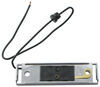
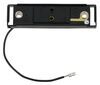
The Optronics Sealed, Thin Line LED Trailer Clearance, Side Marker Light, part # MCL75AB, has the tabs on the end that will snap into the open slots on the ends of the Optronics Chrome Bracket and Single Wire Plug, part # A67CB. See the picture to the right that will show the light snapped into the mounting bracket.
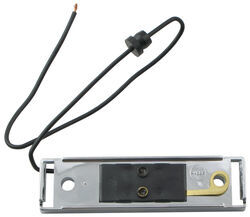
The chrome bracket has two mounting holes that are spaced 3 inches apart (industry standard). These holes are where two screws will go through and attach the bracket to the trailer. One of the holes will have a ground connection that will ground the light to the trailer frame through the screw that is attached to the metal frame. The single lead wire is the power wire that will be connected to a 12 volt power source.
The other choices available for mounting the light will be the same type of bracket only in different finishes. The Optronics Gray Bracket and Single Wire Plug, part # A66PB, and the Optronics Black Bracket and Single Wire Plug, part # A65PB.



Product Page this Question was Asked From
Chrome Bracket and Single Wire Plug for Thin Line Trailer Clearance and Side Marker Lights

- Accessories and Parts
- Trailer Lights
- Mounting Hardware
- Brackets
- Chrome
- Optronics
more information >

Continue Researching
- Search Results: coupon
- Search Results: coupon codes
- Shop: Kenda Karrier KR53 ST205/75R15 Radial Trailer Tire with 15" White Spoke Wheel - 5 on 4-1/2
- Shop: Black Bracket and Single Wire Plug for Thin Line Series Trailer Clearance and Side Marker Lights
- Video: Review of Kenda Trailer Tires and Wheels - Karrier KR53 ST205/75R15 Radial White Spoke - KE36JV
- Video: Miro-Flex Thinline LED Trailer Clearance or Side Marker Light: The Breakdown
- Shop: Optronics ThinLine LED Trailer Clearance and Side Marker Light - Submersible - 4 Diodes - Amber Lens
- Shop: Miro-Flex Thinline LED Trailer Clearance or Side Marker Light - Sumbersible - 4 Diodes - Amber Lens
- Shop: Thinline LED Trailer Tail Light - Stop, Tail, Turn - Submersible - 15 Diodes - Red Lens
- Shop: LED Identification Light Bar for Trailers over 80" Wide - Submersible - 9 Diodes - Red Lens
- Search Results: thin line led tail lights
- Shop: Aluminum AM02 Series Gunmetal Machined Trailer Wheel - 12" x 4" Rim - 5 on 4-1/2
- Search Results: side marker lights
- Q&A: Is Optronics Thin Line LED Trailer Clearance, Side Marker Light Waterproof
- Q&A: Replacement Clearance Light for 1997 Champion Bass Boat
- Q&A: Mounting Bracket with Wiring for Use with Optronics Trailer Light MCL75AB
- Q&A: Is a Base Required for Mounting the # MCL63AB and # MCL75AB Trailer Side Marker Lights
- Q&A: How to Install the Optronics Clearance Light # MCL75AB into the Bracket Base # A65PB
- Q&A: Lug Nut Torque Chart for Trailer Wheels
- Video: Optronics Incandescent Trailer Fender Light: The Breakdown
- Video: An In-Depth Look at the Optronics Incandescent Trailer Fender Light
- Video: Review of Optronics Trailer Lights - Mounting Bracket with Plug - A65PBPG
- Video: Optronics Trailer Lights A65PB Review
- Search Results: trailer lights
- Search Results: a~65pb
- Search Results: trailer wiring
- Q&A: Can I Run A Dedicated Ground Wire To All My Boat Trailer Lights?
- Shop: Trailer Hitch
- Article: Trailer Wiring Diagrams
- Video: Measuring To Choose The Right Trailer Axle

on Accessories and Parts