


How To Pair an Air Lift WirelessAIR Remote to Compressor
Updated 04/30/2020 | Published 12/03/2015
Question:
How to program a new wireless controller to the compressor???
asked by: Oscar R
Expert Reply:
In the settings mode of the controller you can join the manifolds with the controller.
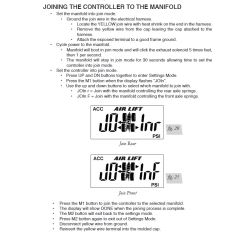
To set the manifold into join mode locate the yellow join wire. It is the yellow wire with heat shrink on the end of it. Remove the cap leaving it attached to the harness. Attach the exposed terminal to a good frame ground. Now the manifold will boot into join mode and will click the exhaust solenoid 5 times fast then one per second. The manifold will stay in join mode for 30 seconds.
On the controller hold the up and down buttons together. Cycle through the different options at this point by pressing the up button. Once you see Join on the display press the M1 button.
Use the up and down button to select which axle you want to join with. Press M1 when you have selected the correct axle you want. The display will show done when complete.
Disconnect the yellow wire from the ground and reconnect into the molded cap.


Product Page this Question was Asked From
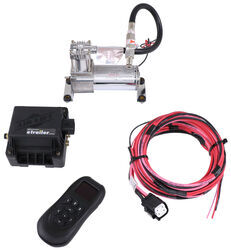
Air Lift WirelessAIR Compressor System for Air Helper Springs - Remote - Bluetooth

- Air Bag Compressor Kit
- Smartphone App
- Wireless Remote
- Dual Path
- Digital Display
- No Tank
- Standard Duty
- Air Lift
more information >
Featured Help Information
Instructions

Continue Researching
- Shop: Fastway Flash Force Adjustable 2-Ball Mount- 2" Hitch - 5" Drop - 5-1/2" Rise - 10K
- Shop: Timbren Suspension Enhancement System - Severe Service - Rear Axle
- Search Results: 13~44
- Shop: etrailer Hitch Pin Alignment Collar for Hitch Accessories - 2" Hitches
- Search Results: tekonsha 9030 brake controller
- Shop: Replacement Lube Plug for DeeMaxx Grease Caps - Qty 1
- Shop: Equa-Flex Cushioned Equalizers - Double Eye Springs - Tandem Axle - 5K to 8K - Greasable Pivot
- Shop: Equalizer for 2" Wide Slipper Springs - 13-1/8" Long - 7/8" Center Hole
- Shop: Repair Kit for etrailer and Ram Channel Tongue Couplers - 2" Ball - 3,500 lbs and 5,000 lbs
- Shop: Gooseneck Hitch
- Shop: Brake Controller
- Search Results: gnrk1111
- Search Results: 17~144
- Q&A: Solution for Discontinued Firestone Replacement Remote
- Search Results: flat mount trailer coupler
- Search Results: trailer coupler
- Shop: Suspension Enhancement
- Search Results: 2 5/16 coupler
- Q&A: Air Lift 72704 Remote Not Working.
- Video: Review of the Replacement Lube Plug for DeeMaxx Grease Caps
- Video: A Closer Look at the Benton ShellRaiser Rooftop Cargo Box - 2023 GMC Terrain
- Video: Setting up the DeeZee Truck Bed Auxiliary Tank on a 2014 Chevrolet Silverado 3500
- Video: Breaking Down the A-Frame Coupler with Oily Finish
- Video: Feature Breakdown: Jacketed 2 Wire (Brake Wire)
- Video: Checking Out the Empire Faucets RV Bathroom Vessel Sink Faucet
- Video: Ultimate Overview of the A-Frame Trailer Coupler w/ Round Jack Hole
- Q&A: How to Link AirLift WirelessONE System with WirelessONE App on Phone to Control via Bluetooth
- Shop: Fifth Wheel Hitch
- Q&A: The Remote Says Fail, Is There A Reset On The Air Lift WirelessAIR Compressor System
- Shop: Trailer Wiring
Greg
4/28/2020
Hi the batteries went dead in my remote thought So i replaced the batteries. The screen is still blank none of the buttons respond. Thank you