


Brightening Screen of Furrion Vision S 5 Inch Monitor
Updated 08/01/2022 | Published 07/28/2022
Question:
How do I make the screen brighter
asked by: John L
0
Expert Reply:
I have added a link below to the instructions, and on page 23 it explains how to change the screen brightness of the Furrion Vision S Wireless RV Backup Camera System w/ Night Vision - Rear Mount - 5" Screen # FOS05TASF.
To do so, on the menu screen select "Picture" then select the camera you want (if you have multiple cameras), then select "Brightness."
expert reply by:
Kyle S

0

Product Page this Question was Asked From
Furrion Vision S Wireless RV Backup Camera System w/ Night Vision - Rear Mount - 5" Screen
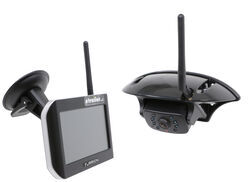

- RV Camera System
- Backup Camera
- Observation Camera
- Anti-Glare
- Mirrored Image
- Motion Detecting
- Night Vision
- Touch Screen
- Waterproof
- Pre-Wired RVs
- Wireless
- Wide View
- Dashboard Mounting Bracket
- Suction Cup Mount
- Side Marker
- 5 Inch Display
- 3 Cameras
- Furrion
more information >
Featured Help Information
Instructions

Continue Researching
- Video: Review of Lippert Replacement 7 In Monitor Vision S Plus Wireless RV Camera System - LC67FP
- Q&A: How to Adjust the Brightness on the Monitor for a Furrion Wireless Backup Camera System
- Q&A: Adjusting Brightness of Furrion Observation System to Reduce Glare
- Search Results: furrion
- Search Results: furrion rv camera system
- Q&A: Best Way To Prevent Battery From Dying While Flat Towing A 2020 Ford Ranger
- Q&A: Can I Use a Voyager Back Up Camera Even If my RV is Prewired for a Furrion Camera
- Q&A: Backup Camera for 2025 Forest River Rockwood Mini Lite 2205S
- Q&A: What is Best RV Backup Camera System
- Q&A: Is Furrion Vision S+ Direct Replacement for Vision S
- Article: Top Weight Distribution Hitches for a Buttery Smooth Ride
- Article: Trailer Wiring Diagrams
- Article: RV AC Not Cooling? What's Normal, What to Check, and When to Replace
- Article: Big Truck Big RV
- Article: 30-Amp and 50-Amp RV Service: What's the Difference?
- Article: Is It Illegal to Leave My Hitch on My Truck?
- Article: Trailer Hitch Balls