


Rear Camera from Drive (wayinterglobal.com) Lost Pairing
Updated 05/24/2021 | Published 05/21/2021
Question:
They paired and then they quit. Camera is no longer pairing? WHY?
asked by: Marcia K
Expert Reply:
I am sorry to hear that you are having problems with your Drive camera. I cannot know why your camera lost its pairing. To pair to the monitor, the manual from Way Interglobal.com directs as follows.
To pair the camera with the monitor, the camera must be completely powered off. Go through the sync process on the monitor and when the Icon starts to flash then put power to the camera and it should pair up. The camera is normally wired into the running lights of the camper so to turn power off to the camper you should be able to just turn the running lights off.


Product Page this Question was Asked From
Drive Wireless RV Backup Camera System w/ Night Vision - Rear Mount - 7" Screen
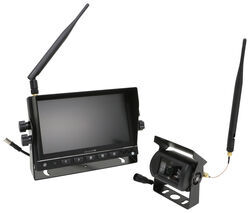

- RV Camera System
- Backup Camera
- Night Vision
- Removable Sunshade
- Wireless
- Standard View
- Dashboard Mounting Bracket
- Rear
- 7 Inch Display
- 1 Camera
- Drive
more information >

Continue Researching
- Q&A: Will B&W Continuum Work With 2024 Ford F-250 Towing 2021 Keystone Hideout 28RKSWE
- Q&A: How Many Hub Savers Do I Need and Where Do They Install?
- Q&A: How Does The Swift Hitch Camera System Connect To Smart Phone and Tablets?
- Q&A: Do Any Wireless Observation Camera Systems Integrate with OEM Vehicle Dashboard Display
- Article: Trailer Wiring Diagrams
- Q&A: Is Intelli-Power Converter PD9260C Lithium Compatible?
- Q&A: Back Up Camera For an In Bed Camper
- Q&A: Replacement for Dometic RM 2652 In Wilderness Lite 25J
- Article: 2 Steps for Finding the Right Weight Distribution Hitch Size
- Article: What Size Generator Do You Need to Run an RV Air Conditioner?
- Article: How to Troubleshoot Your RV Air Conditioner
- Article: 4 Common Myths About RV Solar Power
- Article: Thank you!
- Article: Wiring Trailer Lights with a 6-Way Plug (It's Easier Than You Think)