


How Do You Program a Furrion FR34FR Universal Remote
Updated 05/28/2020 | Published 05/27/2020
Question:
I purchased a Furrion FR34FR remote. I have a Furrion DV3300 Entertainment system and Furrin fireplace but a TCL TV. How do I program or pair the Furrion Remote to control the Entertainment center and fireplace without a Furrion TV
asked by: GARY Y
Expert Reply:
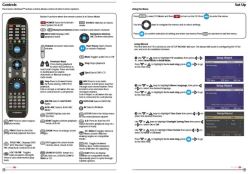
The Furrion Unismart Remote Control # FR34FR is compatible with your system # DV3300SBL as well as Furrion fireplace. You will not need a Furrion TV for the other components to work. I've attached a couple photos of the instruction manual to help. The TV button is used for functions other than the TV as you can see in the photos.



Product Page this Question was Asked From
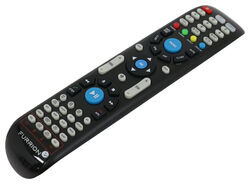
Replacement Unismart Remote Control for Furrion Indoor TVs, Stereos, and Fireplaces

- Accessories and Parts
- RV Fireplaces
- RV Stereos
- RV TV
- Remote Control
- Furrion
more information >
Featured Help Information
Miscellaneous Media

Continue Researching
- Q&A: Does Coleman-Mach Underbunk RV AC Come With Tubes
- Q&A: Replacement Remote For The Furrion RV Soundbar With Bluetooth
- Q&A: Does Furrion Vision S+ Have to Use Included Power Cable for Monitor
- Q&A: Troubleshooting Furrion TV Remote Not Working
- Q&A: Replacement Fireplaces For Greystone 36 Fireplace With Lost Remote
- Q&A: How to Mount 7 Way to 2019 Subaru Outback With Hidden Cross Tube Hitch
- Q&A: Replacement Remote Options for a 2020 Keystone Outback 341RD
- Article: 5 Things to Know About Weight Distribution Hitches
- Article: 2 Steps for Finding the Right Weight Distribution Hitch Size
- Article: Can You Flat Tow a 2025 Cadillac Escalade?