


Volume Control on the Furrion Vision S Backup Systems
Updated 05/19/2020 | Published 05/15/2020
Question:
How do we turn the sound off on our Furrion Backup camera?
asked by: Teresa M
0
Expert Reply:
On the Furrion Vision S Wireless RV Backup Camera System w/ Night Vision part # FOS43TASF to adjust the volume you will enter the menu on the display. From there just below pairing is setup. Select setup and the third option down is the volume. Select it and adjust to your preferences.
expert reply by:
Randy B

0

Product Page this Question was Asked From
Furrion Vision S Wireless RV Backup Camera System w/ Night Vision - Rear Mount - 4.3" Screen
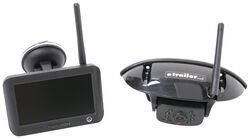

- RV Camera System
- Backup Camera
- Observation Camera
- Built-In Microphone
- Touch Screen
- Anti-Glare
- Mirrored Image
- Night Vision
- Motion Detecting
- Waterproof
- Pre-Wired RVs
- Wireless
- Standard View
- Dashboard Mounting Bracket
- Suction Cup Mount
- Rear
- 4.3 Inch Display
- 1 Camera
- Furrion
more information >
Featured Help Information
Instructions

Continue Researching
- Q&A: Is there a Furrion Camera that Will Hook Up to My Informative in My 2025 Silverado 3500?
- Q&A: Difference Between FOS43TASF and FOS05TASF Rear Cameras
- Q&A: Bolt Hole To King Pin Measurement For The Lippert 1716 5th Wheel Pin Box
- Q&A: Is Furrion Vision S+ Direct Replacement for Vision S
- Q&A: Recommended Longest Extended Pin Box for a Lippert 1621 Bolt Pattern
- Q&A: Weight Distribution Recommendation for a 2025 GeoPro 20FBS
- Q&A: Recommended Camera System for a Pre-Wired Keystone Montana 5th Wheel Trailer
- Article: Trailer Wiring Diagrams
- Article: 30-Amp and 50-Amp RV Service: What's the Difference?
- Article: 5 Things to Know About Weight Distribution Hitches
- Article: How to Measure for Trailer Hitch Drop
- Article: Trailer Tire Sizing
- Article: How to Measure for Travel Trailer and Fifth Wheel Steps
- Article: How to Winterize & De-Winterize Your RV (Simple Guide)