


How To Switch from Door to Rear Camera on the Furrion RV Observation Camera System
Published 04/09/2020
Question:
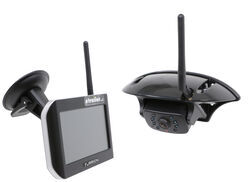
We have Purchased the Vision S model. It has just one camera that we placed over our rear door of our toy hauler. We installed the camera and then took the monitor to our truck. We plugged it in and turned on the running lights. We have an excellent picture, however somehow it was already paired to the door camera instead of the rear camera. We would like to know if there is anyway to the pairing from camera one to camera four so we can get the backup grid that is available for the rear camera.
asked by: Ronald H
Expert Reply:
The Furrion RV Observation Camera Systems like part # FOS05TASF comes preset with the camera paired to the door cam channel. If you want to pair the camera to the rear cam channel, then you would need to do the following:
1) Press the menu button on the monitor.
2) Select pairing via the menu settings.
3) Select either of the rear cam channels.
4) Press the button on the bottom of the camera.
Please note you will need to have someone at the rear of the trailer to press the button on the camera as the pairing process will time out after 6-7 seconds. As you can see, there are three other channels on the Furrion RV Observation Camera System and I highly recommend using these for additional cameras, the Furrion Vision S Side Camera w/ Marker Light Bracket part # FCE48TASL for your trailer's blind spots and the Furrion Vision S Rear Camera w/ Sharkfin Bracket part # FCN48TASF for the vehicle or wherever else you want to put it.


Product Page this Question was Asked From
Furrion Vision S Wireless RV Backup Camera System w/ Night Vision - Rear Mount - 5" Screen

- RV Camera System
- Backup Camera
- Observation Camera
- Anti-Glare
- Mirrored Image
- Motion Detecting
- Night Vision
- Touch Screen
- Waterproof
- Pre-Wired RVs
- Wireless
- Wide View
- Dashboard Mounting Bracket
- Suction Cup Mount
- Side Marker
- 5 Inch Display
- 3 Cameras
- Furrion
more information >
Featured Help Information
Instructions
Miscellaneous Media

Continue Researching
- Q&A: Best Way To Prevent Battery From Dying While Flat Towing A 2020 Ford Ranger
- Q&A: Can I Use a Voyager Back Up Camera Even If my RV is Prewired for a Furrion Camera
- Q&A: Can I Purchase Just the Furrion S Wireless Camera System Monitor By Itself?
- Q&A: What is Best RV Backup Camera System
- Q&A: Is Furrion Vision S+ Direct Replacement for Vision S
- Q&A: Power Adapter For Pulse Width Modulation On 2022 Chevrolet Silverado 2500 To Use Furrion Cameras
- Q&A: How To Power A Furrion Vision S RV Camera Monitor In A Vehicle Without A Cigarette Lighter Port
- Article: Top Weight Distribution Hitches for a Buttery Smooth Ride
- Article: RV AC Not Cooling? What's Normal, What to Check, and When to Replace
- Article: Trailer Wiring Diagrams
- Article: Big Truck Big RV
- Article: 30-Amp and 50-Amp RV Service: What's the Difference?
- Article: Is It Illegal to Leave My Hitch on My Truck?
- Article: Trailer Hitch Balls