


How Do I Ground the Yellow Wire to Pair/Sync My Remote with Air Lift WirelessONE Compressor
Updated 06/25/2025 | Published 01/14/2020
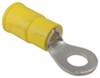
Question:
Im not terribly electrically inclined. In reading through your instructions on syncing a replacement transmitter to the existing receiver, what is involved in grounding the sync input? Your instructions mirror the instructions given with my owners manual, but there is no how to on grounding the sync input. I appreciate your time.
asked by: Michael M
Expert Reply:
Grounding an electrical wire, which is all this is, entails finding a paint and corrosion free spot on the frame of the vehicle that you can connect the wire to. You'll likely want to use a ring terminal like the # 44-5310A and a self tapping screw of some sort to complete the connection to the frame and allow for grounding the circuit.
The steps for pairing the remote are listed below for you to use as a reference in the event that you want a quick place to refer back to.
1. Turn ignition on.
2. Locate the sync wire in the wire harness.It will be the yellow wire that is looped with a yellow cap around it.
3. Remove the yellow wire from the cap leaving the cap attached to the harness.
4. Disconnect power to the receiver. Unplug the connector on the top.
5. Connect power to the receiver while grounding the sync input.
6. Listen for 3 clicks of the internal solenoid, then one click every second. This will indicate that you are now in the sync mode. Sync mode will last for 30 seconds total. Within the 30 seconds press any button on the transmitter to send a message to the receiver. Once the receiver has received a message it will sync with that transmitter and stop
clicking the solenoid in 1 second intervals.
7. Reinsert the yellow wire terminal into the molded cap.



Continue Researching
- Shop: Replacement Remote Control for Air Lift WirelessONE Compressor System
- Search Results: air lift remote
- Shop: Trailer Hitch
- Q&A: What Fuses Need to be Pulled to Flat Tow 2017 Honda Fit
- Q&A: Troubleshooting Air Lift WirelessOne Compressor System Remote Not Pairing
- Shop: EcoHitch Hidden Trailer Hitch Receiver - Custom Fit - 2"
- Shop: Brake Controller
- Search Results: door holdback
- Q&A: Can a 2017 Honda Fit w/ Manual Transmission be Flat Towed Behind a RV
- Search Results: 8508220
- Search Results: 95~01~5600
- Search Results: rvk3255
- Search Results: 57596
- Search Results: 88396
- Shop: Curt Trailer Hitch Receiver - Custom Fit - Class III - 2"
- Shop: Roadmaster High-Low Adapter for Tow Bars - 2" Hitches - 4" Rise/Drop - 6K GTW, 200 lbs TW
- Shop: Air Lift LoadLifter 5000 Air Helper Springs - Rear Axle
- Shop: Suspension Enhancement
- Shop: Curt Trailer Hitch Receiver - Custom Fit - Class III - 2"
- Shop: Buyers Products Tail Light Mounting Box - 6" Oval Hole - 2" Round Hole - Black Steel
- Shop: Fifth Wheel Hitch
J.van
6/23/2025
Erik, does this work for using the app also? I just purchased a truck with this system and cannot get it to sync with the app. I have confirmed that the system does work. The system relieves pressure when I put a load in the bed and applies pressure when I remove the load.