


Option For Replacing Voyager WVOM541AP Monitor
Updated 11/26/2024 | Published 11/24/2024
Question:
I have a Voyager WVOM541AP monitor on A 2018 @7 AirStream pull by a 2019 !500 GMC. I have already spliced the PMW Filter inline to the rear camera. That solved my intermittent signal problem and system has worked well for 2 years. Now my Monitor will not turn on and I can not get the screen to come on. I am thinking my monitor has gone bad. If that is the case, Can I buy a new 5.6 monitor?
asked by: David E
Expert Reply:
Hello David, thanks for reaching out. I hate to be the bearer of bad news, but your only option here will be a new camera system. The WVOM541AP is the old generation of Voyager monitor which is now discontinued. Voyager moved to the WiSight 2.0 cameras and monitors, and the new monitors are not compatible with the original camera models.
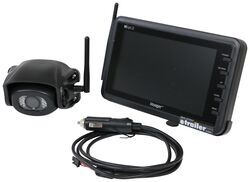
All that said, the only solution I can offer is a whole new camera system like the Voyager WiSight 2.0 Wireless RV Backup Camera System # ASA37YR which comes with a new camera and a 7" monitor.


Product Page this Question was Asked From
Voyager WiSight 2.0 Wireless Backup Camera System w/ Night Vision for Prewired RVs - 7" Screen

- RV Camera System
- Backup Camera
- Built-In Microphone
- Mirrored Image
- Night Vision
- Waterproof
- Pre-Wired RVs
- Wireless
- Standard View
- Suction Cup Mount
- Rear
- 7 Inch Display
- 1 Camera
- Voyager
more information >

Continue Researching
- Shop: Voyager WiSight 2.0 Wireless Backup Camera System w/ Night Vision for Prewired RVs - 7" Screen
- Shop: Voyager WiSight 2.0 Wireless RV Backup Camera System w/ Night Vision - Rear Mount - 7" Screen
- Shop: Voyager WiSight 2.0 Wireless Backup Camera System w Night Vision for Prewired RVs - 4.3" Screen
- Video: Installing the Voyager WiSight 2.0 Wireless RV Backup Camera System on a 2018 Airstream Sport Travel
- Q&A: Trouble Pairing Camera and Monitor on Voyager WiSight Wireless RV Backup Camera System
- Search Results: fantastic fan parts
- Article: RV Pre-Departure Checklist
- Q&A: If a Voyager WiSight WVOM541AP Monitor Needs to be Replaced, Do You Need a Whole New System
- Q&A: Replacement Suction Cup Mount for Voyager WiSight Wireless RV Backup Camera Monitor WVOM541AP
- Q&A: Replacement Suction Cup And Power Cord For Voyager WVOM541AP Monitor
- Shop: Goal Zero Alta 80 Portable Electric Cooler - Dual Zone - 82 Qts
- Shop: UWS A-Frame Trailer Toolbox - 4.1 cu ft - Bright Aluminum
- Shop: K-Source Snap & Zap Custom Towing Mirrors - Snap On - Driver and Passenger Side
- Video: UWS A-Frame Trailer Toolbox Spec Review
- Search Results: nautilus parts
- Video: Setting Up Your Thomas Payne Seismic Power RV Loveseat Console
- Shop: Replacement Voyager WiSight 2.0 Wireless RV Backup Camera Monitor - 7" Screen
- Video: Review of Thomas Payne RV Couches and Chairs - Seismic RV Loveseat 5 Inch Console Dellmead - TP75KR
- Q&A: Is There a Replacement For Voyager WVOM541AP
- Q&A: Do You Have a Replacement Camera That Is Compatible With Voyager Monitor WVOM541AP?
- Video: Voyager WiSight Wireless Backup Camera System Review
- Video: What to Know About the Furrion Vision S+ Wireless RV Backup System
- Video: Replacement Lift Arm for Dometic FanTastic Roof Vents Review
- Shop: Brake Controller
- Q&A: Replacement Monitor for the Voyager WiSight WVOS541 Camera System
- Search Results: 205 75 15 trailer tire
- Shop: Windshield Wiper Blades
- Search Results: roof vent
- Search Results: smartplug ethernet
- Search Results: rv sewer cap
David E.
11/25/2024
Jesse M, Thank you for reply on Old Voyger system. What is actually involved with up grade to 2.0? Does the camera also need to be replaced? And will the new Voyager work with my GMC 1500 electrical system or do I also need the inline capacitor to smooth out the pulse current to the camera? Again I have very limited space to work with in the outer shell of the Airstream. Thank you for more specific installtion details. I will probably do the install myself. Thank you!