


Resetting Pin of Replacement 5-Function Remote Receiver
Updated 04/24/2023 | Published 04/23/2023
Question:
what is the pin code to get in and change or assign fuses in the 5 function receiver
asked by: Kerry R
0
Expert Reply:
The pin the pin associated with the # LC305117 can be reset by following these simple steps. Press "home" button to turn on transmitter. Then press and release "home" button 5 times. Then press "config". The screen will ask you if you want to reset the screen lock PIN code. The screen will also confirm when the PIN has been reset.
expert reply by:
Jameson C

0

Product Page this Question was Asked From
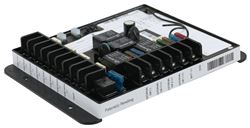
Replacement 5-Function Remote Receiver with Replaceable Fuses

- Accessories and Parts
- Camper Jacks
- Trailer Jack
- Remote Receiver
- Lippert
more information >

Continue Researching
- Q&A: Replacement Remote for 2012 Keystone Cougar 322QBS Leveling System
- Q&A: Is Start Capacitor Needed For Furrion 15k Btu AC FACR15HESA-BL-AM
- Q&A: Does the Replacement 5-Function Remote Receiver with Replaceable Fuses # LC305117 Work w OneControl
- Q&A: How to Sync the Lippert Linc Analog Remote
- Q&A: Availability of Auto Start System for Cummins Onan QG 5500 Generator
- Q&A: How to Sync the Linc Analog Remote Part # LC292614
- Q&A: Do I Need A Ducted Chill Cube AC For My 2020 Vanleigh Beacon With Ducted Airways?
- Article: RV AC Not Cooling? What's Normal, What to Check, and When to Replace
- Article: Breakaway Kit Installation for Single and Dual Brake Axle Trailers
- Article: How to Measure for Travel Trailer and Fifth Wheel Steps
- Article: Trailer Wiring Diagrams