


Setting the Clock with the Furrion Unismart Remote
Updated 09/09/2019 | Published 09/07/2019
Question:
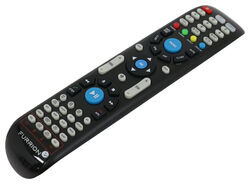
How do I set the clock with the Furrion Unimote? I’m not sure how to shift to the Clock feature above the RDM button. Our RV didn’t come with the smaller standard remote which all the tutorials reference. So, we have not been able to set the time correctly. Thanks for any help!
asked by: Crystal
0
Expert Reply:
You have to hold down the RDM/Clock button to allow you to adjust the clock. Once you enter clock mode you use the volume +/- to change the time.
expert reply by:
Jameson C

0

click to enlarge

click to enlarge
Product Page this Question was Asked From
Replacement Unismart Remote Control for Furrion Indoor TVs, Stereos, and Fireplaces

- Accessories and Parts
- RV Fireplaces
- RV Stereos
- RV TV
- Remote Control
- Furrion
more information >

Continue Researching
- Q&A: Does Coleman-Mach Underbunk RV AC Come With Tubes
- Q&A: Will Gen-Y Hitch Nomad Gooseneck Pin Box Void Lippert Frame Warranty
- Q&A: Looking For Ideas On How To Increase Clearance When Towing My 5th Wheel.
- Article: 5th Wheel Hitch Installation | The Ultimate DIY Guide
- Article: 4 Steps to Choosing Your 5th Wheel Pin Box
- Q&A: Comparing The Trailair Rota-Flex 1116 And Trailair Air Ride 1116 Pin Boxes
- Q&A: King Pin Center to Mounting Hole Measurements for Trail Air Air Ride King Pin # LC179879
- Q&A: Replacement Remote For The Furrion RV Soundbar With Bluetooth
- Q&A: Does Furrion Vision S+ Have to Use Included Power Cable for Monitor
- Article: 5 Things to Know About Weight Distribution Hitches
- Article: 2 Steps for Finding the Right Weight Distribution Hitch Size
- Article: Can You Flat Tow a 2025 Cadillac Escalade?