


Troubleshooting Master Lock Safe Space that Won't Close
Updated 03/23/2018 | Published 03/22/2018
Question:
Hello I was trying to change my combination and my finger slipped and I did not see where the combination stopped and Im going to override my combination because I cant get it closed its permanently open can you help me with a master override key or way to change my combination because right now I cant change
asked by: Jennifer C
Expert Reply:
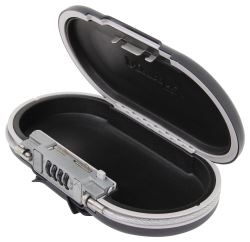
The Master Lock Safe Space Portable Storage Box with Combination Lock # ML5900D has instructions to set the combination. The instructions to reset the code is as follows:
Locate the light gray "set combination" lever on the top of the combination lock on the left-hand side. Move the lever to the right and hold the lever in place.
While holding the lever, move the dials to set your new combination.
Release the lever. The safe will now unlock with the new combination.
If you can't fully move the lever to reset the combination, then you will need to rotated the dials to allow for it to fully engage. If it never officially reset, then 0000 is the default code. It is possible that you will need to find the combination you accidentally created to reset the box, which is a pain, but the good news is that you don't have a box locked closed.
If you find there is a malfunction, I recommend contacting the manufacturer to utilize your limited lifetime warranty on this product.


Product Page this Question was Asked From
Master Lock Safe Space Portable Storage Box with Combination Lock

- Vehicle Locks
- Lock Box
- Keyed Unique
- Plastic
- Master Lock
more information >
Featured Help Information
Miscellaneous Media

Continue Researching
- Q&A: Troubleshooting Why Reset Button of Master Lock Safe Space Won't Depress
- Article: Trailer Wiring Diagrams
- Q&A: Parts Needed to Install a Red Arc Brake Controller in a 2023 Toyota Tacoma
- Article: Brake Controller 7- and 4-Way Installation Kit (ETBC7)
- Q&A: Can 2022 Ram 2500 Power Wagon Use Aftermarket Brake Controller
- Article: How to Measure for Trailer Hitch Drop
- Article: Wiring Trailer Lights with a 7-Way Plug (It's Easier Than You Think)
- Article: How to Measure Your Trailer Wheel Bolt Pattern
- Article: How to Choose the Right Trailer Hitch Class
- Article: 5 Things to Know About Weight Distribution Hitches