


How To Use Uni-Smart Remote For Furrion Fireplace
Updated 02/03/2020 | Published 02/01/2020
Question:
Tried the universal remote, didnt work. Have the small Furrion remote. It doesnt work either. Do I need to do prep first? Furrion Fireplace
asked by: John B
Expert Reply:
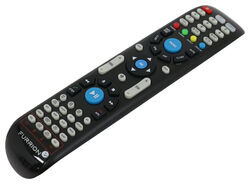
The Furrion Unismart Remote Control part # FR34FR does not require any programming according to Furrion however to use it on a Fireplace like part # FF34SW15ABL you will need to hit the "TV" button at the top of the remote.
You would then press and hold one of the 4 functions at the bottom of the remote highlighted in the photo. Starting from the left to the right, the first button is power, the second button is high or low setting, the third button is temperature setting and the fourth button is to set a timer. Once you have pressed and held one of the options, it activates that feature for ten seconds. You will use the same button to quickly press to change the settings.



Product Page this Question was Asked From
Replacement Unismart Remote Control for Furrion Indoor TVs, Stereos, and Fireplaces

- Accessories and Parts
- RV Fireplaces
- RV Stereos
- RV TV
- Remote Control
- Furrion
more information >
Featured Help Information
Miscellaneous Media

Continue Researching
- Q&A: Does Furrion Vision S+ Have to Use Included Power Cable for Monitor
- Q&A: Troubleshooting Furrion TV Remote Not Working
- Q&A: Replacement Fireplaces For Greystone 36 Fireplace With Lost Remote
- Q&A: Will The Blue Ox SwayPro BXW1500 Work For 34' Trailer 950 lb Dry Tongue Weight?
- Q&A: How to Mount 7 Way to 2019 Subaru Outback With Hidden Cross Tube Hitch
- Q&A: Replacement Remote Options for a 2020 Keystone Outback 341RD
- Q&A: Can Furrion Chill Cube Replace Dometic Penguin II RV AC Units and Control Furnace
- Article: 5 Things to Know About Weight Distribution Hitches
- Article: 2 Steps for Finding the Right Weight Distribution Hitch Size
- Article: Can You Flat Tow a 2025 Cadillac Escalade?