


Which Arrows to Hold Down When Programming Remote for Fan-Tastic Roof Vent FV9068-81
Published 09/08/2023
Products Featured in This Question
Question:
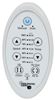
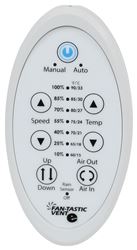
Your instructions for fan-tastic remote reprogramming/ re-pairing talk about holding down “two arrows” except there are four arrows on the remote. Two up and two down or a pair for both fan speed and temperature. Which two arrows is one meant to press and hold to reset/ re-pair the remote please?
asked by: Andrew
Expert Reply:
That is a great question, but the answer is you'll have to try both sets of arrows when programming the remote part # FV9068-81, either the speed arrows or the temp ones as it can be either. Hold the remote 12 inches from the fan and hold both arrows. The auto and manual lights will flash, continue holding until all 7 lights in the middle flash once. If it does not work at first, try the other set of arrows until it does.

Product Page this Question was Asked From
Replacement Digital Remote Control for Dometic FanTastic Roof Vent with 12V Fan - White

- Accessories and Parts
- RV Vents and Fans
- Roof Vent
- Remote Control
- Dometic
more information >

Continue Researching
- Q&A: Will Installation of Firestone Coil-Rite Air Helper Springs Void Vehicle Warranty
- Q&A: Correct Replacement Wall Controller for a Fan-Tastic Vent 6504-414
- Q&A: Correct Replacement Wall Controller for Fantastic Vent 6504/414 Vent Fan
- Q&A: Can I Replace Furrion Vision S Cameras With Furrion Vision S+ Cameras in Fifth Wheel
- Q&A: Troubleshooting Fan-Tastic Roof Vent Remote that Won't Program
- Q&A: Troubleshooting Powered Lift Not Working on Fan-Tastic Vent Roof Vent
- Q&A: Replacement Remote Control for my Fan-tastic Fan Model 6600
- Article: Flat Towing Package for 2018 Jeep Wrangler JL and JL Unlimited
- Article: Best Vehicles to Flat Tow Behind an RV
- Article: RV Roof Types: What Type of Roof Does My RV Have?