


How To Activate Furrion Vision S Side Camera Views With The Turn Signal
Updated 09/05/2025 | Published 04/20/2023
Question:
I have a 2022 Chevy 2500 HD and a 2023 alliance avenue 5th wheel the camper is wired for the back up camera to pull power from the camper so I dont have to leave vehicle running lights on to power it I also tied the side cameras into the switch also. All three cameras show on monitor but side cameras wont turn on when using left or right blinker and trigger wires are hooked up. Would it still be the power issue that the newer trucks are having?
asked by: James E
Expert Reply:
Since you're powering the Furrion Vision S RV Camera System # FCE48TASL-05 off of the trailer battery instead of the tow vehicle it wouldn't be a PWM wiring issue like you're suspecting. Where exactly do you have the trigger wire ran to? If it's not running to the junction box on your trailer and tying into the turn signal circuit then you're just getting the running light circuit power and not getting anything for the cameras to trigger on.
If that's all good then the next step is to turn the "LCD Auto" function off in your settings and to put your monitor in "View ALL" mode. You can get to view all mode by double tapping the screen and in the bottom left corner "View All" will pop up for you to press. In this mode every time you activate your turn signal it will switch to that specific side. A few seconds after you turn off the turn signal it will revert back.


Product Page this Question was Asked From
Furrion Vision S Wireless RV Backup Camera System w/ 3 Cameras - 5" Screen
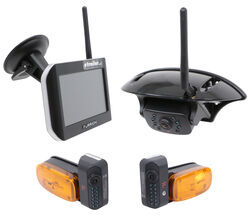

- RV Camera System
- Backup Camera
- Observation Camera
- Anti-Glare
- Mirrored Image
- Motion Detecting
- Night Vision
- Touch Screen
- Waterproof
- Wireless
- Wide View
- Dashboard Mounting Bracket
- Suction Cup Mount
- Side Marker
- 5 Inch Display
- 3 Cameras
- Furrion
more information >
Featured Help Information
Instructions
Miscellaneous Media

Continue Researching
- Search Results: furrion vision s camera
- Search Results: jt strong
- Search Results: jt strong arm
- Search Results: furrion side cameras
- Search Results: rv sealant
- Q&A: Can a Furrion Wireless Backup Camera and Observation System Be Used with GM Infotainment System?
- Q&A: Dimensions of the JR Products Magnetic Baggage Door Catch JR44ZR
- Search Results: turn signal
- Search Results: gas struts
- Shop: Victron MultiPlus Pure Sine Wave Inverter Charger - 2,000 Watts - 50 Amps - 12V - UL Listed
- Shop: 7-Way Vehicle Power Adapter for Furrion RV Observation Camera
- Shop: Alpha Systems AlphaThane 5121 Self-Leveling Sealant for RVs - White - 9.8 oz - Qty 1
- Shop: Alpha Systems N2100 Alphaseal All Purpose Sealant for RVs - Clear - 10.3 oz - Qty 1
- Shop: Propane Adapter Fitting - Disposable Cylinder Port x 1/4" Female NPT
- Shop: Propane Hose - POL Pigtail x 1/4" Male Inverted Flare - 12'
- Shop: MB Sturgis Propane Adapter Hose - Type 1 x Disposable Cylinder Port - 12'
- Q&A: Distance Between Mounting Holes of JR Products Magnetic Baggage Door Catch # JR64ZR
- Article: Can You Flat Tow a 2024 Chevy Blazer?
- Shop: Fifth Wheel Hitch
- Video: What to Know About the Camco RV Drain Valve w Flange for 1/2" or 3/8" Diameter Drain Hose
- Video: All You Need to Know About the Camco Propane Supply Hose
- Shop: Trailer Hitch
- Q&A: How Are The Rear Stabilizers For JT's Strong Arms Connected To Auto Leveling System?
- Q&A: Will the Reese Goosebox Clear the Cab On a Short Bed Truck
- Q&A: Wiring Guide For The Furrion RV Side Camera W/ Night Vision
- Video: The Low-Down on the Valterra Waste Valve for RV Black Water Tank
- Shop: Trailer Wiring
- Video: In-Depth Review of the 7-Way Vehicle Power Adapter for Furrion RV Observation Camera
- Q&A: Adapter to Use Furrion Vision S Observation System with 2022 GMC Sierra 3500
- Shop: Base Plate for Tow Bar
Keith T.
9/4/2025
Hi, this is Keith. I’ve got one side camera mounted up on the passenger side of the RV in the existing lamp section. I’ve tied the trigger wire into the box in the storage compartment where all the wiring is at. I found the turn signal to the right side and that is where I’ve connected onto it I’ve tried to view all on the monitor that doesn’t change a thing every time I turn the right signal on I lose the camera on the right side. I turn it off. I usually have to touch the screen to get it to come back on.