


Replacement For Furrion Camera System That Wont Pair
Updated 05/25/2021 | Published 05/21/2021
Products Featured in This Question
Question:
I have a Furrion backup camera model FOD43TA-BL. I recently broke the monitor antenna and replaced it with a Furrion OEM antenna. However, now the monitor wont pair with the camera. I have power at the camera blue light on and the monitor works fine when I connect the camera directly to the monitor in my truck wired connection. I dont want to buy a new camera before exhausting all other options. The base where the antenna screws into the monitor looks fine no visible damage. I have tried pairing the unit by pushing the camera button and initiating the pairing on the monitor screen. Do you have an other suggestions? Heading on a long trip very soon and would like an operational camera. Thank you.
asked by: Tom D
Helpful Expert Reply:

I can definitely understand not wanting to get an entirely new system, but unfortunately we just don't have any tips or guidelines for getting a camera and monitor to pair apart from the standard things of reducing the distance between the camera and monitor and even ensuring the camera pairing button is fully pressed for at least two seconds, which I know sounds silly but is something people often overlook, which is why I mention it.
If those things won't work, the best option we can recommend is a replacement for the now-discontinued FOD43TA-BL; you can use the latest model, which is the Furrion Vision S and comes in your choice of three different monitor sizes:
- 4.3" Monitor: Furrion Vision S Wireless RV Backup Camera System # FOS43TASF
- 5" Monitor: Furrion Vision S Wireless RV Backup Camera System # FOS05TASF
I have added links below to some video reviews for you to check out as well if you'd like to take a look.


Product Page this Question was Asked From
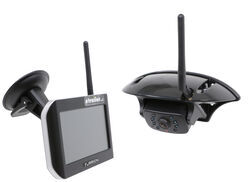
Furrion Vision S Wireless RV Backup Camera System w/ Night Vision - Rear Mount - 5" Screen

- RV Camera System
- Backup Camera
- Observation Camera
- Anti-Glare
- Mirrored Image
- Motion Detecting
- Night Vision
- Touch Screen
- Waterproof
- Pre-Wired RVs
- Wireless
- Wide View
- Dashboard Mounting Bracket
- Suction Cup Mount
- Side Marker
- 5 Inch Display
- 3 Cameras
- Furrion
more information >
Featured Help Information
Instructions
Miscellaneous Media



Continue Researching
- Q&A: Backup Camera for 2025 Forest River Rockwood Mini Lite 2205S
- Q&A: Can I Use The B&W Tow & Stow 2-Ball Mount BWTS20037B If My Camper's Dry Weight is 7600lbs
- Q&A: How to Power the Furrion Vision S+ Cameras to Work in Security Mode
- Q&A: Is There Furrion Vision S+ Observation System that Doesn't Have Side Cameras
- Q&A: What is Best RV Backup Camera System
- Q&A: Availability Of Replacement Camera For Furrion Vision S Camera System
- Q&A: How Do I Mount the Back Up Camera for the Furrion Vision S+?
- Article: Trailer Wiring Diagrams
- Article: Holiday 2025 | RVers’ Favorite Gear & Road Picks
- Article: 30-Amp and 50-Amp RV Service: What's the Difference?
- Article: How to Measure for Travel Trailer and Fifth Wheel Steps
- Article: Brake Controller 7- and 4-Way Installation Kit (ETBC7)
- Article: How to Install a Brake Controller on Chevrolet / GMC 1999-2006 Pickups
- Article: Wiring Trailer Lights with a 4-Way Plug (It's Easier Than You Think)